Many teams struggle with AI in customer service. The tools feel complex. The options feel endless. One wrong move can cost time, money, and trust.
This guide fixes that problem.
It explains AI in customer service in simple words. You learn what it is. You see why it matters. You understand how it works in real support teams.
The article walks you through everything in a clear order. The definition comes first. Then the benefits. Then how to use AI the right way. You see real examples. You compare the best tools.
By the end, you know how to use AI in customer service with clarity. You know what to choose. You know what to avoid. And you know how to build better support without losing the human touch.
What Is AI in Customer Service
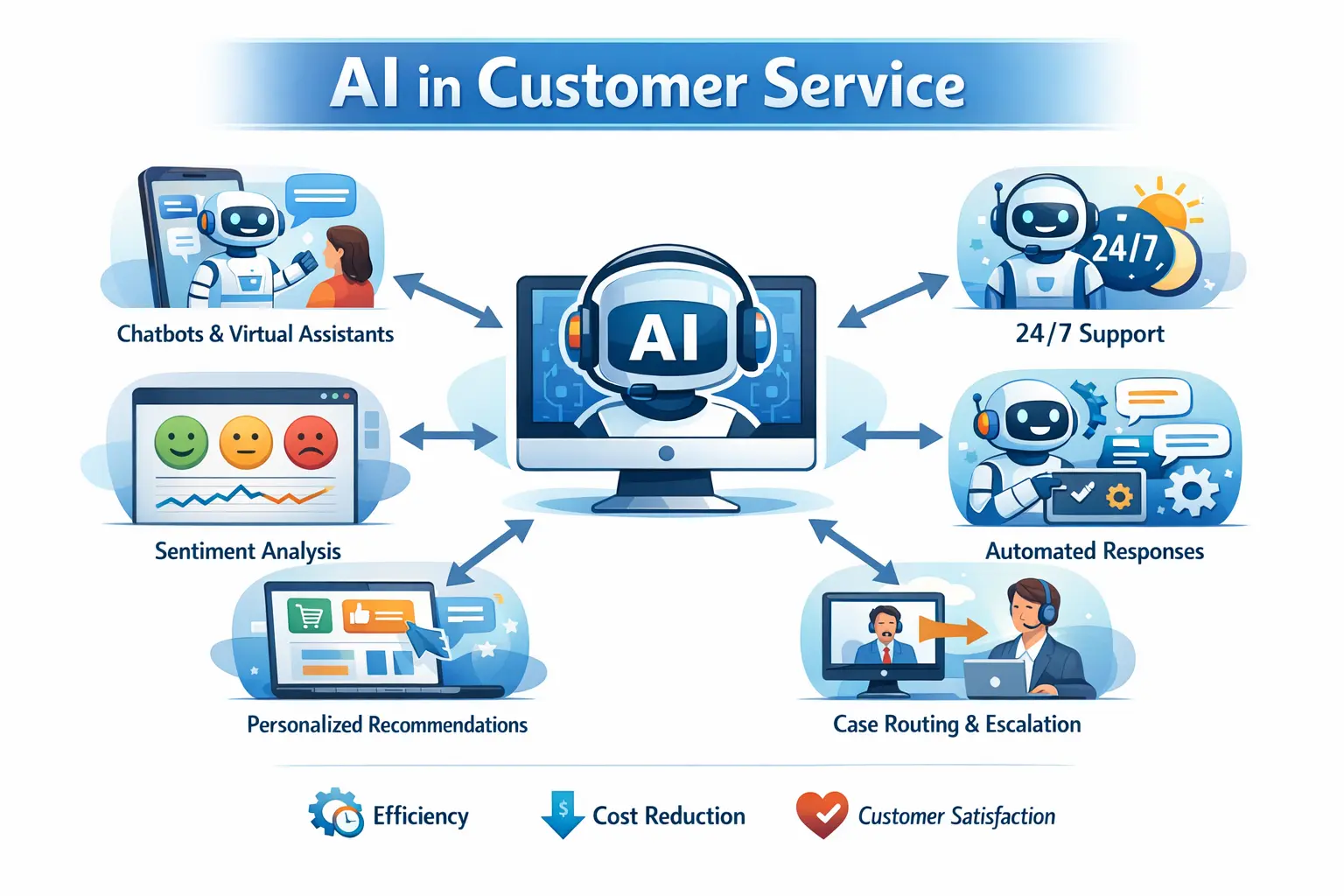
AI in customer service means using artificial intelligence to improve how businesses support customers. It helps teams respond faster and handle more requests with better accuracy. AI works across chat, email, and voice channels.
AI powered tools like chatbots and virtual assistants answer common questions. They solve simple issues and offer 24 7 support using natural language processing. When a request is complex, AI sends it to the right human agent based on intent and urgency.
AI also studies customer data to improve support quality. It personalizes replies, detects customer mood, and flags urgent or high risk cases. This cuts response time, lowers support costs, and boosts customer satisfaction.
In simple terms, AI in customer service helps businesses deliver faster, smarter, and more consistent support at scale.

SMARTe GTM Intelligence
Start Smarter Prospecting Today
Examples of AI in Customer Service
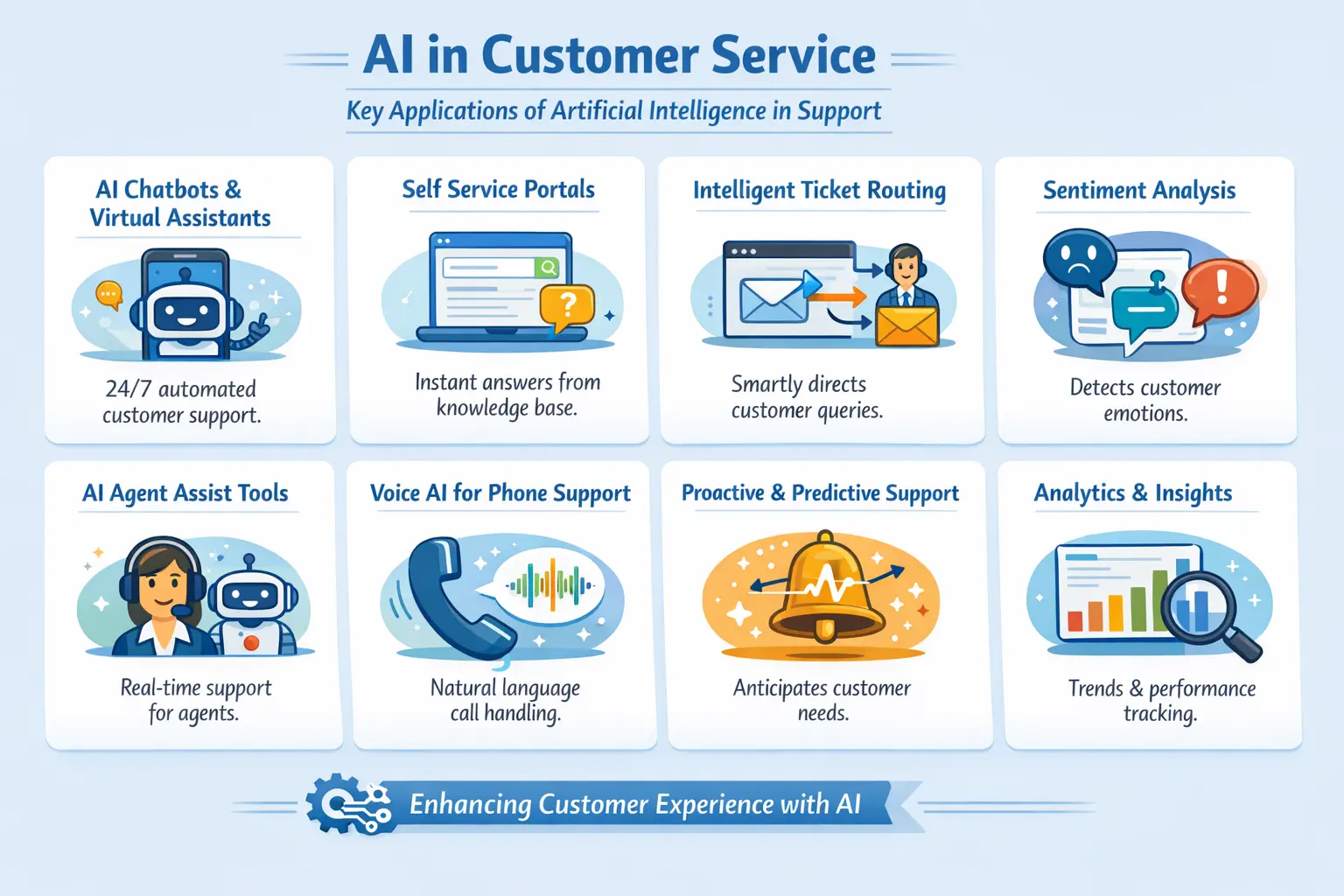
AI in customer service is already widely used across industries. From self service chatbots to agent assist tools, these applications help businesses respond faster, reduce costs, and improve customer satisfaction. Below are the most important and proven examples, explained clearly.
1. AI Chatbots and Virtual Assistants
AI chatbots are the most common example of AI in customer service. They handle repetitive and high volume queries such as order status, refunds, billing questions, and account access.
Modern chatbots use natural language processing to understand intent instead of relying on fixed keywords. They respond instantly and work 24 hours a day across websites, mobile apps, and messaging platforms.
In mature implementations, chatbots resolve 60 to 80 percent of routine customer queries without human involvement. This significantly reduces wait times and support workload.
2. AI Powered Self Service Portals
AI driven self service portals help customers find answers on their own. Instead of searching through static help articles, users can ask questions in natural language.
The AI generates accurate responses from the knowledge base and guides users step by step. This reduces ticket creation while improving the customer experience.
Self service powered by AI is especially effective for SaaS, eCommerce, and B2B platforms with large documentation libraries.
3. Intelligent Ticket Routing
AI analyzes incoming tickets to understand intent, urgency, and complexity. Based on this analysis, tickets are automatically routed to the right team or agent.
High priority or emotionally charged issues are escalated faster. Simple requests are handled by automation or junior agents.
This improves first contact resolution and reduces overall resolution time.
4. Sentiment Analysis and Emotion Detection
Sentiment analysis is a critical application of AI in customer service. It helps systems identify customer pain points by detecting frustration, confusion, or dissatisfaction in messages and voice conversations.
When negative signals appear, AI can prioritize the ticket, trigger alerts, or escalate the case to a skilled agent. This allows teams to act early, before small issues turn into major problems.
By understanding emotion in real time, sentiment-based routing supports faster service recovery and reduces customer churn while improving overall customer experience.
5. AI Agent Assist Tools
AI agent assist tools work alongside human agents during live support conversations. These systems act as real time copilots. An AI agent reviews past interactions, understands context, and suggests accurate responses as the conversation unfolds.
With an AI agent supporting them, agents spend less time searching through tickets or knowledge bases. They stay focused on solving the issue in front of them. This improves response speed, accuracy, and consistency across every interaction.
AI agent assist is especially valuable in complex customer service environments where precision matters. It helps teams handle higher volumes without sacrificing quality or customer trust.
6. Voice AI for Phone Support
Voice AI replaces traditional IVR systems with natural conversations. Customers explain their issue in plain language instead of navigating menu options.
The AI understands intent, answers basic questions, or routes the call to the right agent. Voice AI reduces call handling time and improves customer satisfaction.
It is commonly used in telecom, banking, utilities, and large service operations.
7. Proactive and Predictive Support
AI can predict customer needs by analyzing usage data, behavior patterns, and past issues. This enables proactive outreach before customers contact support.
Examples include outage notifications, renewal reminders, usage alerts, and onboarding guidance. Proactive support reduces inbound tickets and improves trust.
This is where AI in customer service moves from reactive support to experience management.
8. Internal Analytics and Insights
AI analyzes customer interactions to identify trends, recurring issues, and process gaps. Support leaders gain real time visibility into what customers struggle with most.
These insights help improve products, knowledge bases, and support workflows. By addressing these issues, businesses can make each stage of the customer journey smoother and more efficient. Over time, AI driven analytics enable continuous improvement across the organization.
These examples show how AI in customer service works across the entire support lifecycle. From self service and automation to agent assistance and proactive engagement, AI improves both efficiency and experience.
When applied thoughtfully, AI does not replace human agents. It strengthens them. It allows teams to scale support while maintaining quality, empathy, and consistency.
The Key Benefits of AI in Customer Service
AI in customer service delivers measurable improvements across speed, cost, experience, and operational efficiency. When used strategically, it strengthens both customer satisfaction and internal support performance.
A) Faster Responses and Always On Support
AI enables instant responses through chatbots and virtual agents. Customers receive help in seconds instead of waiting in queues. Support remains available 24/7 across time zones and channels. This significantly reduces average response time and improves first contact resolution for common issues.
B) Reduced Operational Costs
Automation handles repetitive and high volume inquiries that would otherwise require human agents. This lowers staffing pressure and reduces overall support costs. Businesses can scale customer service during growth or seasonal spikes without proportional hiring.
C) Consistent and Accurate Support
AI delivers standardized responses based on approved knowledge sources. This reduces human error and ensures customers receive consistent information across all channels. Accuracy improves over time as the system learns from interactions and feedback.
D) Personalized Customer Experiences
AI analyzes customer history, behavior, and preferences to tailor responses. Customers feel recognized rather than treated as tickets. Personalization improves engagement, satisfaction, and long term loyalty.
E) Higher Agent Productivity and Focus
AI assist tools reduce manual effort for agents. Conversation summaries, response suggestions, and knowledge surfacing help agents resolve issues faster. Agents can focus on complex, high value, and empathy driven interactions.
F) Proactive Issue Resolution
Predictive analytics help identify potential problems before customers reach out. AI can trigger alerts, reminders, or follow ups based on usage patterns or sentiment. This reduces inbound volume and prevents escalation.
G) Actionable Insights and Continuous Improvement
AI converts support interactions into structured data. Teams gain visibility into recurring issues, product gaps, and process inefficiencies. These insights inform better decisions across support, product, and customer success teams.
H) Scalable Support Operations
AI in customer service enables growth without sacrificing experience. As customer volume increases, support quality remains stable. This makes AI essential for businesses focused on long term scalability.
Together, these benefits show why AI in customer service is no longer optional. It is a foundation for efficient, reliable, and customer focused support.
AI vs Human Support in Customer Service
AI is best for speed, scale, and consistency. Human agents are essential for empathy, decision making, and complex cases. The strongest customer service teams use both together, not one instead of the other.
How to Use AI in Customer Service Effectively
Implementing AI in customer service requires a structured approach. Rushing adoption without clear goals, clean data, or team alignment often leads to poor outcomes. The steps below reflect how mature support teams successfully deploy AI and scale it over time.
Step 1: Assess Support Needs and Readiness
Begin with a detailed analysis of your existing customer support data. Review ticket volume, resolution times, escalation rates, and the most common customer queries across channels. Identify repetitive, low complexity issues such as FAQs, order status requests, password resets, or billing questions.
At the same time, assess operational bottlenecks. Look for areas where agents spend excessive time on manual tasks or context switching. Align AI use cases with clear business objectives such as reducing response time, improving first contact resolution, lowering support costs, or increasing customer retention.
This step ensures AI in customer service is applied where it delivers measurable impact rather than unnecessary automation.
Step 2: Define Clear Use Cases and Success Metrics
Before selecting tools, define what success looks like. Decide which interactions AI will fully automate, which it will assist, and which must remain human led. Establish measurable KPIs such as deflection rate, CSAT, average handling time, containment rate, and cost per ticket.
Clear use cases prevent over automation and help stakeholders understand the role of AI within the broader customer service strategy.
Step 3: Select the Right AI Tools and Platforms
Choose AI platforms that integrate seamlessly with your existing CRM, helpdesk, and communication channels. Prioritize solutions that offer strong natural language understanding, knowledge base grounding, analytics, and smooth human handoff.
Security, compliance, and data privacy are critical, especially for B2B and regulated industries. Avoid tools that operate as black boxes. Transparency and control are essential for long term success with AI in customer service.
Step 4: Prepare and Train AI on Internal Data
AI systems perform only as well as the data they are trained on. Use accurate and up to date internal content including FAQs, help articles, policies, scripts, product documentation, and historical support tickets.
Clean the data before training. Remove outdated responses, duplicate content, and conflicting information. This step ensures the AI delivers accurate, brand consistent, and context aware responses across all customer touchpoints.
Step 5: Train and Enable Support Teams
AI should augment agents, not alienate them. Provide structured training on how agents collaborate with AI tools, review suggested responses, and manage escalations effectively.
Address concerns around job displacement early. Emphasize how AI reduces repetitive work and allows agents to focus on complex, high value, and empathy driven interactions. Strong change management is essential for adoption.
Step 6: Launch Gradually with Controlled Rollouts
Start with a pilot launch on a single channel or use case. Monitor performance closely before expanding. Gradual rollout reduces risk and allows teams to identify gaps in accuracy, tone, or escalation logic.
During this phase, closely track key metrics such as deflection rate, CSAT, response accuracy, and customer feedback.
Step 7: Measure Performance and Optimize Continuously
Use dashboards to monitor AI performance in real time. Analyze conversation logs, failed interactions, escalations, and customer sentiment. Identify patterns where AI struggles and refine training data accordingly.
Continuous optimization is critical. AI in customer service is not a one time implementation. It improves through iteration and feedback.
Step 8: Scale AI Capabilities Strategically
Once the foundation is stable, expand AI capabilities to additional channels such as voice support, proactive outreach, and personalized engagement. Use predictive analytics to anticipate customer needs and prevent issues before they occur.
At scale, AI becomes an integrated part of customer service operations rather than a standalone tool.
A structured implementation ensures AI in customer service delivers long term value. It balances automation with human judgment, protects customer experience, and supports sustainable growth.
Teams that follow this process achieve faster resolutions, lower costs, higher customer satisfaction, and a support operation that scales with confidence.
Which AI Tool Is Best for Customer Service
Choosing the best AI software for customer service depends on your business size, support volume, and budget. There is no single solution that fits every company. However, several proven platforms lead the market by combining automation, strong natural language understanding, and smooth human handoff. Below are the top options most businesses use to deliver smarter and more scalable support.
1. Zendesk AI – Best All-Around AI Support Platform
Zendesk AI offers a complete resolution platform designed for an AI-first service era. It goes beyond basic chatbots by providing autonomous AI agents that can handle complex multi-step resolutions across email, chat, and social channels. The platform also includes an Agent Copilot that proactively assists human teams, ensuring faster resolution times and higher quality interactions. With built-in AI-driven quality assurance and workforce management, Zendesk provides a unified environment for managing both human and automated support workflows at scale.
Why it’s strong
- Scalable AI agents that resolve issues without human intervention.
- Proactive Copilot tool that boosts agent productivity and accuracy.
- Native integrations for automated quality scoring and workforce forecasting.
Best for medium to enterprise-level businesses looking for a secure, integrated, and highly scalable customer service solution.
2. Intercom Fin AI – Best Conversational AI Assistant
Intercom’s Fin AI stands out for its natural, human-like conversations. It learns from your help center and past interactions to answer questions, triage requests, and escalate issues when needed. The AI supports multiple channels including chat, email, and messaging apps.
Why it’s strong
- Human-like conversational responses
- Proactive messaging and intelligent routing
- Multilingual support
Best for SaaS, ecommerce, and teams that want flexible and modern AI driven conversations.
3. Freshchat’s Freddy AI – Best for Integrated Support Workflows
Freshchat with Freddy AI is ideal for teams looking for contextual automation within a unified support platform. It handles FAQs, assists live agents, and automates workflows across web, email, and messaging channels.
Why it’s strong
- Unified inbox and ticketing with automation
- AI assisted replies and context aware suggestions
- Easy CRM and help desk integration
Best for growing businesses that need a balanced mix of automation and human support.
4. Tidio’s Lyro AI – Best for Small to Mid-Size Teams
Tidio’s AI agent, Lyro, combines chatbot automation with live chat and email support. It is simple to set up and cost effective, making it a strong option for small and mid size businesses. It also supports multilingual replies and integrates well with ecommerce platforms.
Why it’s strong
- User friendly interface
- Multichannel support
- Affordable pricing
Best for smaller teams that want powerful AI without added complexity.
5. Netomi – Best for Omnichannel Support
Netomi delivers strong omnichannel automation with advanced natural language capabilities. It routes customer queries across chat, social media, and email while maintaining full context throughout the interaction.
Why it’s strong
- Predictive analytics and proactive support
- Consistent experience across channels
- Seamless live agent integration
Best for companies supporting customers across multiple platforms at scale.
6. LivePerson and Oracle AI Agents – Best for Enterprise AI
Platforms such as LivePerson and Oracle AI agents offer enterprise grade conversational AI with advanced analytics, intelligent routing, and voice support. These solutions are designed for large organizations that require deep customization, predictive routing, and robust reporting.
Why they’re strong
- Advanced NLP and intent recognition
- Smooth and reliable human escalation
- Strong analytics and predictive capabilities
Best for large enterprises with complex customer service ecosystems.
7. Parloa – Best for Enterprise Voice AI
Parloa is an AI agent platform leading the shift toward autonomous customer service in high-volume, high-stakes environments. By deploying AI agents that manage millions of customer interactions with human-like fluency, Parloa helps businesses eliminate hold times and handle complex workflows like scheduling and refunds. This approach allows companies in industries like telecom and banking to transition from reactive troubleshooting to proactive relationship building while maintaining high operational efficiency.
Why it’s strong
- Delivers human-like voice AI fluency that eliminates wait times
- Enterprise-grade security with SOC 2, ISO 27001, and HIPAA compliance
- Full orchestration of the AI agent lifecycle for continuous performance improvement
Best for large enterprises in high-stakes industries needing reliable, secure voice and omnichannel automation.
8. Crescendo – Best AI-Native Full-Stack CX Platform
Crescendo is an AI-native customer experience platform designed to replace the traditional, fragmented CX stack with a unified data model and specialized AI agents. It integrates routing, ticketing, quality assurance, and workforce management into a single, self-improving system that can be deployed in just four weeks.
Why it’s strong
- Autonomous Specialized Agents: Deploys a team of specialized agents including Concierge for customer-facing resolution and Agent Assist for real-time human copilot support.
- Self-Improving Infrastructure: The platform's Quality Agent reviews 100% of conversations to identify gaps and automatically update its knowledge base for compounding performance.
- Rapid Time-to-Value: Delivers measurable results like a 30% CSAT lift and 15% average cost savings, with the ability to cut response times from hours to mere seconds.
Best for enterprise brands looking for a secure, all-in-one AI platform to modernize their customer service operations and achieve high-resolution rates without the need for seasonal hiring.
Choosing the Right AI
To select the best AI for your customer service team, consider the following:
- Team size and budget – Smaller teams may benefit from tools like Tidio or Freshchat
- Integration needs – Zendesk and Intercom work best within established CRM environments
- Complexity of queries – Advanced NLP and omnichannel support matter more for larger customer bases
- Scalability – Enterprise platforms like LivePerson and Oracle support long term growth
Each platform has strengths based on different business goals. A practical approach is to pilot one or two options using real support data before making a long term commitment.
Tips for Better Use of AI in Customer Service
- Do not rely only on AI: Humans still matter. Customers connect best with people, not systems. Use AI to support your team, not replace them. The best experience comes when humans and AI work together.
- Start with repetitive issues first: Let AI handle common questions like order status, pricing, and basic troubleshooting. These tasks save time and reduce load. Avoid using AI for complex or emotional issues early on.
- Train AI on your real support data: Use your help articles, policies, and past tickets. This keeps responses accurate and on brand. Generic data leads to weak and risky answers.
- Set clear limits for what AI can handle: Define clear rules for escalation. When confidence drops, AI should step aside. This protects the customer experience.
- Monitor AI conversations regularly: Review chats and tickets every week. Fix wrong answers fast. AI improves only with continuous guidance.
- Avoid over automation across all touchpoints: Too much AI feels cold and robotic. Some moments need empathy and judgment. Balance speed with care.
- Be transparent with customers: Let users know when they are speaking to AI. Clear communication builds confidence and trust.
- Improve step by step, not all at once: Start small. Test with real users. Scale only when quality stays high and feedback is positive.
Conclusion
AI in customer service is no longer optional. It is a practical tool that helps teams respond faster, scale support, and deliver better experiences without increasing costs. When used correctly, it removes friction for customers and pressure from support teams.
The real value of AI comes from balance. Automation handles speed and volume. Humans handle empathy and judgment. Together, they create support that feels both efficient and personal.
If you approach AI with clear goals, the right tools, and ongoing improvement, it becomes a long term advantage. Not just for support teams, but for the entire customer experience.