
SalesIntel alternative tools are now a must for growing sales teams. Many teams still use old data or pay high prices for tools that only work well in one country. That slows prospecting and hurts results.
I have reviewed and ranked the 16 best SalesIntel alternative platforms for 2026. Each tool is checked for data accuracy, global coverage, pricing, and real user feedback.
Inside, you will see key features, clear pros and cons, simple pricing, and honest reviews. If you want better data, lower costs, and faster sales results, this guide will help you choose the right platform.
Here are the 16 best SalesIntel competitors:
1. SMARTe

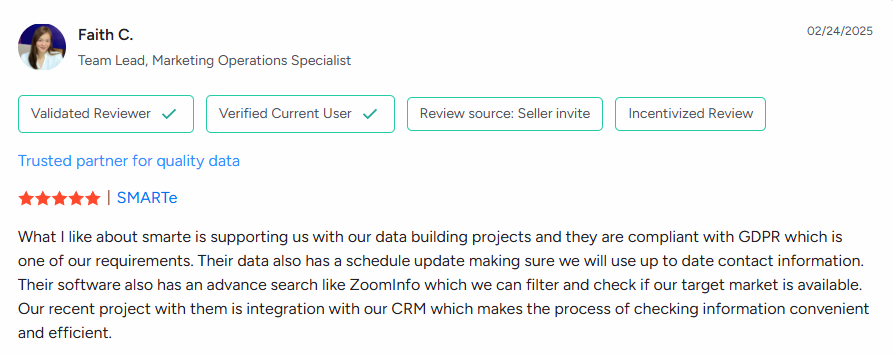
SMARTe is a powerful B2B sales platform and a top SalesIntel alternative. It helps sales teams find accurate phone numbers and emails for buyers all over the world. While many tools only focus on North America, SMARTe is famous for its great data in Europe, Asia, and Latin America. It connects directly to your CRM, like Salesforce or HubSpot, making it easy to find leads and close deals. If you want high-quality global data without paying a fortune, SMARTe is the right choice.
Top Features
- Global Reach: Search over 281 million contacts and 65 million companies worldwide.
- More Mobile Numbers: Get the best coverage for direct mobile numbers in global regions (50% coverage outside the US).
- Safe and Legal: Fully certified (GDPR and CCPA compliant) so your team can prospect safely.
- Real-Time Updates: The system automatically cleans your data and updates it when a contact changes jobs.
- Easy Connections: Works perfectly with major tools like Salesforce, HubSpot, Outreach, and Salesloft.
Pros
- Better International Data: It offers much better accuracy for global contacts than most competitors.
- Lower Cost: It is often much cheaper than big names like ZoomInfo.
- High Accuracy: Email addresses are 95% accurate, so your messages actually get delivered.
- Great Support: Users love how fast and helpful the customer support team is.
Cons
- Built for Enterprises: Since it is designed for large companies, it might be too powerful or expensive for very small businesses (SMBs).
- Learning Curve: Because it has so many advanced tools, it may take some time for new users to learn every feature.
Pricing
SMARTe keeps its pricing simple and transparent. Unlike many competitors that hide their costs, SMARTe lets you know exactly what you are paying for.
- Free Plan ($0): Great for testing. You get 10 free credits every month to try the data. No credit card is required.
- Pro Plan (Starts at $25/user/month): Best for individuals or small teams. You get a set number of credits to download contact info. It includes key features like CRM integration.
- Enterprise Plan: Designed for big teams. It offers custom credit packages, unlimited lookups, and advanced support. You need to contact sales team for a custom quote.
User Review:

SMARTe GTM Intelligence
Start Smarter Prospecting Today
2. Apollo.io

Apollo.io is a leading alternative to SalesIntel because it does it all. When I first tested this platform, I was surprised by how much time I saved. Instead of switching tabs, I could enrich data and send emails from the same screen. It really streamlines the chaotic day of a sales rep. It offers robust data enrichment, sequencing, and outreach tools perfect for growing teams. You get access to over 210 million contacts and 35 million company profiles. It is comprehensive prospecting without the high enterprise price tag.
Top Features
- Smart Automation: Advanced email sequencing and automation.
- Rich Data: Enrichment with verified contacts and company insights.
- Easy Sync: Integrates with Salesforce, HubSpot, and Pipedrive.
- Buyer Signals: Shows intent signals and tech filters.
- Browser Tool: A Chrome extension for quick lookups.
Pros
- Great Value: Affordable pricing with a free tier for testing.
- Popular: High ratings and strong adoption by SMBs.
- More than Data: Comprehensive engagement features.
- Generous Limits: Paid plans offer lots of credits.
Cons
- Fast Burn: Credits deplete quickly just by viewing data.
- Accuracy: Some users report occasional data errors.
- Learning Curve: Advanced features take time to learn.
- Support: Responsiveness can vary.
Pricing
- Free tier: Available.
- Basic: $49/user/month.
- Professional: $99/user/month (9,000 credits).
- Organization: $119–$149/user/month (50,000+ credits).
User Review
G2 Rating: 4.7/5. One user notes, "Apollo.io appeals to startups seeking multi-functional sales tools," but warns that "credits are used up simply by viewing."
3. ZoomInfo

ZoomInfo stands out as the premium choice for enterprise teams. In my experience working on larger accounts, nothing beats the sheer depth of their data. It feels like having a superpower when you can see exactly when a company is ready to buy. It delivers a vast B2B contact database with AI insights and "scoops" on company changes. It is pricey, but for complex strategies, I found the investment pays off if you need scale and accuracy under one roof.
Top Features
- Huge Database: Massive reach with direct dials and emails.
- Real-Time Intel: Buyer intent data and company scoops.
- AI Insights: Smart lead scoring and technographics.
- Connected: Extensive CRM and marketing integrations.
- Custom Workflows: Great for account-based marketing.
Pros
- High Accuracy: Reliable data, especially for big companies.
- Deep Intel: Comprehensive intent topics and market intelligence.
- Scalable: Works well for large teams.
- Native Sync: Strong integrations with other tools.
Cons
- Expensive: Very high cost with hidden pricing.
- Overkill: Often too costly for SMBs.
- Email Mix: Occasional personal emails mixed with business ones.
- Renewal: Watch out for price surprises at renewal.
Pricing
- Custom: Starts at $10K–$30K/year per contract. Varies by users and credits.
User Review
G2 Rating: 4.5/5. Users say, "Direct Numbers and Intent Topics help us reach targeted clients." However, some mention "needs weekly database updates" to fix stale emails.
4. UpLead

UpLead is a strong SalesIntel alternative that focuses heavily on data quality. I hate high bounce rates, so using UpLead felt like a relief. Their real-time verification meant I spent less time cleaning lists and more time selling. They promise 95%+ accurate B2B emails. It is ideal for sales teams that want precision over massive, messy databases. The simple interface makes B2B prospecting efficient and headache-free.
Top Features
- Quality Promise: 160M+ contacts with a 95% accuracy guarantee.
- Smart Filters: Advanced tech and buyer intent filters.
- Real-Time Check: Verifies emails and phones instantly.
- CRM Ready: Integrations and bulk exports.
- Free Trial: No credit card required to start.
Pros
- Verified Quality: Excellent accuracy confirmed by reviews.
- Flexible: Affordable for small teams.
- Targeting: Strong filtering options.
- Easy: User-friendly with good support.
Cons
- Smaller List: Smaller database than big competitors.
- Billing: Credit system can surprise users.
- Less Auto: Limited advanced automation features.
Pricing
- Starts at: $74–$99/month (credit-based).
User Review
G2 Rating: 4.7/5. Popular for "reliable email data without enterprise contracts." Users value accuracy but note the need to read plans carefully.
5. Cognism

Cognism is a top alternative for teams that need to follow strict data rules. Navigating GDPR in Europe used to stress me out, but Cognism takes that worry away. It excels in EMEA coverage with verified emails and direct dials. It supports precise prospecting in Europe and North America. If you are doing international outreach, I have found this tool is the safest bet for compliance.
Top Features
- Compliant: GDPR-compliant data with verified contacts.
- Regional Focus: Strong EMEA coverage and intent data.
- CRM Sync: Connects with Salesforce and HubSpot.
- Verification: Phone and email checking on demand.
- Premium Tiers: Diamond/Platinum access levels.
Pros
- Best for Europe: High accuracy in EMEA regions.
- Direct Access: Good for direct dials.
- Safe: Solid CRM compatibility and compliance.
Cons
- Opaque Cost: Pricing is not transparent.
- Basic UI: The platform can feel basic to some.
- High Fees: Access fees can be expensive.
Pricing
- Platinum: ~$15K access + $1.5K/user/year.
- Diamond: ~$25K access + $2.5K/user/year.
User Review
G2 Rating: 4.6/5. Users appreciate the compliance, but some find "pricing is opaque and inflexible."
6. RocketReach

RocketReach is a cost-effective alternative for high-volume searches. For those times when I just need a contact's info quickly while browsing LinkedIn, their Chrome extension is a lifesaver. It is fast, scrappy, and gets the job done without a fuss. It targets sales pros who need emails and phones at lower costs. With over 700 million profiles, it is a great choice for budget-conscious teams who need speed.
Top Features
- Massive Reach: 700M+ profiles with bulk tools.
- Browser Tool: Chrome extension and API access.
- Finder: Email/phone finder with verification.
- Export: CRM integrations and export options.
- Volume: High-volume search capabilities.
Pros
- Affordable: Cheaper than the big players.
- Fast: Easy interface for frequent use.
- Current: Reliable data at a fraction of the cost.
Cons
- Accuracy Varies: Moderate accuracy (77–80/100 on G2).
- Limits: Lookup limits and add-on fees.
- Support: Slow support and refund issues.
Pricing
- Essentials: $48/month (annual).
- Pro: $108/month.
- Ultimate: $249/month.
User Review
G2 Rating: 4.2/5. "Great data that is current & accurate at a fraction of the cost," says one user. It offers strong value despite mixed accuracy reviews.
7. LeadIQ

LeadIQ is a lifesaver when you want to stay in the zone. When I am deep in a prospecting groove on LinkedIn, the last thing I want is to open a new tab to copy-paste data. LeadIQ keeps me in the flow by capturing data right where I am working. I also love the "champion tracking" feature. It alerted me when my favorite contacts moved to new companies, which instantly created warm leads for my pipeline. It is perfect for mid-sized teams who want speed over complex databases.
Top Features
- Massive Limits: Get unlimited work emails (up to 10,000/month).
- Smart Scoring: Uses confidence scores so you know who to prioritize.
- Track Job Changes: Alerts you when a "champion" moves jobs.
- Generous Data: Includes 120 mobile numbers and 2,000 email generations.
- Easy Sync: Advanced integrations with CRMs and API access.
Pros
- Great Value: Very affordable for small to mid-sized teams.
- Helpful: Customer support is fast and responsive.
- Warm Leads: Tracking job changes creates easy opening opportunities.
- Seamless: Captures leads directly from LinkedIn without hassle.
Cons
- Credit Caps: You might hit limits on lower plans.
- Inflexible: You cannot buy extra credits on basic tiers.
- Not for Giants: It is less suited for massive enterprise needs.
Pricing
- Free plan: Limited access.
- Basic: $36/user/month.
- Pro: $79/user/month.
- Enterprise: Custom pricing for unlimited prospecting.
User Review
G2 Rating: 4.6/5. Users say, "LeadIQ makes it incredibly easy to capture lead data." However, some warn that the "credit system can catch you off guard" if you are a heavy user.
8. Lusha

Lusha is my "in a pinch" tool for finding phone numbers. Sometimes I just need a contact number immediately without navigating a complex dashboard. Lusha sits in my browser and gives me answers instantly. It is simple, fast, and surprisingly accurate. It is ideal for sales reps who live in their browser and need targeted lists on a budget. It removes the friction from finding contact info.
Top Features
- Instant Findings: Discover emails and phone numbers instantly.
- Browser Tool: A Chrome extension that works on LinkedIn and Sales Navigator.
- Clean Data: verifies and enriches data automatically.
- Connected: Integrates easily with Salesforce and HubSpot.
- Teamwork: Includes tools for team collaboration.
Pros
- Cost Effective: Lower prices with high data accuracy.
- Simple: Very easy to use for finding quality leads.
- Fast: No manual browsing or digging required.
Cons
- New Look: Some users find the new interface graphics hard to navigate.
- Basic: Fewer advanced features compared to all-in-one platforms.
Pricing
- Pro: $22.45/user/month (billed annually) or $29.90 monthly.
- Premium/Enterprise: Custom tiers available.
User Review
G2 Rating: 4.3/5. "The lower prices and data accuracy allow us to search for leads on a budget," says one user. However, some feedback mentions the UI changes could be better.
9. Hunter.io

Hunter.io is my go-to when email is the main priority. I remember using this when I needed to build a massive outreach list quickly. It doesn't just find emails; it verifies them so your bounce rate stays low. It is a precise tool for anyone focused on cold emailing. It even has an AI writer that helps draft messages, which saves a ton of time. It is perfect for growing teams that need volume.
Top Features
- Finder: Locates and verifies email addresses effectively.
- Automation: Handles bulk outreach campaigns.
- AI Help: Includes a writing assistant for your emails.
- High Volume: Higher plans offer 25,000+ credits.
- Collaborate: Unlimited team members can join the account.
Pros
- Time Saver: Great for massive lead outreach.
- Long Life: Flexible credits last for 12 months.
- Savings: Free plan available and 30% off for annual billing.
Cons
- Price Jump: Premium features can feel pricey for some.
- Limits: Lower tiers have strict credit limits.
Pricing
- Free: $0.
- Starter: $34/month.
- Growth: $104/month.
- Business: $349/month.
User Review
G2 Rating: 4.5/5. Users love the efficiency: "Saves me a lot of time on reaching out to a massive number of leads." The main critique is that premium plans are "a bit too expensive."
10. Clearbit
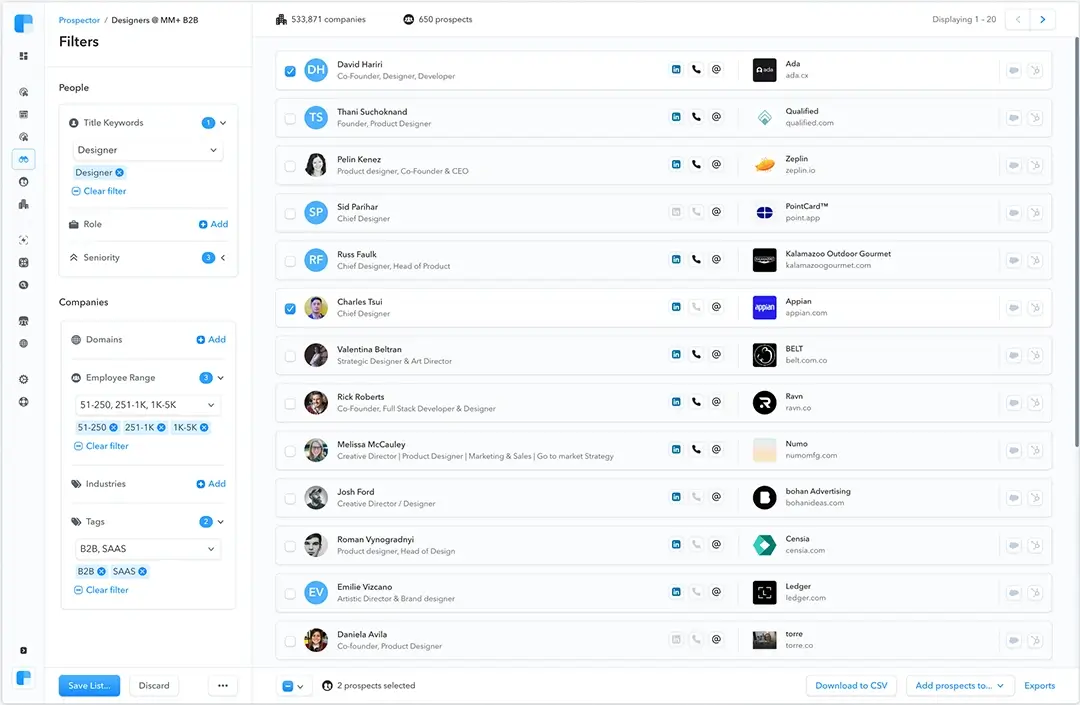
Clearbit is different because it focuses on fixing your existing data. I use it to fill in the blanks. If I only have an email address, Clearbit works in the background to fill in the rest of the details in my CRM. It is amazing for keeping your Salesforce or HubSpot data clean and useful. It bridges the gap between marketing and sales perfectly by ensuring everyone sees the full picture of a lead.
Top Features
- Live Updates: Real-time data enrichment and verification.
- Wide Reach: High coverage of business data.
- CRM Sync: Seamless integration with Salesforce and Marketo.
- Dev Friendly: Flexible API for custom setups.
- Structure: Tools to view lead and account hierarchies.
Pros
- High Quality: Data accuracy is generally excellent.
- Easy Setup: Simple installation and great support.
- CRM Power: Adds huge value to Salesforce records.
Cons
- Pricing Model: You pay based on database size, not just usage.
- Credit Burn: Limited credits can deplete quickly.
- Setup: Some users report provisioning issues.
Pricing
- Custom: Usage-based pricing tied to your database size.
User Review
G2 Rating: 4.4/5. Users praise the "high coverage rate" and "easy install process." However, some wish for more credits, noting that "pricing based on database size" can be tricky.
11. Kaspr

Kaspr is a powerhouse for European data. If you are struggling to find mobile numbers in the EMEA region, this tool is a game-changer. I found it incredibly easy to grab contact info right from a LinkedIn profile widget. It is mobile-first and fully compliant. It is ideal for individual reps or small teams who need quick, safe data while on the move without a steep learning curve.
Top Features
- Email Freedom: Unlimited B2B email credits.
- Phone Access: Includes 100 phone credits per month.
- LinkedIn Tool: seamless integration and enrichment.
- Sync: Syncs data to your CRM.
- Direct Access: Specific credits for direct emails.
Pros
- User Friendly: Very easy to use and navigate.
- Accurate: Provides correct contact details.
- Good Feedback: Strong ratings on G2.
Cons
- Low Freebies: The free plan has very low credit limits.
- Mixed Reviews: Some Capterra ratings are mixed.
Pricing
- Starter: €45/month (if paid annually) or €59 monthly.
- Higher Tiers: Available with more credits.
User Review
G2 Rating: 4.4/5. "Easy to use. They provide correct contact... gives scope to reach target customer," says a user. The main downside is that "free credits are very low."
12. Lead411
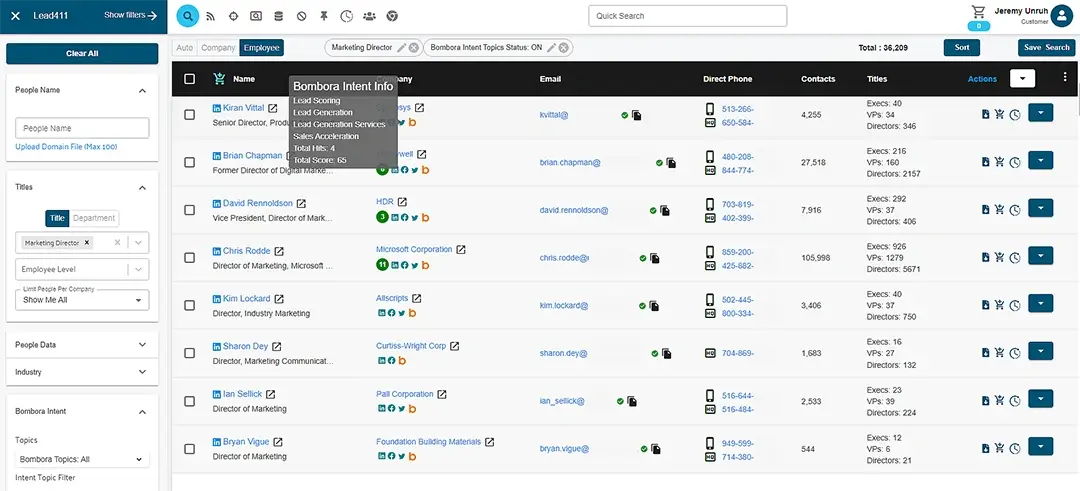
Lead411 is my go-to recommendation for teams who are tired of paying top dollar to ZoomInfo. I found their "unlimited lookups" feature on their affordable plans to be a huge relief—it felt like a breath of fresh air not worrying about credit counts every hour. It gives you verified contacts, intent data, and sales automation for a mid-market price. It is great for U.S. coverage and building your pipeline without draining your budget.
Top Features
- Verified Data: Emails, direct dials, and mobile numbers.
- Smart Signals: Buyer intent and technographics.
- Automation: Sales cadence tools and CRM synchronization.
- Event Ready: List enrichment for tradeshows and events.
- Data Cleanup: Tools to keep your lists fresh.
Pros
- Affordable: Much cheaper than high-end alternatives.
- Unlimited: Accurate data with unlimited lookups on paid plans.
- Flexible: Monthly or pay-per-export options.
- Great for Mid-Size: Strong fit for small-to-mid teams.
Cons
- Stale Contacts: You might find occasional outdated contacts.
- Limited Global: Coverage beyond the U.S. is not as strong.
- Basic Plans: Base plans lack advanced outreach tools.
Pricing
- Starts at: $99/month (includes unlimited lookups).
- Enterprise: Custom plans with per-export options.
User Review
G2 Rating: 4.6/5. Users note the "cost-effectiveness... significantly less than alternatives like ZoomInfo." They also love the ability to "load lists for enrichment after events."
13. Seamless.AI
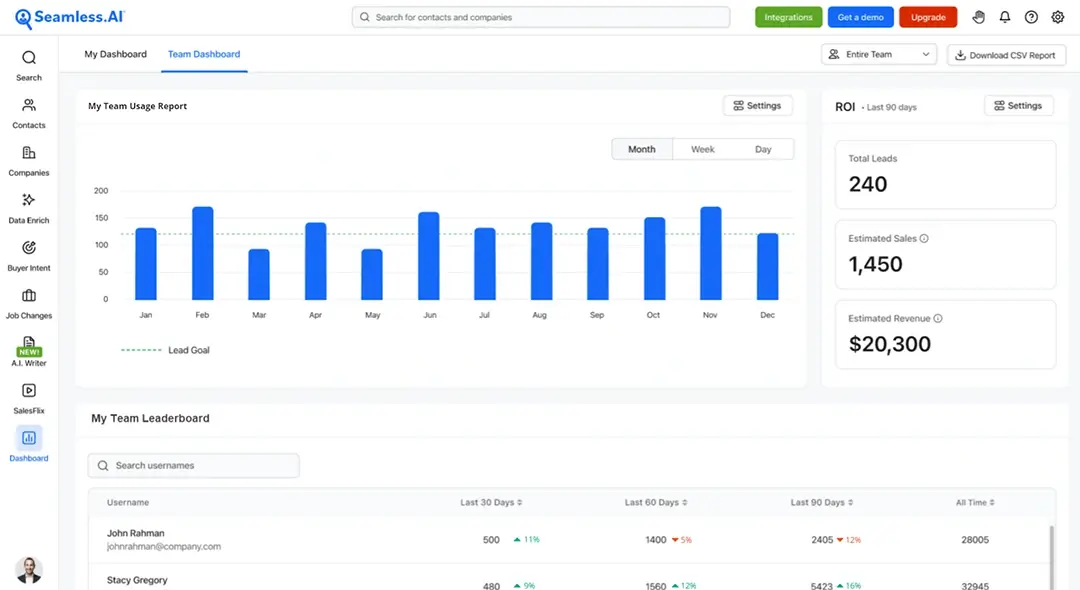
Seamless.AI is all about speed and freshness. When I was building a target list for a product launch, I needed the most current data possible. Seamless.AI delivered because it uses AI to find and verify contacts in real time. It is a fantastic tool if you are fed up with stale databases. It is best for sales executives who need on-demand, AI-refreshed intelligence with a clean interface.
Top Features
- Live Search: Real-time AI contact search and verification.
- Direct Access: Finds direct dials, mobiles, and emails.
- List Ready: CRM integrations and list-building tools.
- Insights: Buyer intent and company details.
- Easy to Use: A simple, clean interface.
Pros
- Fresh Data: Data is updated more often than many competitors.
- Affordable: Good pricing with great customer support.
- High Volume: Provides many accurate leads.
Cons
- Unpredictable Pricing: The credit system changes often.
- Wasted Credits: You are sometimes charged even if the data is not found.
- High Cost: Pricing can feel high for smaller teams.
Pricing
- Custom: Credit-based plans, often criticized for opaque pricing.
User Review
G2 Rating: 4.5/5. Users praise the "Real-time AI data... accuracy far superior." However, they mention that "pricing changes frequently without notice" and credits are charged for unavailable data.
14. SignalHire
SignalHire is the versatile tool I recommend when a user is also a recruiter. It is great for hybrid roles. I found it very effective for quickly sourcing global contact data when searching for both prospects and potential hires. It targets small businesses with its extension-based enrichment and bulk searches at a decent price. It is a solid choice for those managing both sales and recruiting pipelines.
Top Features
- Finder: Locates emails and phone numbers across different platforms.
- LinkedIn Tool: Chrome extension for quick enrichment.
- Bulk Tools: Search and verification in bulk.
- CRM Sync: Integrations available.
- Outreach: Includes tools for running campaign outreach.
Pros
- Versatile: Good for both small businesses and recruiters.
- Rich Features: A wide range of contact sourcing tools.
- Responsive: Great for individual use and quick results.
Cons
- High Price: The starting price can be steep for very small teams.
- Limited Custom: Customization in outreach campaigns is lacking.
- Scale Issues: Not the best choice for large enterprises.
Pricing
- Entry-level: $2,500/year.
User Review
G2 Rating: 3.6/5. Users like the capabilities but note that "pricing may be a bit steep for smaller businesses." They find the sourcing effective but want more flexibility.
15. VoilaNorbert
When my main focus is email deliverability, I turn to VoilaNorbert. Their 98% accuracy claim is real—I saw a noticeable drop in my bounce rates when I used this to verify my lists. It is excellent for outreach teams who run sequenced campaigns and need precise list-building. Plus, the seamless Gmail integration makes it easy to go from finding a lead to sending an email in seconds.
Top Features
- High Accuracy: 98% accurate email finder and verification.
- Gmail Ready: Integration for sequences and outreach.
- AI Writer: AI email writing assistant and A/B testing tools.
- Bulk Use: API and bulk usage options.
- Warm-up: Unlimited email warm-up included.
Pros
- Highly Accurate: Provides emails with confidence scores.
- Simple: Easy interface for both pros and beginners.
- Flexible: Pay-as-you-go options are available.
Cons
- Tier Limits: Tiered credits can limit heavy users.
- Email Focus: Focused mostly on email, not full account intelligence.
Pricing
- Valet: $39–$49/month (1,000 leads).
- Teams: $59/user/month.
- Scale: $99/user/month.
User Review
G2 Rating: 4.7/5. Users rave about the "highly accurate email finding" and how it "connects to Gmail for sequences... saves tons of time." It is highly rated for precision.
16. Datanyze
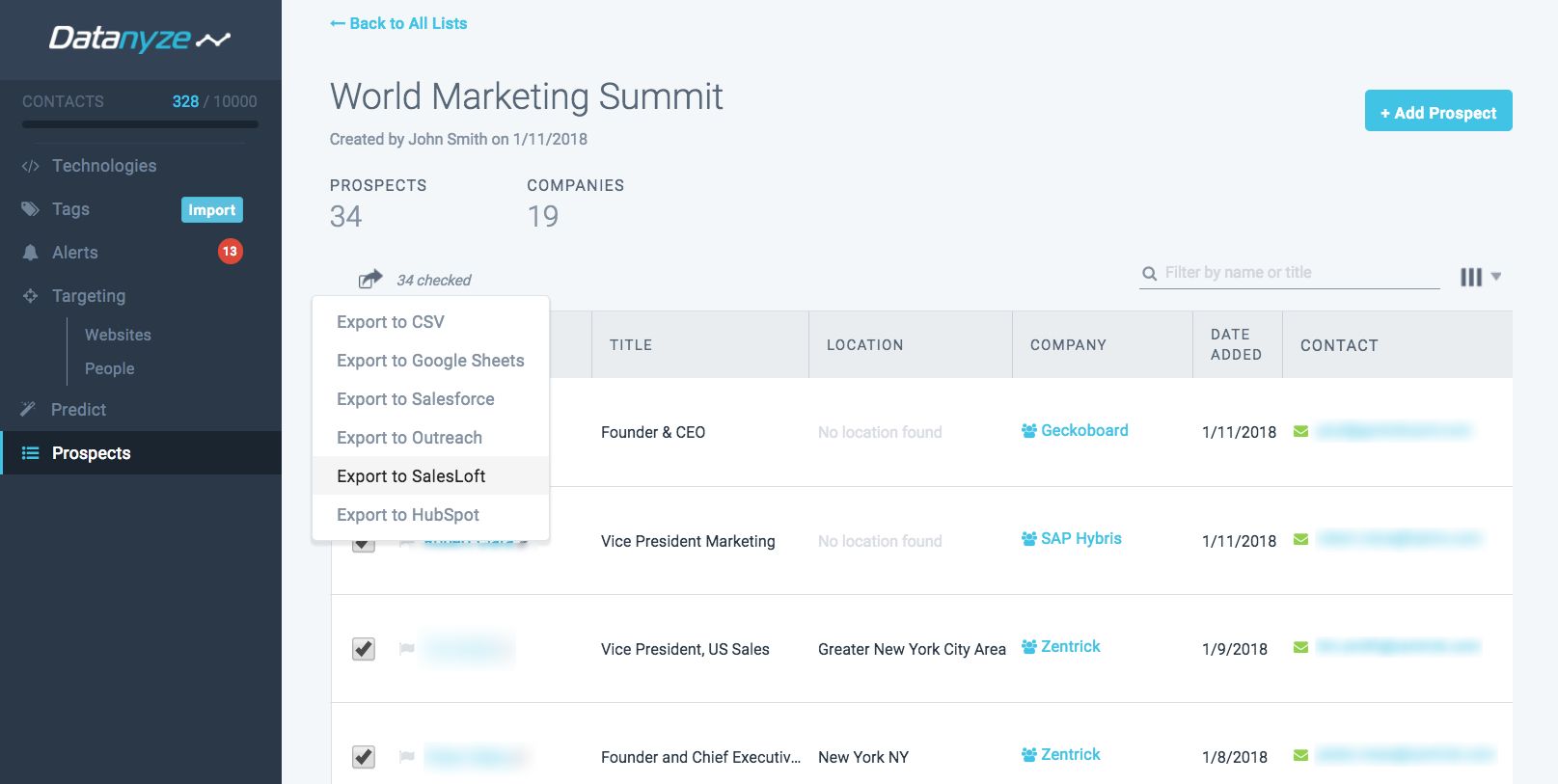
Datanyze is the perfect choice for budget reps who need enterprise-grade coverage. I used their self-service model when I was a solopreneur, and it was a great way to access good data without a huge contract. It works via a Chrome extension and uses a credit system for reveals. It is the leanest option on the list and targets small teams or individuals who need quick, affordable data enrichment.
Top Features
- Credit System: Contact reveal (1 credit per contact).
- Browser Tool: Chrome extension for finding leads quickly.
- Tech Data: Technographics and company details.
- Tools: API and bulk usage options.
- Easy Setup: Simple self-service onboarding.
Pros
- Accessible: Great for lean teams and individuals.
- Generous Trial: Long trial period and annual discounts.
- Low Cost: Enterprise-grade data at a low price.
Cons
- Volume Limit: The credit model limits heavy volume users.
- Basic: Not as robust as full prospecting platforms.
Pricing
- Nyze Lite: Trial version.
- Pro 1: 80 credits/month (~$29+).
- Pro 2: 160 credits/month.
User Review
G2 Rating: 3.8/5. The value for money is 3.6/5. Users like the ease of use but feel constrained by the credit model for scaling up.
Conclusion
Sales teams outgrow tools before they realize it. What once worked starts to slow them down. Data gets stale. Coverage feels limited. Costs rise while results stay flat. That is usually the signal to look elsewhere.
This page exists to make that decision easier. Each SalesIntel alternative listed here was chosen for a clear reason. Better accuracy. Wider reach. Simpler pricing. Or stronger fit for modern sales workflows. Some tools help teams expand globally. Others help lean teams move faster without heavy contracts.
There is no perfect platform. There is only the right one for how your team sells today. Use this list to compare, test, and decide with clarity. The right data partner should support your growth, not hold it back.