
There's a window that opens the moment an executive changes jobs.
Most sales reps miss it completely.
A new VP of Sales just stepped into a role. They're frustrated with the old tech stack. They have budget. They have pressure to prove themselves fast. They're looking for vendors who can help them win early.
That window? Roughly 90 days.
After that, they've settled in. Priorities are locked. Cold outreach gets ignored.
If you're not tracking executive job changes, you're leaving warm pipeline on the table. Every single week.
So let's fix that.
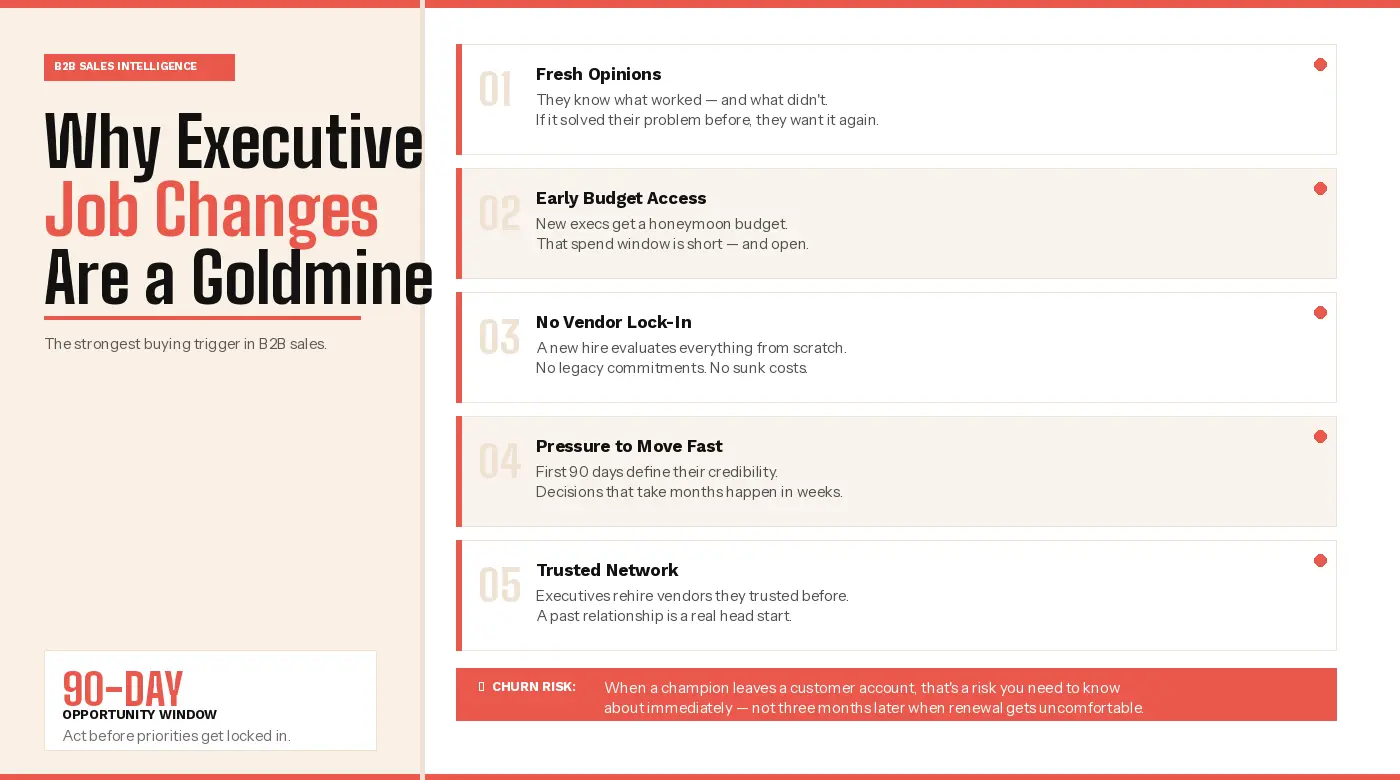
Why Executive Job Changes Are a Goldmine for B2B Sales
This isn't just a nice-to-have signal. It's one of the strongest buying triggers in B2B sales.
Here's why it matters so much.
When an executive moves to a new company, several things happen at once:
- They arrive with fresh opinions. They know what worked at their last company — and what didn't. If your product solved a problem they cared about before, they'll want it again.
- They have early budget access. New executives get a window to make their mark. Budget gets spent before scrutiny kicks in. That money has to go somewhere.
- They're not locked into existing vendors. A tenured executive is committed to a stack. A new hire is evaluating everything from scratch.
- They need to move fast. The first 90 days can make or break a new exec. Decisions that take months elsewhere happen in weeks.
- They bring their trusted network. Executives rehire vendors they've trusted before. A strong past relationship gives you a real head start.
There's another side to this too — churn prevention. If your main champion just left a customer account, that's a risk. You need to know now. Not three months later when renewal gets uncomfortable.
The Real Problem With How Most Teams Track This
Here's the honest truth: most B2B sales teams track executive job changes terribly.
The approach is reactive. A rep notices a LinkedIn update by chance. A customer mentions their old contact "moved on." The AE finds out because an email bounced.
By then, the window is gone.
Even teams with solid CRMs fall into this trap. Data goes stale. Contact records don't update when someone changes jobs. That VP of Marketing you tagged six months ago? She's at a different company now. You have no idea.
There's also a coverage gap nobody talks about:
- Reps only track job changes inside active pipeline
- Deals lost 18 months ago get forgotten
- Champions who moved on disappear from the radar
- Executives at your ideal customer profile accounts move around undetected.
All of that is real pipeline. Most teams have zero visibility into it.
The fix isn't checking manually when you remember. It's building a system that catches signals automatically and routes them fast.
Here's how to do that.
Method 1: SMARTe — The Most Reliable Way to Track Executive Job Changes
Let's be upfront. Every other method on this list can work. But they're all hit or miss.
They depend on people updating LinkedIn on time. On reps remembering to check. On data that may already be weeks old when it reaches you.
For a signal this time-sensitive, that's a real problem.
SMARTe is built for exactly this. It's the most reliable way to track executive job changes at scale — and it goes far beyond basic alerts.
Here's what SMARTe does that other methods can't:
- New Hires & Promotions Tracking — SMARTe's Buying Signals feature monitors contacts around the clock. The moment a decision-maker lands in a new role, your team gets an alert. You can reach out in that critical first 90-day window.
- Champion Tracking — SMARTe tracks past buyers and champions as they move between companies. When they land somewhere new, you get the alert with full context on their new account.
- ICP-Filtered Alerts — Job change signals get matched against your ICP criteria automatically. No noise. Just the moves that matter to your pipeline.
- Buying Intent Layered In — SMARTe adds Bombora intent data on top of job change signals. You don't just know someone moved. You know if their new account is actively researching right now.
- Tech Stack Visibility — SMARTe tracks 64K+ technologies. You can see what tools the executive's new company runs. Spot competitor usage. Find the gaps you can fill.
- CRM Enrichment at 90%+ Match Rates — When a job change happens, SMARTe updates your CRM records automatically. Your database stays clean. No one has to maintain it manually.
- Playbook Automation — SMARTe triggers the right workflow the moment a signal fires. Notify a rep. Create a task. Launch a sequence in Outreach or Salesloft. Update a CRM record. It saves reps 8+ hours of manual work every week.
- Global Coverage — 289M+ contacts across 200+ countries. 75%+ US mobile and direct dial coverage. 50%+ global direct dial coverage. Most tools are US-heavy. SMARTe is built for global teams.
- Native Integrations — Works directly with Salesforce, HubSpot, Outreach, Salesloft, and MS Dynamics. Alerts land inside the tools your reps already use.
The result? A tracking system that runs in the background, all the time.
When a signal fires, the right rep gets notified — with full context, not just a name and a company.
If you want to turn executive job changes into a real pipeline motion, this is where you start.
Method 2: LinkedIn Sales Navigator Job Change Alerts
Sales Navigator is the most widely-used tracking method in B2B sales. It's a reasonable starting point — but it has real limits.
The core feature is simple. Save leads and accounts. Navigator notifies you when a saved contact changes roles. You can cover your active pipeline, current customers, and target accounts.
To get the most out of it, be intentional about who you save:
- Champions and power users at current customers
- Decision-makers in active pipeline accounts
- Buyers you lost deals to in the past 12–18 months
- Key contacts at top ICP accounts you haven't broken into yet
Now here's the honest part.
Sales Navigator only catches job changes that show up on LinkedIn. Executives often update their profiles weeks or sometimes months after starting. By then, the window is gone.
That's exactly why you need a LinkedIn Sales Navigator alternative like SMARTe. One that tracks executive moves in real time, not when someone remembers to update their profile.
It also doesn't give you buying intent. No technographic data. No automated CRM data enrichment.
It's a notification. Not a full signal.
It works for individual contributors with a focused list. But consistent pipeline generation needs more than notifications. Sales Navigator is a starting point. It's not a system.
Method 3: Google Alerts and Manual LinkedIn Monitoring
This is the scrappy version. It works better than most people expect — especially for teams without a tool budget.
Google Alerts: Set up alerts for your top 20–30 executive targets. You'll catch press releases, news mentions, and some LinkedIn activity in search results. It's noisy. But it's free.
Manual LinkedIn review: Spend 15 minutes a week checking saved contacts for recent profile updates. Follow key contacts as yourself — not just from a Sales Navigator account. Their activity shows up in your personal feed organically.
Here's the honest caveat though.
This doesn't scale. It misses a lot. And it depends entirely on executives updating their profiles on time — which many don't. If someone waits two months to update LinkedIn after a new role, the window is gone.
Use it as a supplement to a real system. As your main method? It's a leaky bucket.
Method 4: Build a "Boomerang List" Into Your Sales Process
Almost no one does this. That's exactly why it works.
A boomerang list is a curated set of past contacts:
- Champions who used your product at a previous account
- Decision-makers from deals you lost
- Strong advocates you lost touch with over time
These people know your category. They've formed opinions about your product. When they land at a new company that fits your ICP in sales, they're warm introductions — not cold prospects.
The problem? Most teams forget about people once a deal closes or goes cold. They fall out of sequences. They disappear from the radar.
Here's how to fix that:
- Build a dedicated list in your CRM
- Tag contacts by relationship type: champion, evaluator, executive sponsor, or heavy user
- Run the list through SMARTe monthly to catch job moves automatically
When someone from your boomerang list lands at an ICP-fit account, treat it as tier-one outreach. These aren't cold contacts. They have history with your product. They're in a new seat with new influence. That conversation starts very differently than a cold sequence.
Method 5: Trigger-Based Sequences — Turning the Signal Into Pipeline
Tracking job changes is only half the job. The other half is responding in a way that actually creates pipeline.
This is where most teams drop the ball.
The common mistake? Treating a job change alert like a generic trigger. Reps send the same "congrats on the new role" message to everyone. Response rates are low. They wonder why.
The message has to match the moment. That means tying your outreach to their new company, their new mandate, and a reason why right now makes sense.
A strong trigger-based sequence looks like this:
- Day 1–2: Short, personal message. Reference their new role. Add a specific insight about their new company or industry.
- Day 7–10: Follow up with a useful resource. Tie it to a challenge common at their company's stage.
- Day 14–21: Third touch. Speak to a specific problem your product solves for teams like theirs.
The reps who win this window don't always reach out first. They reach out with the most relevant message.
Speed matters. But relevance wins.
Putting It All Together: A Practical Tracking Stack
You don't need everything. You need the right combination for your team size and motion.
Lean team or solo AE:
- Sales Navigator alerts + weekly LinkedIn review habit
- Google Alerts for your top 30 targets
- A basic boomerang list in your CRM
Low cost. Far more structured than most teams operate.
Growing sales team:
- Add SMARTe to catch job changes across your full ICP automatically
- Connect signals to your CRM so reps get notified without checking manually
- Add trigger-based sequences for a consistent response
Scaled revenue org:
- SMARTe as your signal and enrichment foundation
- ICP-filtered job change triggers feeding automated Playbook workflows
- A boomerang list powering a dedicated warm outreach motion
At this level, you're not reacting to job changes. You're running a proactive pipeline system built around them.
The Mindset Shift That Makes This Work
Here's what most people miss.
The tools are just infrastructure. The real shift is treating executive job changes like a first-class pipeline signal. Not a nice-to-have. Not something you check when you're bored.
A trigger that gets the same urgency as a warm inbound lead.
When someone in your ICP steps into a new executive role, the clock starts. Your job is to be the first credible voice in their ear. Not with a pitch — with a perspective. Something that shows you understand their new situation and have something worth their time.
The teams winning this motion built the right system. They used the right data. They trained reps to move fast with context.
That's the edge. And it's repeatable.
Ready to Turn Executive Job Changes Into Consistent Pipeline?
SMARTe gives your team real-time job change signals, champion tracking, buying intent data, and automated CRM enrichment — across 289M+ contacts in 200+ countries.
Your reps act on executive moves before the competition even sees them.
See how SMARTe tracks executive moves, keeps your CRM clean automatically, and fits directly into the workflow your team already uses.