Every few months, something shows up in the AI world that sounds technical but turns out to matter a lot. MCP is one of those things.
You've probably seen it pop up in developer forums, AI newsletters, or a stray LinkedIn post. The name sounds dry. "Model Context Protocol." It sounds like something only a backend engineer would lose sleep over.
It isn't. If you use AI tools at work, or you're thinking about bringing AI into your team's workflow, this one is worth your time.
In this guide, I'll cover what MCP is, how it works under the hood, why the biggest names in AI all agreed to adopt the same standard, and what it actually means for the way sales and marketing teams work. By the end, you'll have a clear picture of why MCP is quietly becoming one of the more important building blocks in modern AI.
The Problem MCP Was Built to Solve
Think about what an AI assistant actually knows. It knows what it was trained on. That training has a cutoff date. And beyond that cutoff, the model knows nothing. No live data. No access to your company's internal docs. No visibility into what's happening in your CRM right now.
That's the fundamental limitation of a static large language model (LLM). It's a brain without eyes and hands.
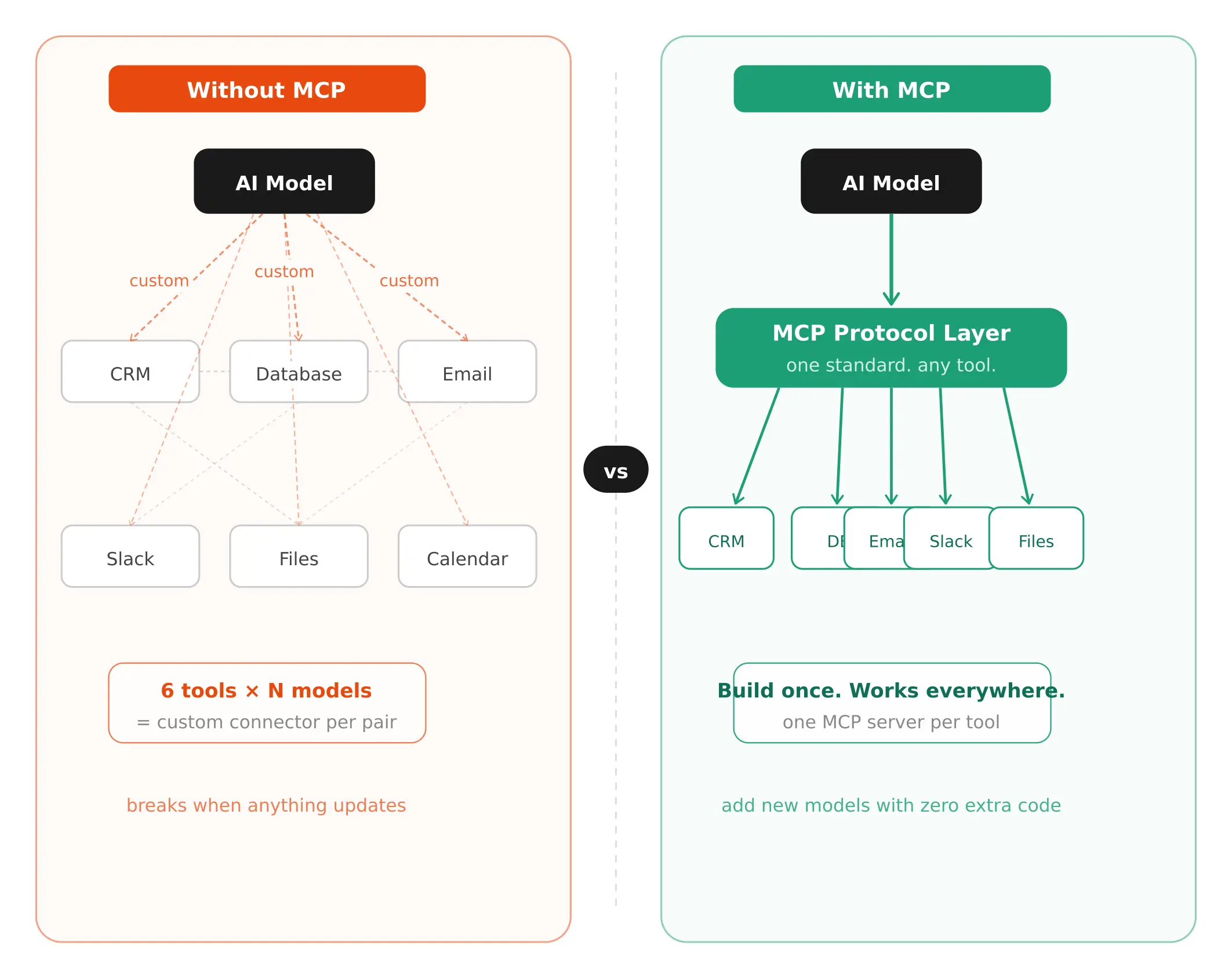
Teams started working around this by giving AI models access to external tools. You could connect a chatbot to a database, or let an AI assistant call an API. But here's what happened in practice. Each connection was custom-built. Every new tool needed its own integration. Every new AI model needed its own connector. If you had 10 AI models and 20 tools, you were looking at up to 200 individual custom integrations.
Developers called this the N x M problem. N models times M data sources. It doesn't scale. It breaks constantly. And it makes building reliable AI agents close to impossible.
That's the problem the Model Context Protocol was built to fix.

SMARTe GTM Intelligence
Start Smarter Prospecting Today
So What Actually Is the Model Context Protocol?
The Model Context Protocol, or MCP, is an open standard introduced by Anthropic in November 2024. It defines a universal way for AI models to connect with external tools, data sources, and services.
Instead of building a custom connector for every combination of AI model and tool, a developer builds one MCP-compatible server for their tool. Once. That server works with any AI application that speaks the same protocol.
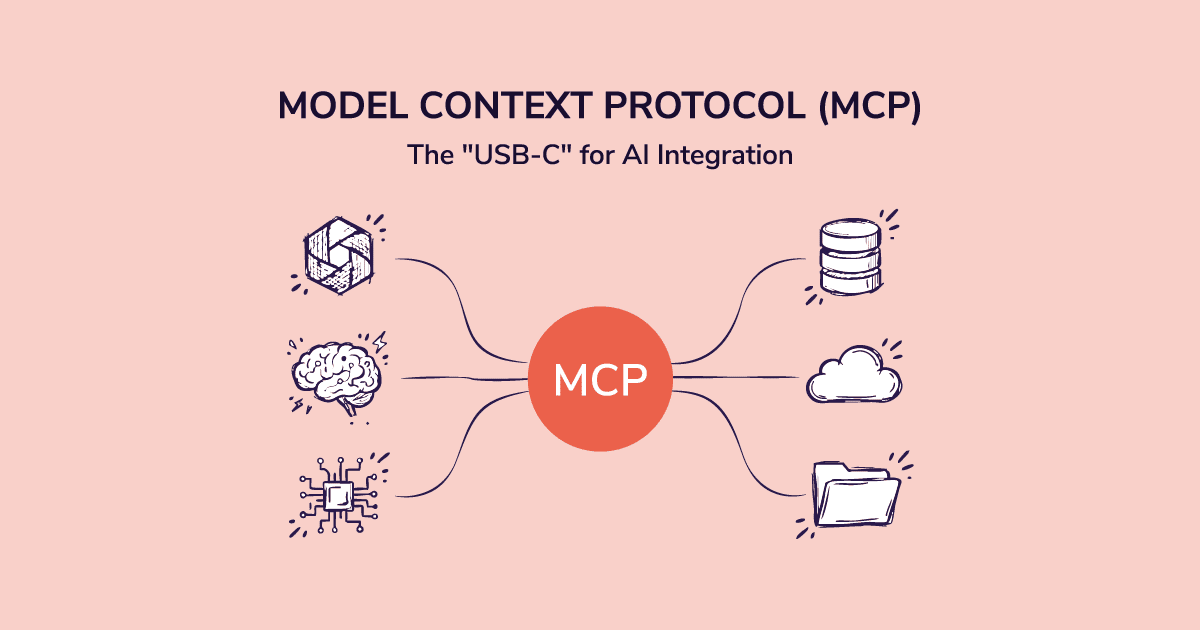
The analogy that makes the most sense to me is USB-C. Before USB-C, every device had its own cable. Chargers, headphones, data transfers — all different. USB-C created one standard that handles everything. Plug any compliant device into any compliant cable, and it just works.
MCP does the same thing for AI. One protocol. Any AI model that supports MCP can talk to any tool that supports MCP. You build the connector once, and it works everywhere.
But here's the part that makes MCP more than just a convenience standard. It's not just about reading data. It's a two-way communication layer. An AI can retrieve information, yes. But it can also take action. Update a file. Run a database query. Send a message. Create a task. MCP handles all of that through a consistent interface.
That's what separates it from a basic API wrapper.
How MCP Actually Works: The Three Moving Parts
You don't need to be an engineer to understand this. There are three components, and they map to roles you already understand.
The Host
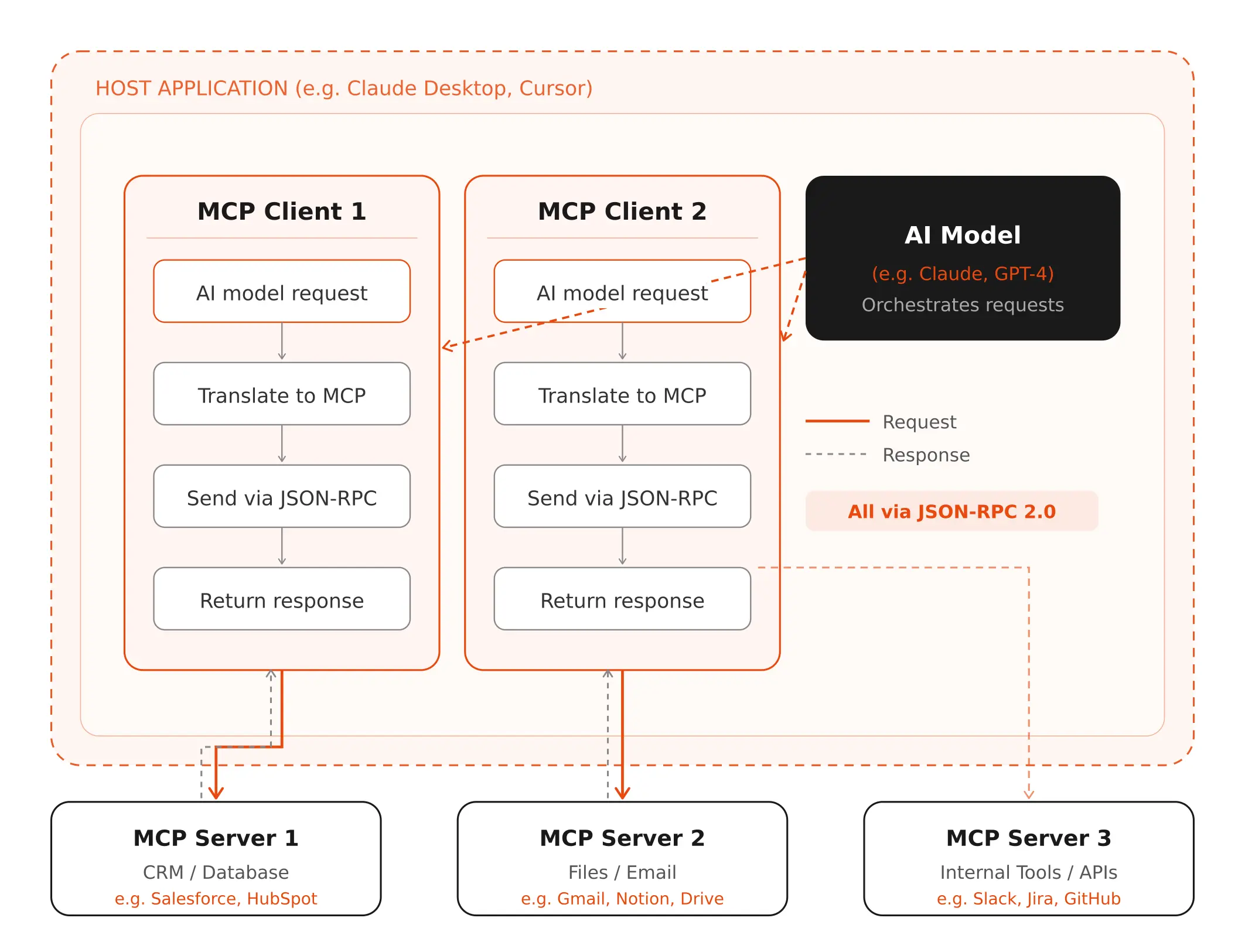
The host is the AI application the user interacts with. Claude Desktop, Cursor (the AI code editor), a custom internal AI tool your team built. The host is in charge of security, permissions, and which AI clients are active. Think of it as the control room.
The Client
Inside the host, you have MCP clients. Each client connects to one MCP server. The client's job is translation. The AI says "get me the Q2 revenue data." The client converts that into a structured MCP request the server can actually process, then brings the response back.
One host can run multiple clients simultaneously. So the same AI application can be talking to a CRM server, a calendar server, and a file system server all at once.
The Server
The MCP server is where the capability lives. It sits in front of a specific tool or data source and exposes that tool's functionality in a format any MCP client can understand. A company might run an MCP server in front of their database, their email system, their internal wiki, or a third-party API.
The server doesn't care what AI model is calling it. As long as the client speaks MCP, the connection works.
All communication happens over JSON-RPC 2.0 — a structured, predictable message format. The specifics don't matter unless you're building MCP tools. What matters is that it keeps everything consistent across every connection.
A Concrete Example
Let's say you ask an AI assistant: "Pull last quarter's pipeline data and send a summary to my VP of Sales."
Without MCP: either this fails, or it works only because a developer built a custom integration specifically for your setup.
With MCP: the AI recognises it needs two capabilities. Database access and email. It checks which MCP servers are available. It finds a CRM server and an email server. It calls the CRM server with a query, gets the pipeline data back, then calls the email server with a composed summary. Your VP gets the email. Done.
No custom integration required. No developer standing by to wire things together. That's the compounding value of a shared standard.
The Three Things MCP Can Pass Between AI and Tools
There's a specific vocabulary here that's worth knowing. MCP standardises three types of things that move between clients and servers. The spec calls them primitives.
Resources
Resources are structured data the server provides to give the AI more context. A document section. A product record. The output of a database query. Resources are how the AI gets factual, current information it couldn't know from training alone.
(And honestly, this is one of the most underappreciated parts of MCP. The AI's training data has a cutoff. But resources can be live. Real-time inventory data. Today's pipeline numbers. Customer records updated five minutes ago. The AI works with what's current, not what it learned months ago.)
Prompts
Prompts are reusable instruction templates stored on the server side. Think of them as saved workflows. "Summarise this support ticket." "Generate a commit message for this code diff." "Write a follow-up based on this call recording." The server keeps them. Users can call them by name. It gives AI tools repeatable, consistent starting points for common tasks.
Tools
Tools are actions. Things the AI can actually do in the real world. Query a database. Create a record. Send a notification. Trigger a workflow. This is where the real power of agentic AI lives.
And because that power is real, this is also where the most important safety rule kicks in: the MCP specification requires user consent before any tool gets invoked. The AI doesn't fire off actions on its own. A human approves. That's not optional. It's built into the protocol design.
Local vs Remote: Two Ways MCP Servers Run
MCP servers run in two ways, and the difference matters depending on how you're using them.
Local MCP Servers
These run on the same machine as the host application. A developer sets up a local MCP server to connect to their project's file system or a local database. Communication happens through standard input/output, basically a direct pipe between the host and server on the same device. It's fast and private, but it requires manual setup, and it's not plug-and-play for non-technical users.
Remote MCP Servers
Remote servers live in the cloud. You connect over the internet, authenticate through a standard OAuth flow, and the AI application gains access to whatever that server exposes. No local setup required.
This is where the ecosystem is growing fastest. GitHub, Figma, Slack, and dozens of other platforms are publishing remote MCP servers that anyone can connect to. You log in, and your AI application inherits those capabilities immediately.
The practical implication for teams: you don't need engineers to build every integration from scratch anymore. If the tool you use has an MCP server, the AI can use it. Out of the box.
Why MCP Is the Foundation That AI Agents Actually Need
Here's what I think most people miss when they read about MCP. They treat it as a developer convenience. A slightly better way to wire things together. But the real story is bigger than that. MCP is the infrastructure layer that makes AI agents actually viable at scale.
A static AI model is useful. You ask it something, it tells you something. But an AI agent is different. An agent plans, reasons, acts, and responds to the results of its actions. It runs multi-step workflows without a human guiding every step.
That kind of agent only works if it can reliably connect to the real systems where actual work happens. Your CRM. Your pipeline reports. Your internal databases. Your communication tools.
Without a shared standard, every new agent is a custom build. Every integration is a one-off. And every update to a downstream tool potentially breaks the agent.
With MCP, an agent that connects to one CRM today can connect to a different one tomorrow, as long as both have MCP servers. The agent doesn't need to be rebuilt. It just needs to authenticate and connect.
And this matters directly for sales teams. The AI sales tools that are worth using in 2026 aren't just chatbots anymore. They're tools that actually act on data. They surface contacts, update records, prioritise outreach, and feed back results into your workflow. MCP is what makes that architecture possible without an army of developers maintaining bespoke integrations.
What This Means If You Work in B2B Sales
I want to bring this down to earth a bit, because so far most of the MCP conversation has lived in developer circles. But the implications for revenue teams are significant.
Think about how AI in B2B sales works today. Most AI sales tools are islands. They have their own data. Their own interface. Their own outputs. Getting them to talk to your CRM, your sequencing tool, your enrichment provider — each of those connections is either manual, limited, or requires IT involvement.
MCP changes that architecture. An AI system built on MCP can pull live data from your CRM, cross-reference it against your enrichment provider, update a prospect record, and trigger the next step in a sequence — all as part of a single workflow. No copy-paste. No switching tabs. No waiting for a sync that runs at midnight.
For teams already thinking about AI sales agents — systems that can autonomously handle parts of the prospecting and outreach workflow — MCP is the plumbing that makes those agents actually usable in a real sales stack. Without it, every new AI tool you add is another isolated system someone has to maintain.
That's not a problem unique to AI. It's the same fragmentation that has plagued sales tech stacks for the last decade. MCP is, in part, an answer to it.
MCP vs RAG: What's the Difference?
If you've spent any time reading about AI, you've probably heard of RAG, which stands for Retrieval-Augmented Generation. People sometimes confuse MCP and RAG, or treat them as alternatives. They're not.
What RAG Does
RAG is a technique for improving AI responses by retrieving relevant documents from a knowledge base before generating an answer. You have a vector database full of your company's internal docs. When a user asks a question, the system searches that database, finds the most relevant chunks, and feeds them into the model as context. The model generates a response based on those retrieved documents.
RAG is excellent for making AI responses more accurate and grounded in specific knowledge. But it's primarily about information retrieval. The AI gets smarter context. It doesn't necessarily take action.
What MCP Does
MCP is a broader communication standard. It covers retrieval (through Resources), but it also covers action (through Tools) and templated workflows (through Prompts). An AI using MCP can read data from a live database in real time, not just from pre-indexed documents. It can also write back to that database. It can call APIs. It can trigger workflows.
The practical way to think about it: RAG makes the AI smarter about what it knows. MCP makes the AI capable of doing things in the real world. They're complementary. Many production AI systems use both.
The Security Stuff Worth Knowing Before You Build on MCP
Look, I'm not going to pretend the security picture is perfect. It isn't. And if you're evaluating MCP-based tools for your team or considering building on MCP yourself, this part matters.
The core MCP spec is solid. The consent requirements are real. The architecture is sensible. But the spec can't enforce what individual developers actually implement on top of it. And in early 2025, as adoption exploded, some implementations cut corners.
The main concerns security researchers flagged:
- Prompt injection through malicious server responses — a compromised MCP server could try to manipulate the AI's behavior through its output.
- Overly broad permissions — some servers were granting access to far more data than any individual workflow actually needed.
- OAuth token exposure — poorly secured remote MCP connections could leak authentication credentials.
- Consent flows that weren't actually enforced — the spec requires user approval before tools run, but not every host was building that approval step properly.
None of these are reasons to avoid MCP. But they are reasons to ask the right questions when you evaluate a tool that runs on it. What permissions does this tool request? How does it handle consent? What data does the MCP server actually have access to?
The good implementations treat those questions seriously. The ones that don't are worth avoiding.
Who Has Adopted MCP So Far?
Adoption moved fast. Faster than most open standards do.
Anthropic introduced MCP in November 2024 and open-sourced it immediately. By January 2025, AI developer tools like Cursor and Windsurf had already added support. In March 2025, OpenAI officially adopted the protocol. Google DeepMind followed. Microsoft announced Windows-level MCP support and integrated it into Azure and their Semantic Kernel framework.
By February 2025, the open-source community had contributed over 1,000 MCP connectors. GitHub, Figma, Slack, Block (Square), Apollo, and dozens of others shipped MCP servers.
In late 2025, Anthropic donated MCP to the Agentic AI Foundation, a directed fund under the Linux Foundation, co-founded by Anthropic, Block, and OpenAI. That move matters. It took MCP from being Anthropic's protocol to being the AI industry's protocol. When the three biggest names in the space co-own a standard, that standard tends to stick.
Honestly? When OpenAI, Google, and Anthropic align on the same thing, that thing is going to win. This isn't the first time an open standard has become table stakes for an entire industry. It won't be the last.
The Bottom Line
Here's what I actually think about MCP. It's one of those standards that looks unglamorous on the surface but ends up being the thing everything else depends on.
HTTP didn't seem exciting when the web was new. It was just a protocol. But it was the protocol that made everything possible. MCP has that energy. It's not the AI. It's not the product. It's the layer that lets the AI become genuinely useful in the real world.
If you're a developer, learning how to build MCP servers and clients right now is probably one of the highest-value things you can do. The ecosystem is moving fast and the tooling is still young enough that early expertise matters.
If you're evaluating AI tools for your team, ask whether they're MCP-compatible. An AI tool that speaks MCP can plug into your existing stack far more cleanly than one that requires custom integrations for everything.
And if you're just trying to understand where AI is heading, this is a major part of it. The shift from AI as a question-answering tool to AI as an active participant in your workflows. MCP is a big part of what makes that shift possible.
.png)