TL;DR:
Claude RevOps automation is how revenue operations teams replace hours of weekly manual work with AI-driven workflows that handle CRM cleanup, lead enrichment, routing logic, pipeline reporting, and outbound personalization without engineering support.
- Claude operates in two modes: Claude.ai (browser, no code required) and Claude Code (terminal, script-based)
- Without a live data connection, Claude reasons only on what you paste into it
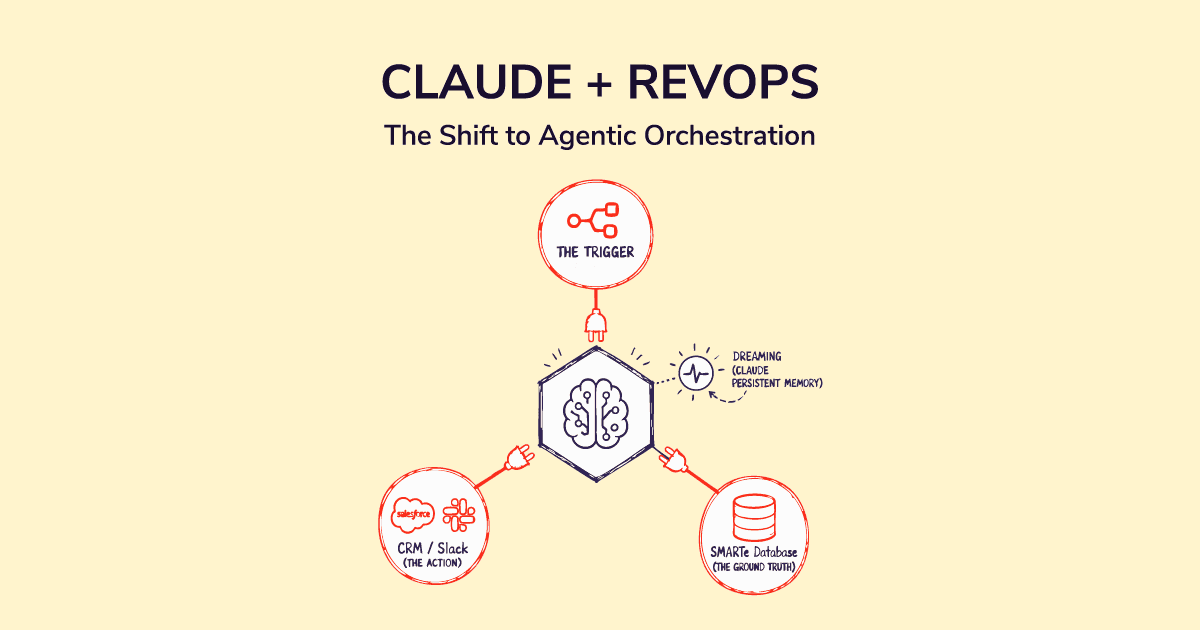
- MCP (Model Context Protocol) connects Claude to live tools including your CRM, Salesforce, HubSpot, and B2B data sources
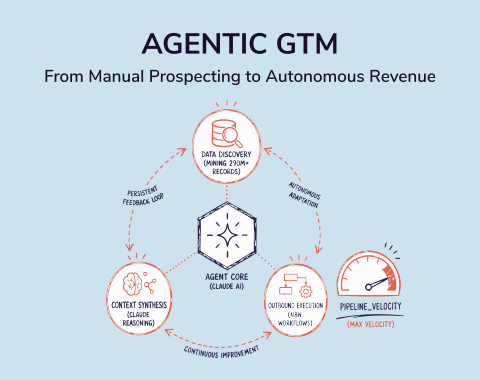
- SMARTe MCP gives Claude real-time access to 289M+ verified contacts, direct dials, technographics, and Bombora intent signals inside a single conversation
- Six workflows worth starting with: CRM data cleanup, lead enrichment, lead routing logic, SLA monitoring, pipeline reporting, and outbound personalization
Using Claude to automate RevOps workflows is one of the fastest-moving shifts in how revenue operations teams work right now. Teams that used to file engineering tickets for CRM automation are shipping those workflows in an afternoon. Tasks that ate three hours of someone's Monday are running on a schedule. And the RevOps leaders paying attention are pulling significantly ahead of those who aren't.
The catch is that most of the content on this topic skips the part that actually matters: what Claude can realistically do versus what it can't, and why the quality of the data feeding into it determines whether the whole thing works.
According to Salesforce's State of Sales research, sales reps spend 70% of their time on non-selling tasks. A significant portion of that burden falls on RevOps. Enrichment runs. Pipeline reports. Routing fixes. SLA checks. These are the tasks Claude handles well. Getting that right starts with understanding the two modes Claude operates in and the data layer both of them depend on.
Two Ways to Use Claude for RevOps
Before diving into specific workflows, it helps to understand that "using Claude" can mean two different things. Which one you use determines what's possible.
Claude.ai: The Browser Interface
Claude.ai is the version most people already know. You open a browser, start a conversation, and work with Claude by describing what you need. No code. No setup. No terminal.
For RevOps, Claude.ai is useful for analysis tasks where you bring the data to Claude. You export a CSV from your CRM, paste the contents into the chat, and ask Claude to audit it for missing fields, flag duplicates, or score leads against your ICP criteria. You paste a pipeline export and ask it to produce a Monday morning report. You paste meeting transcripts and ask it to identify recurring objections across your deals.
The limitation is that Claude.ai only sees what you give it. Every session starts fresh. Data lives in a chat window, not connected to your actual systems.

SMARTe GTM Intelligence
Start Smarter Prospecting Today
Claude Code: The Terminal Agent
Claude Code is Anthropic's agentic coding tool. It runs in your terminal, reads files on your machine, writes and executes scripts, and connects to external APIs via MCP. This is where persistent automation lives.
For RevOps, Claude Code is where you build workflows that actually run on a schedule. A script that pulls new leads from your CRM every morning, checks them against enrichment rules, routes them to the right rep, and logs a timestamp for SLA tracking. A cleanup job that audits 30,000 contact records for missing fields, normalizes phone formats to E.164, and produces a clean import file. These don't require manual input every time. You build them once, run them on a cron job, and they work.
The learning curve is real. You need to be comfortable in a terminal and willing to iterate on prompts. But you don't need to write code from scratch. Claude Code writes the logic for you. You describe what you want in plain English and review the output.
The Data Problem Every Claude RevOps Workflow Faces
This is the section most articles skip, and it's the most important one.
Claude is a reasoning engine. A strong one. It can analyze data, apply logic, score leads, write routing rules, and produce reports. What it cannot do, without a live data connection, is find verified contact information, check a company's current tech stack, surface which accounts are in an active buying cycle, or tell you if a contact changed jobs last month.
When you ask Claude to enrich a lead with no data connection, it guesses. Confidently. And gets it wrong. The 2025 State of RevOps Survey by Openprise and RevOps Co-op, which surveyed over 150 operations professionals, found that 71% of companies say bad CRM data actively hurts their go-to-market execution. Feeding that bad data into Claude doesn't fix the problem. It automates it.
What MCP Changes
MCP, or Model Context Protocol, is an open standard Anthropic released in late 2024. It's the bridge between Claude and live external systems. Once you connect an MCP server, Claude can query your CRM in real time, pull data from live databases, write results back to systems, and take action inside your existing workflow rather than just reasoning inside a chat window.
HubSpot, Salesforce, Slack, and a growing list of GTM tools now have official MCP servers. As of early 2026, over 8,600 MCP servers exist and 28% of Fortune 500 companies have deployed MCP in some form.
For RevOps teams, MCP turns Claude from a smart clipboard into a live operational layer.
How SMARTe MCP Gives Claude Real B2B Data
Most Claude RevOps workflows hit the same wall: the automation is smart but the data feeding it is stale or incomplete. Only 11% of RevOps professionals rate their CRM data quality as excellent, according to Gartner. That means 89% are running workflows on records with missing fields, outdated contacts, and job titles nobody verified.
SMARTe MCP changes this. Connect SMARTe's MCP server to Claude and Claude gets real-time access to 289M+ verified contacts, 75%+ US mobile coverage, 90%+ CRM match rates, and Bombora intent data natively built in. No separate integration. No tab switching. No batch enrichment cycle that goes stale before the next quarter.
Instead of asking Claude to guess at a contact's current role or company, you describe what you need and Claude pulls verified, live data directly into the workflow. A lead comes in with a name and company domain. Claude hits the SMARTe MCP, returns a verified direct dial, the decision-maker's current title, the company's tech stack, their recent funding round, and whether they've been actively researching your category this week. That's enrichment that identifies both fit and timing, not just fit.
That combination, Claude's reasoning with SMARTe's real-time verified data, is what turns RevOps automation from an interesting experiment into a reliable operational system.
Six RevOps Workflows to Automate with Claude
These are the six workflows where RevOps teams are getting the most consistent value. Each one starts with what you're replacing and what Claude actually does differently.
1. CRM Data Cleanup and Normalization
Every CRM has the same problems: duplicate accounts, phone numbers in 14 different formats, "VP Sales" and "Vice President of Sales" and "VP, Sales" stored as three different job titles, and missing fields that nobody got around to filling in. Most teams handle this with quarterly cleanup sprints that take a week and solve the problem for about six months.
With Claude, the cleanup becomes a prompt. Export your contacts as a CSV. Describe your rules. Claude audits every record, flags what's broken, normalizes the fields you specify, deduplicates by domain and email pattern, and outputs a clean import-ready file. What used to take a week takes an afternoon.
A sample prompt structure that works well:
"Audit this contact list. Flag any record where the email is missing or invalid, the phone number has fewer than 10 digits, the company name is blank, or the job title doesn't match our standard categories. For each flagged record, note what's missing and why. Normalize all phone numbers to E.164 format. Deduplicate by email and company domain. Output a clean CSV and a separate file of records that need manual review."
Pair this with CRM data enrichment running continuously through SMARTe MCP and the cleanup cycle stops repeating every quarter.
2. Lead Enrichment and ICP Scoring
A lead arrives in your CRM with a name, email, and company domain. That tells you almost nothing about whether they're worth pursuing or which rep should get them.
With SMARTe MCP connected, Claude pulls the full picture in a single step: verified contact details, current role, company size, funding stage, tech stack, headcount growth, and whether they're showing active intent on topics relevant to your category. Then it applies your ICP scoring criteria and returns a score with a reason.
The reason matters as much as the score. "Score: 82/100. Series B SaaS company in your target vertical, 50 to 200 employees, currently running Salesforce and Outreach, raised $12M 60 days ago, showing Bombora intent on sales intelligence this week." That's an account worth calling today. A name, email, and company domain without that context is a guess.
This is what separates buying signals from static firmographic scoring. Fit tells you who belongs in your ICP. Intent tells you who belongs in your pipeline this week.
3. Lead Routing Logic
Basic round-robin routing is easy. Real routing logic, the kind that handles territory assignments, segment-based qualification, capacity balancing, exception rules for named accounts, and conditional paths based on company size or tech stack, requires either a developer or a maze of Salesforce flows that break every time someone changes a field.
Claude Code builds routing logic as a readable script with an audit log. When routing misfires, you read the log, find the rule, update the prompt, and redeploy. No clicking through 15 workflow nodes to find where the logic broke.
A practical approach: export your closed-won and closed-lost deals along with enrichment data. Ask Claude to identify which attributes correlate most strongly with wins. Build a scoring model from your actual data. Feed that model back into your routing logic so high-scoring leads reach the right rep within minutes of entering the CRM.
The RevOps tech stack article covers how routing logic fits into the broader data architecture. The short version: routing is only as accurate as the enrichment data feeding it.
4. SLA Monitoring and Handoff Tracking
SLA breaches are where pipeline leaks silently. A qualified lead sits in a queue for 48 hours because no alert fired. A deal closes and gets handed to customer success without the context CS needs to onboard properly. Nobody notices until the quarterly review.
Claude Code builds SLA monitors that run on a schedule. A typical setup:
- Queries the CRM for leads assigned in the last 24 hours with no logged activity
- Calculates time elapsed since assignment versus the SLA threshold (four hours for inbound, 24 hours for outbound is a common starting point)
- Flags approaching breaches at 75% of the SLA and actual breaches at 100%
- Sends a Slack alert to the assigned rep and their manager with lead context attached
This is where the RevOps flywheel concept becomes operational. The handoff SLAs that connect Attract to Engage and Engage to Delight don't enforce themselves. An automated monitor built in Claude Code is what makes them real rather than aspirational.
5. Pipeline Reporting and Forecast Summaries
The Monday morning pipeline report is one of the most consistently cited time drains in RevOps. Export CRM data. Paste into spreadsheet. Format for the leadership meeting. Two to three hours. Same task. Every week.
Claude Code with CRM access via MCP does this in seconds. A prompt that works well for the weekly pipeline review:
"Compare this week's pipeline export against last week's snapshot. What changed: deals won, lost, stage movements, new deals added, deals pushed. Red flags: no activity in 14 or more days, close dates this month with no recent engagement, deals that moved backward in stage. Coverage: total pipeline value versus quota target, by segment and rep. The one deal I should personally intervene in and why."
The output goes to Slack. The snapshot saves for next week's comparison. The RevOps KPIs and metrics guide covers which metrics belong in this report and why tracking them weekly matters.
For quarterly business reviews, extend the prompt to include win/loss pattern analysis across closed-won and closed-lost deals from the period. Claude identifies what your best deals had in common and what your losses had in common. That insight typically takes a skilled analyst half a day to produce manually and ends up getting skipped most quarters as a result.
6. Outbound Personalization at Scale
Generic outbound fails because "personalization" usually means a first name and a company name. Real personalization means knowing a company hired four new SDR managers last quarter, opening the first line with that, and connecting it to why that matters for your product.
With SMARTe MCP, Claude pulls the context that makes personalization specific: recent funding events, leadership changes, tech stack details, open roles that signal hiring direction, and intent data showing what topics the company has been researching. Then it generates a first message that uses that specific context rather than a template.
The difference between a generic sequence and a signal-based one is measurable. Studies of sales preparation data show reps who demonstrate strategic preparation before calls see seven times more deal advancement than those who don't. Not 7%. Seven times. The gap between "I saw you work at [company]" and "I noticed you raised a Series B and are hiring four SDR managers, which tells me pipeline generation is a current focus" is what that research is capturing.
This doesn't replace your engagement platform. It feeds it. Claude generates the context layer. The sequence still runs in Outreach or Salesloft. The revenue operations software your team already uses handles the execution.
How to Start Without Breaking Anything
The fear most RevOps teams have about AI automation is reasonable. Claude touching production CRM data and getting something wrong across 50,000 records is a bad day. Here's how to avoid it.
Start Read-Only
Your first workflows should only read data, never write it. Export your CRM data. Ask Claude to analyze it. Review the output. Trust builds with evidence. Running 10 read-only workflows and seeing accurate, useful output is what earns the confidence to let Claude write back to the CRM.
Review Before Writing Back
When you're ready to automate write-back, always include a confirmation step. Claude produces the output. A human reviews it. Then it runs. For the first three to five cycles of any new workflow, this review step is non-negotiable. One wrong field update pushed to 30,000 records can corrupt data that took months to clean.
The teams that build reliable RevOps automation treat the review step the way a financial team treats a sign-off on wire transfers. Not optional. Not something you skip because it worked fine last time.
Build One Workflow, Prove It, Then Expand
I've watched teams try to automate six workflows simultaneously and ship zero. Start with the most painful recurring task on your list. For most RevOps teams, that's either the Monday pipeline report or CRM cleanup. Build that one thing. Run it ten times. Fix the edge cases. Then add the next workflow.
The RevOps teams getting the most from Claude are treating it as a daily tool for small tasks, not something they only use for big projects. Daily use builds the context layer. The context layer makes every subsequent automation faster and more accurate. The revenue operations team structure that supports this kind of iteration has someone on the team whose job includes maintaining and improving the workflow library, not just building it once.
What Claude Isn't Good at in RevOps
Honest answer to this is important, because the hype around AI in RevOps will lead teams to apply it to the wrong problems and then write the whole thing off when it underperforms.
Claude is not a replacement for your CRM. It's not a replacement for your engagement platform, your BI tool, or your data enrichment layer. It's a reasoning and automation engine that works best when the systems it connects to are reliable and the data feeding it is clean.
It's also not good at live event-driven triggers. If you need something to fire the moment a form is submitted or a deal changes stage, you still need Make, Zapier, or n8n to catch the trigger and call Claude from there.
And it doesn't carry memory between sessions in Claude.ai. Everything you know about your ICP, your CRM schema, your routing rules, and your team structure needs to get defined in a context file that Claude reads at the start of each session. Teams that skip this step spend half their session re-explaining things Claude already needed to know.
In my experience, the teams that get the most from Claude RevOps automation are the ones who treat the context layer as seriously as the prompt. The GTM tech stack underneath the automation determines whether Claude has clean, current data to reason against. That's still the job of the RevOps team to maintain.
The RevOps Team That Pulls Ahead
The revenue operations function is changing faster than most practitioners expected. The teams pulling ahead aren't necessarily the ones with the biggest budgets or the most headcount. They're the ones that figured out which parts of the job a well-prompted AI can do reliably, and freed themselves to do the parts it can't.
Automation doesn't replace the judgment that RevOps requires. It removes the manual work that blocks that judgment from being applied. When your Monday morning no longer starts with pulling a pipeline report, you spend that time on the question the report was supposed to answer.
Try SMARTe free and connect it to Claude with SMARTe MCP. See what verified, real-time contact data changes about the quality of every workflow you're already running. No credit card required.
.png)