TL;DR:
A gentle reminder email is a polite, low-pressure follow-up that nudges someone about a pending reply, payment, or deadline without sounding pushy. The best ones assume the person is busy, not ignoring you, and make it easy to respond.
What makes a reminder email work:
- Reply in the same thread so the recipient keeps the full context
- Wait 3 to 5 business days before a general follow-up (24 to 48 hours for urgent ones)
- Open with empathy, acknowledge they're busy, then recap the topic in one sentence
- Keep it under 120 words and end with a low-friction call to action
- Send Tuesday to Thursday, 10 AM to 2 PM, and avoid Monday mornings and Friday afternoons
- Skip spam-trigger words like "urgent" or "action required" to protect deliverability
This guide includes 19 copy-and-paste templates for ghosted follow-ups, overdue invoices, deadlines, meetings, and more.
Waiting for a reply is one of the most uncomfortable aspects of modern professional communication. Whether it is a blocking payment, a stalled project decision, or a signed contract that hasn't come back, the silence can be deafening.
You need to follow up. You have to follow up. But the fear of sounding "pushy," "desperate," or "annoying" often holds you back.
This is exactly what gentle reminder emails are for.
In this master guide, we are going to move beyond simple templates. We will explore the psychology of the "nudge," the technical art of timing, and provide you with 19 battle-tested, polite reminder email templates that you can copy, paste, and send with confidence.
These templates cover every scenario:
- Ghosted follow-ups
- Overdue invoices and payments
- Nudging bosses and senior stakeholders
- Time-sensitive deadlines
- Job interviews and networking
Let’s master the art of the polite follow-up.
What is a Gentle Reminder Email? (And Why You Need It)
A gentle reminder email is a polite, low-pressure message sent to nudge a recipient about a pending action or unanswered query. Unlike a "demand," a gentle reminder assumes positive intent—it assumes the recipient is busy, not ignoring you maliciously.
The Psychology of the "Nudge"
Why do people ignore emails? In 90% of cases, it isn't personal.
- Cognitive Overload: The average professional receives 120+ emails a day.
- Task Friction: If your request requires "thinking time," they likely flagged it for later and forgot.
- The "Buried" Effect: If they didn't reply within 24 hours, your email is likely off their primary screen.
A friendly reminder acts as a pattern interrupt. It brings the task back to the top of the "cognitive stack" without triggering the recipient's defensive mechanisms. In professional communication (Sales, HR, Management), the gentle reminder is not just a tool—it is a necessity for closing loops.

SMARTe GTM Intelligence
Start Smarter Prospecting Today
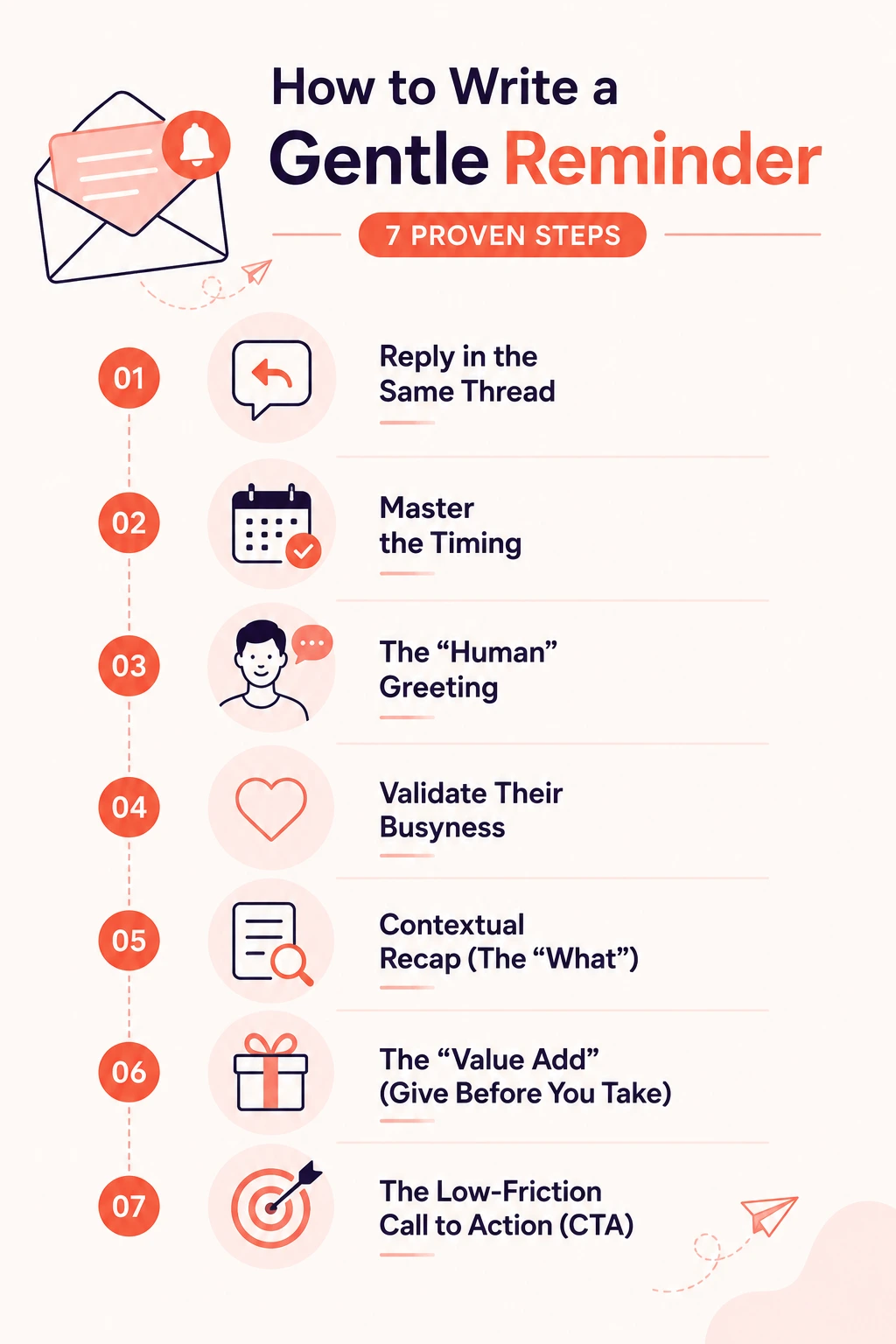
How to Write a Gentle Reminder in 7 Proven Steps
If you’ve ever stared at a blinking cursor wondering how to send a reminder without sounding pushy, you’re not alone. A well-written follow up email balances clarity, politeness, and timing.
The framework below is built from real sales outreach data and response-rate optimization principles to help your reminder land professionally every time.
Step 1: Always Reply in the Same Thread
Never start a new email chain (unless the topic has completely changed).
- Why: It keeps the context history attached. The recipient doesn't have to search their archives to remember who you are or what you discussed.
- How: Go to your Sent folder, find the original email, and hit "Reply All."
- Pro Tip: If the thread is getting messy, change the Subject Line to: “Re: [Original Subject] - Following Up” to refresh the visibility while keeping the thread ID.
This keeps visibility high while maintaining conversation history — a tactic commonly used in effective b2b cold email templates.
Step 2: Master the Timing (The Goldilocks Zone)
Sending a reminder two hours later is aggressive. Sending it two weeks later is irrelevant. You need the "Goldilocks" timing.
- General Follow-up: 3–5 Business days.
- Urgent Deadlines: 24–48 Hours.
- Invoices: 1 day after the due date (or 3 days before).
- Best Time to Send: Tuesday, Wednesday, or Thursday between 10:00 AM and 2:00 PM. Avoid Monday mornings and Friday afternoons.
Avoid Monday mornings and Friday afternoons when inbox fatigue is highest — a principle widely applied in modern b2b email marketing strategies.
Step 3: The "Human" Greeting
Robotic emails get robotic silence. Open with warmth.
- Instead of: "Hello,"
- Try: "Hi Alex, hope your week is off to a great start," or "Hi Sarah, hope you’re recovering well from the conference madness."
When you write cold email messages or reminders, personalization immediately increases engagement.
Step 4: Validate Their Busyness (Empathy Statement)
This is the most critical sentence in a gentle reminder. By acknowledging they are busy, you remove the guilt they feel for not replying. When you remove the guilt, they are more likely to reply.
- The Phrase: "I know this is a busy time of year..." or "I imagine your inbox is flooded right now..."
Step 5: Contextual Recap (The "What")
Assume they have forgotten everything. Provide a 1-sentence recap.
- Formula: "Touching base on [Original Topic] to see if [Specific Goal] is still a priority."
- Example: "Following up on the marketing demo from Tuesday—wanted to see if the pricing tier worked for your budget."
Clear context is especially important when contacts were sourced through efforts to find email address details across large prospect databases. That context matters even more in industries where you're reaching busy specialists, like when you follow up with contacts from a verified healthcare email list of physicians and hospital administrators.
Step 6: The "Value Add" (Give Before You Take)
Don't just ask for a reply; offer to make their life easier.
- The Offer: "Happy to resend the file if it got lost," or "If it’s easier, I can record a 2-minute Loom video explaining this so you don't have to read the full report."
Step 7: The Low-Friction Call to Action (CTA)
End with a specific, easy request. Avoid open-ended questions like "Thoughts?" which require mental energy.
- High Friction: "Let me know what you think about the proposal."
- Low Friction: "Does Wednesday at 2 PM work for a call, or would Friday be better?"
- Zero Friction: "If you’re still interested, reply with a 'Yes' and I’ll handle the rest."
Simple decisions reduce cognitive load and increase responses — especially when messaging contacts sourced from trusted b2b email list providers.
19 Gentle Reminder Email Templates (Copy & Paste)
These templates are categorized by scenario. Choose the one that fits, tweak the bracketed text, and send.
Category A: The "Ghost" (No Response) scenarios
1. The Standard Gentle Nudge
Best for: General follow-ups when you haven't heard back in 3+ days.
Why this works: It excuses their silence ("inboxes get buried") and offers help rather than demanding an answer.
2. The "Friendly" Follow-Up (Casual)
Best for: Colleagues, long-term clients, or warm leads.
3. The "Busy Schedule" Acknowledgement
Best for: High-level executives or people you know are swamped.
Category B: The "Money" (Payments & Invoices)
4. The Polite Invoice Reminder (Pre-Due or On Due Date)
Best for: Ensuring you get paid without ruining the client relationship.
5. The Renewal Reminder
Best for: SaaS, subscription services, or retainers.
Category C: The "Internal" (Bosses & Colleagues)
6. Reminding the Boss (Upward Management)
Best for: Getting approval from a senior stakeholder who is blocking progress.
7. The Timesheet/Admin Reminder
Best for: HR or Project Managers chasing team members.
Subject: Update: [Period] Timesheet Submission
8. Collaborative Project Follow-Up
Best for: Peers working on a shared project.
9. Task Delegation Check-In
Best for: Managers checking on delegated work.
Category D: The "Urgent" (Deadlines & Events)
10. Time-Sensitive Warning
Best for: Approaching deadlines where non-action has consequences.
11. Document Submission Deadline
Best for: Collecting reports, paperwork, or requirements.
12. Meeting Confirmation/Reminder
Best for: Reducing no-show rates for sales calls or interviews.
Category E: Sales & External Relationships
13. Proposal/Contract Follow-Up
Best for: Moving a deal from "Maybe" to "Yes."
14. Requesting Feedback/Review
Best for: Post-purchase or post-project feedback.
15. Cart Abandonment (E-commerce)
Best for: Recovering lost sales.
16. Support Ticket Follow-Up (From Customer)
Best for: When customer support hasn't replied to YOU.
Category F: The Creative & Personal
17. The "Humorous" Reminder
Best for: People with whom you have a great rapport. Do NOT use this for cold contacts.
18. The Lighthearted "Pop In"
Best for: Low-stakes reminders.
19. Job Interview Post-Interview Nudge
Best for: 1 week after an interview with no news.
Multi-Channel Reminders (LinkedIn, WhatsApp & SMS)
In 2026, email is not the only way to communicate. If you have a pre-existing relationship, a nudge on a secondary channel can work wonders.
Sales and recruiting teams often start outreach using a linkedin email finder to identify the right contact, then use secondary channels only when a conversation is already warm.
The goal is simple: remind, not pressure.
Rules for Multi-Channel:
- Keep it short: 1-2 sentences max.
- No pressure: Acknowledge you are switching channels.
- Opt-in only: Never WhatsApp a cold lead who hasn't given you their number.
- Be intentional on LinkedIn: Since platforms limit outreach through inmail credits, use them for meaningful follow-ups rather than repeated nudges.
Template 1 (LinkedIn):
"Hi [Name], hope you are okay! Just a friendly nudge regarding the email I sent last week about [Topic]. Let me know if you prefer to chat here instead. Thanks!"
Template 2 (WhatsApp/SMS - Formal):
"Hi [Name], [Your Name] here. Just sent you a quick email regarding the invoice due tomorrow. Let me know if you have any questions. Have a great day!"
Template 3 (WhatsApp - Casual):
"Hey [Name], just a quicky—we are still on for the call tomorrow at [Time]? Looking forward to it!"
Best Practices for High Response Rates
Writing the email is only half the battle. How you send it matters just as much.
1. Keep it Under 120 Words
Data shows that emails between 50 and 90 words have the highest response rates. This forces you to be concise. The template structure should be:
- Greeting (5 words)
- Context/Empathy (20 words)
- The Ask (15 words)
- Clear email call to action (10 words)
2. Write Subject Lines That Make Sense Alone
Your subject line should explain the purpose even before the email is opened. Avoid vague phrases that resemble spam.
Weak examples:
- “Following up”
- “Hello?”
Stronger cold email subject lines:
- “Follow-up: Project X Design Assets”
- “Quick question about Project X timeline”
Specific subject lines create clarity and trust.
3. Avoid Spam-Trigger Language
Gentle reminders fail when they sound overly urgent or promotional.
Avoid words like:
- Urgent
- Final Chance
- Action Required
Instead, use neutral language such as:
- Update
- Checking in
- Next steps
Maintaining clean sender reputation with reliable email verification tools also improves email deliverability and ensures reminders actually reach inboxes.
4. Include a Soft Deadline
A soft deadline creates momentum without pressure.
Example: “If you can share this by Thursday, we’ll stay on track for the Monday launch.”
This keeps the tone collaborative rather than demanding.
How to Automate Gentle Reminders
Sending reminders manually becomes difficult when managing multiple conversations. Many teams rely on the best email automation software to schedule follow-ups while keeping messages personalized.
The Automation Workflow:
- Step 1: Send original email.
- Step 2 (Trigger): If No Reply after 3 days -> Send Gentle Reminder Template #1.
- Step 3 (Trigger): If No Reply after 5 more days -> Send Value Add Email (Template #3).
- Step 4 (Trigger): If No Reply after 7 more days -> Send Break-up Email.
Why Automate?
- Consistency: You never forget a follow-up.
- Scalability: You can manage 50 conversations as easily as 5.
- Analytics: You can see which templates get opened and which get ignored.
Conclusion: The Power of the Gentle Nudge
The secret to getting a response isn't about shouting louder; it's about making it easier for the other person to reply.
By using these templates, you shift the dynamic from "I am demanding something from you" to "I am here to help you close this loop." Whether you are a freelancer chasing a payment, a salesperson chasing a deal, or a manager chasing a report, kindness combined with clarity is your best strategy.
Ready to send? Pick a template, customize the greeting, and hit send. Your reply is likely just one gentle nudge away.