TL;DR:
The average B2B sales team uses five or more lead generation tools and still misses pipeline targets every quarter. Adding another one rarely fixes the problem. Identifying the actual gap and matching it to the right tool does.
I've personally used many of the tools on this list. For the ones I haven't, I went through peer feedback, hands-on reviews from people actively using them, and platform documentation rather than marketing copy. This article covers 28 lead generation software tools across eight categories: contact data providers, CRM platforms, landing page builders, email automation, paid ad formats, webinar platforms, referral programs, and video lead capture. Each tool covers a different job. Most teams need two or three matched to their specific funnel stage, not all 28.
Every entry covers the use case each tool is built for and one honest limitation you won't find on their marketing page. I didn't include tools I wouldn't recommend to a team I knew personally.
What Is Lead Generation Software?
Lead generation software helps businesses find potential customers (prospects), collect their contact details, and move them toward a buying conversation. Some tools focus on one thing, like finding verified emails or building landing pages. Others cover multiple stages.
B2B stands for business-to-business. Most tools on this list serve B2B teams. A few (like Gleam and ReferralCandy) work for both B2B and consumer brands.
Quick glossary for this article: firmographic data means company-level info (size, revenue, industry). Technographic data means the software a company uses. ABM stands for account-based marketing. CPL is cost per lead.
Quick Comparison: 28 Lead Generation Tools at a Glance
28 Best Lead Generation Tools [2026]
1. SMARTe

Best for: Outbound B2B teams that need verified direct dials globally
Bad data costs more than most teams realize. Your SDR dials 80 contacts. 40 numbers are wrong. 20 go to a main reception line. 15 don't answer. Five connect. That's the math when you're working off a stale database.
SMARTe fixes this. It's a B2B sales intelligence platform built for outbound-first teams. The database holds 289M+ verified contacts across 200+ countries. US mobile coverage sits at 75%+. That matters because direct dials bypass the gatekeepers entirely.
What you get:
- 289M+ verified contacts with real-time validation (not a quarterly batch update)
- 75%+ US direct dial coverage and 50%+ globally, including real depth in LATAM and APAC
- Native Bombora intent data built in, so you know which accounts are actively researching your category
- AI agents that map buying group members per account automatically
- 66M+ company profiles with firmographic and technographic filters (64K+ products tracked)
- CRM enrichment at 90%+ match rates for Salesforce and HubSpot
- Browser extension that pulls contact data directly from LinkedIn profiles
The free plan gives you 10 credits per month with no credit card required. Pro starts at $25/month. Enterprise from $15,000/year.
One honest note: SMARTe gives you the data. It doesn't have built-in email sequencing. You'll pair it with a dedicated outreach tool for that.
Pricing: Free (10 credits/mo, no credit card) | Pro from $25/mo | Enterprise from $15,000/yr | See pricing
Watch out for: The free plan is very limited. Ten credits disappear fast. Budget for Pro if your team is doing real prospecting volume.
2. UpLead

Best for: Small sales teams that need verified emails and phones without ZoomInfo pricing
UpLead runs a 95% email accuracy guarantee. That's not a marketing claim. If an email bounces, they credit you back. For SDR teams where bounce rates damage sender reputation, that guarantee has real value.
The database covers 155M+ to 180M+ contacts (it varies by source). Real-time email verification runs before every export. You won't find out an email is dead after your whole campaign has launched.
- 50+ search filters including firmographics, technographics, and job function
- Chrome extension reveals contact data while you're browsing LinkedIn
- Bulk list enrichment: upload your CRM data, fill gaps in missing fields
- Direct dial numbers available (weaker coverage than mobile-first platforms)
- CRM integrations with HubSpot, Salesforce, Pipedrive, and Zoho
Credits expire at the end of each billing period. If you buy 170 credits and use 100, the remaining 70 disappear at renewal. There's no rollover on monthly plans.
Pricing: 7-day free trial (5 credits) | Essentials $99/mo (monthly) or $74/mo (annual), 170 credits | Plus $199/mo (monthly) or $149/mo (annual), 400 credits | Professional custom | Visit UpLead
Watch out for: Mobile coverage outside North America is thin. If your target market is APAC or LATAM, expect data gaps.
3. Lusha
Best for: Sales reps who prospect on LinkedIn every day

You're on a LinkedIn profile. You want the phone number. One click. That's the Lusha pitch, and it works.
The Chrome extension pulls contact data from LinkedIn profiles and company websites without switching tools. For reps doing 50+ prospect lookups a day, that frictionless workflow adds up.
Lusha changed its credit system in 2025. Phone reveals now cost 10 credits each, up from 5. Budget around that before you choose a plan.
- One-click contact reveals on LinkedIn via Chrome extension
- GDPR (EU General Data Protection Regulation) and CCPA compliant with SOC 2 and ISO 27701 certifications
- Real-time job change alerts when a target contact moves to a new role
- CRM sync to Salesforce, HubSpot, Outreach, and Salesloft
- Team sharing for passing leads across reps
Pricing: Free (70 credits/mo) | Paid plans from ~$49/mo | Enterprise custom | Phone reveals cost 10 credits each | Visit Lusha
Watch out for: Coverage drops in APAC and LATAM. Match rates in Asian markets are noticeably lower than North America and Europe. If those are your primary markets, SMARTe or UpLead serve you better there.
4. Hunter.io
Best for: Solo founders and small teams doing email outreach on a limited budget

Hunter.io has found email addresses since 2015. Three million users still use it. The reason is simple: it does one thing very well.
Type in a company domain. Hunter surfaces every indexed email for that domain, with confidence scores. Type in a name plus a company. Hunter finds a specific person's email. Before you send, the verification tool checks whether it actually works.
Third-party accuracy tests show Hunter returns roughly 91% valid emails on a 1,000-email sample. That's among the highest in standalone email finders.
- Domain Search: type in any company domain, get all known emails
- Email Verifier: check deliverability before sending to protect sender reputation
- Basic cold email sequencing built into the platform
- Chrome extension for lookups on company websites and LinkedIn
- Free Starter plan with 50 credits per month (real use, not just a trial)
Pricing: Free (50 credits/mo) | Starter $49/mo or $34/mo (annual) | Growth $149/mo or $104/mo (annual) | Scale $299/mo or $209/mo (annual) | Visit Hunter.io
Watch out for: Email only. No phone numbers on any plan. The moment your team needs direct dials, Hunter becomes one tool in a two-tool stack.
5. Apollo
Best for: Sales teams and founders looking for an all-in-one prospecting and outreach solution.
Apollo.io is an integrated sales intelligence and engagement platform that combines a massive B2B database with powerful outreach tools. It allows teams to discover leads, verify contact information, and launch automated multichannel campaigns all within a single interface. By consolidating data and execution, Apollo helps reduce tech stack costs while increasing sales efficiency.
- Massive B2B database: Access to 240M+ contacts with verified emails and direct-dial phone numbers.
- AI-Powered research: Use AI Power-Ups to automate lead research and personalize sequences based on live prospect data.
- Multichannel outreach: Build multichannel workflows across email, LinkedIn, and phone tasks in one unified sequence builder.
- CRM integration: Seamlessly sync records with Salesforce, HubSpot, and other major CRMs to maintain data integrity.
- Inbound optimization: Identify anonymous website visitors and instantly route inbound leads to the right representatives.
Pricing: Free $0 | Basic $49/mo | Professional $79/mo | Organization $119/mo (billed annually) | Visit Apollo
Watch out for: While its US-centric data is exceptionally strong, mobile number accuracy can vary in some international regions. Additionally, the platform’s extensive feature set may require a period of adjustment for new users.
6. HubSpot CRM
Best for: Teams building their first CRM and lead capture setup from zero
HubSpot's free CRM is the best free starting point in this category. It's not a watered-down trial. You get contact management for up to 1 million contacts, email tracking, live chat, a meeting scheduler, landing pages, and forms. No expiration date.
(I've watched teams run the free version for two years before ever needing to upgrade. That's not typical, but it's possible.)
For inbound lead generation, HubSpot covers most of what you need at zero cost:
- Live chat and chatbots capture leads from your website without a developer
- Email tracking alerts you when a lead opens your message
- Pipeline management shows every deal in progress
- Forms and landing pages feed contacts directly into the CRM
- Gmail and Outlook sync keeps interactions logged without manual entry
Paid plans start at $20/seat/month (Starter). Professional is $100/seat/month. Marketing Hub Enterprise starts at $3,600/month.
Pricing: Free (1M contacts, 2 core seats) | Starter from $20/seat/mo | Professional from $100/seat/mo | Enterprise from $3,600/mo | Visit HubSpot
Watch out for: The free plan recently cut to 2 core seats. As soon as a second person needs to edit pipelines, you're on a paid plan. HubSpot also charges by contact count at higher tiers. Check the full pricing page before you commit at scale.
7. Salesforce
Best for: Mid-market to enterprise orgs that need deep CRM customization
Salesforce is the right CRM when your sales operation has real complexity. Multiple teams, territory management, custom approval flows, deep reporting. For a five-person startup, it's usually too much.
For larger orgs, nothing else in the market matches the depth:
- Lead and opportunity management from first touch to closed revenue
- Agentforce AI (2025) for lead scoring, pipeline forecasting, and conversation summaries
- Territory management assigns leads by geography, industry, or account type automatically
- AppExchange gives access to hundreds of third-party integrations
- Pardot (Account Engagement) connects B2B marketing automation directly to the pipeline
Salesforce raised pricing on Enterprise and Unlimited editions in August 2025. Budget for implementation on top of license fees. Most companies also need a Salesforce admin or partner.
Pricing: Starter Suite $25/user/mo | Pro Suite $100/user/mo | Enterprise $175/user/mo | Unlimited $350/user/mo | Visit Salesforce
Watch out for: Implementation is a project, not a weekend. Factor in admin time or partner costs before comparing the license price to simpler CRMs.
8. Pipedrive
Best for: SMB sales teams that want a CRM reps will actually use
Pipedrive was built by salespeople who found Salesforce too complicated. The result is a CRM that leads with the pipeline. Drag-and-drop deal cards. Clear stage names. No buried menus.
If your reps skip logging activity because the CRM is too complex, Pipedrive usually solves that problem within the first week.
- Visual Kanban pipeline shows every deal across all reps at a glance
- Automated reminders trigger when a contact goes cold
- Smart contact data enrichment fills company details from public sources
- Built-in call logging and email sync keeps interactions recorded without manual entry
- Conversion reports show which pipeline stage loses the most deals
Pricing: Lite $24/mo (monthly) or $14/user/mo (annual) | Growth $49/$39 | Premium $79/$49 | Ultimate $99/$79 | Visit Pipedrive
Watch out for: Email campaigns and website visitor tracking are paid add-ons. For a team that needs both, the total bill climbs well above the base plan price.
9. Tidio
Best for: E-commerce sites and small business websites that need lead capture up and running fast
Most websites lose over 95% of visitors without capturing anything. Tidio's chatbot catches some of that traffic. Setup takes minutes. Pick a template, customize the flow, add a code snippet to your site.
Shopify integration is one click. That's why Tidio is so popular with e-commerce stores.
- Live chat: real agents respond to visitors in real time
- Lyro AI: chatbot that answers questions from your knowledge base without a human
- Visitor tracking shows which pages someone is browsing before the chat opens
- Unified inbox for Facebook Messenger, Instagram, email, and live chat
- Cart abandonment and lead capture templates
The pricing gets complicated. Lyro AI is a separate add-on. A team on the Growth plan ($59/mo) that also wants the AI chatbot adds at least $39/mo for Lyro. Real cost: $98/mo for 50 AI conversations.
Pricing: Free (50 conversations/mo) | Starter $29/mo | Growth $59/mo | Plus $749/mo | Lyro AI add-on from $39/mo | Visit Tidio
Watch out for: All plans cap at 10 agent seats. When you hit that ceiling, your only option is the $749/month Plus plan. There's nothing between $59 and $749.
10. Intercom
Best for: SaaS companies that want to turn website visitors into leads and handle support in one platform
Intercom is not just a chat widget. It handles the full customer lifecycle: converting first-time visitors, onboarding new users, supporting existing customers, and re-engaging churned ones.
In April 2026, Intercom launched Fin for Sales, extending its AI into revenue workflows. Before that it was mainly known for customer support.
- Fin AI agent handles visitor questions automatically, qualifying leads 24/7
- Proactive messages trigger based on behavior: time on pricing page, scroll depth, visit count
- Lead routing sends high-value conversations to the right rep by company size or industry
- 400+ integrations connect to your CRM, analytics, and email marketing automation tools
- Product tours and in-app messages drive upsell without manual outreach
The $0.99/resolution fee for Fin AI means costs scale with conversation volume. Support-heavy teams need to model expected ticket volume before signing up.
Pricing: Essential $39/seat/mo | Advanced $99/seat/mo | Expert $139/seat/mo | Fin AI $0.99 per resolution (add-on) | Visit Intercom
Watch out for: Once volume is high, Intercom gets expensive fast. The per-resolution billing is unpredictable. Get an estimate based on your monthly support tickets before committing.
11. Drift (Now Part of Salesloft)
Best for: Enterprise B2B teams with dedicated ABM programs and large deal values
Drift was acquired by Salesloft in 2024. It's now part of their sales engagement suite. The core concept still applies: instead of a form and a follow-up email, a visitor from a target account gets a live chat or a calendar booking in real time. No form. No friction. Immediate conversation.
For account-based marketing programs where one enterprise deal justifies a dedicated page and experience, that friction removal matters.
- AI chatbots identify the visitor's company and personalize the conversation based on account data
- Account-based routing sends target account visitors directly to the right AE
- Conversational landing pages replace static forms with guided chat flows
- Real-time rep alerts when a target account visits a product or pricing page
- Deep Salesforce and HubSpot integration logs every conversation automatically
Drift does not publish pricing. Market data puts enterprise packages around $2,500/month and up. Implementation typically takes 60 to 90 days.
Pricing: Enterprise only, custom. Estimated from $2,500/mo. Contact Salesloft. | Visit Drift
Watch out for: This is not a tool you buy this week. It's an enterprise procurement process. Not a fit for growth-stage teams needing a chatbot quickly.
12. Leadpages
Best for: Founders and solo marketers who need a landing page live fast with no visitor caps
Leadpages made one move in 2026 that competitors skipped: it killed traffic caps entirely. Unbounce caps you at 20,000 visitors per month on its Build plan. Instapage caps at 15,000. Leadpages has no limit on any paid plan.
For teams running paid ads with unpredictable traffic spikes, that's real money.
- 200+ high-converting templates for lead capture, webinar registration, and sales pages
- A/B testing included on all plans, not gated behind a higher tier
- Smart Traffic AI routing on the $199/mo plan routes traffic to the best-performing variant automatically
- Pop-ups and alert bars collect emails without building a full page
- Integrations with Mailchimp, HubSpot, Salesforce, ActiveCampaign, and Zapier
Pricing: Grow $99/mo | Optimize $199/mo (adds Smart Traffic and heatmaps) | Visit Leadpages
Watch out for: Templates are clean but less polished than Instapage's. If design quality matters for high-stakes enterprise campaigns, Instapage has the edge there.
13. Unbounce
Best for: PPC marketers running paid campaigns who want AI-powered traffic routing
Unbounce's main selling point is Smart Traffic: an AI feature that routes each visitor to the page variant most likely to convert them, based on device, location, and behavior. The larger your campaign, the smarter it gets.
It's a real differentiator. I've seen well-configured Smart Traffic campaigns lift conversions meaningfully without manual testing adjustments.
- Drag-and-drop builder with 100+ templates organized by campaign type
- Dynamic text replacement swaps headline copy to match the visitor's exact search term
- A/B testing starts on the Experiment plan ($149/mo)
- Visitor caps per plan: Build 20,000/mo, Experiment 30,000/mo, Optimize 50,000/mo
- 1,000+ native integrations with CRMs and marketing tools
Pricing: Build $99/mo or $74/mo (annual) | Experiment $149/mo or $112/mo (annual) | Optimize $249/mo or $187/mo (annual) | Visit Unbounce
Watch out for: Smart Traffic doesn't start until the $249/mo Optimize plan. A/B testing starts at $149/mo. If you want either of those features, budget for the higher tiers from day one.
14. Instapage
Best for: Enterprise advertising teams running large-scale PPC with personalized post-click experiences
Instapage focuses on teams spending serious money on paid ads. The goal is what happens after someone clicks. Every ad-to-page pairing should feel like the page was made specifically for that ad. Actually, let me correct that: not "made specifically" but matched tightly. The page should match the ad's promise precisely.
- AdMap visualizes which ad connects to which landing page across your full campaign set
- Dynamic content swaps page elements based on visitor attributes: industry, company size, location
- Heatmaps and scroll maps show where visitors engage and where they exit
- A/B testing with statistical significance tracking starts at the $199/mo tier
- Team collaboration: clients and designers comment directly on pages before they go live
Instapage was acquired by airSlate in 2023. G2 reviewers note the product has moved slowly since then. The core builder is solid but hasn't seen major updates in two years.
Pricing: Create $99/mo (15,000 visitor cap) | Optimize $199/mo (30,000 visitor cap, includes A/B testing) | Convert: custom | Visit Instapage
Watch out for: A/B testing is not available on the $99 plan. You need $199/mo to run experiments. And pages can't be exported to HTML, which creates lock-in.
15. ActiveCampaign
Best for: B2B teams that need automated email sequences triggered by CRM and behavior data
I'd pick ActiveCampaign over Mailchimp for any list above 1,000 contacts. The automation logic is the reason. You can branch sequences based on link clicks, page visits, CRM stage changes, or custom field values. That level of branching logic is available on the Starter plan, not locked behind a $200/month tier.
Pair it with a solid lead nurturing strategy and the automation practically runs itself.
- Website tracking triggers email sequences when a lead visits your pricing or product pages
- Lead scoring assigns numeric values based on email engagement and page visits
- Built-in CRM keeps marketing and sales data together and reduces handoff friction
- SMS and multi-channel sequences extend reach beyond email
- Conditional content inside emails shows different copy to different contact segments
Pricing scales with contact count. At 1,000 contacts, Starter is $15/month. At 10,000 contacts, that same plan hits $149/month.
Pricing: Starter from $15/mo (1K contacts, annual) | Plus, Professional, Enterprise scale with contacts | Visit ActiveCampaign
Watch out for: Starter plan caps workflows at 5 automation actions. Most serious use cases hit that ceiling fast and need Plus or Professional.
16. Mailchimp
Best for: Small businesses sending their first email campaigns
Mailchimp is where most people start with B2B email marketing. The interface is clean, templates cover all standard campaign types, and setup requires no technical skills.
The free plan got smaller in 2026. In February, Mailchimp cut it from 500 contacts to 250 contacts and 500 sends per month. If your list is larger than that, you're on a paid plan from day one.
- 100+ responsive email templates for newsletters, promotions, and event announcements
- Sign-up forms and embedded landing pages capture contacts directly
- Basic segmentation by engagement, location, and custom tags
- Send-time analysis picks the best delivery window per contact based on past behavior
- Analytics track open rates, click rates, unsubscribes, and revenue attribution
Pricing: Free (250 contacts, 500 sends/mo) | Essentials from $13/mo | Standard from $20/mo | Premium from $350/mo | Visit Mailchimp
Watch out for: Multi-step automation workflows require the Standard plan. The Essentials tier only includes single-step automations. New users often don't realize this until they've already committed.
17. LinkedIn Sales Navigator
Best for: B2B sales reps who spend significant time prospecting on LinkedIn
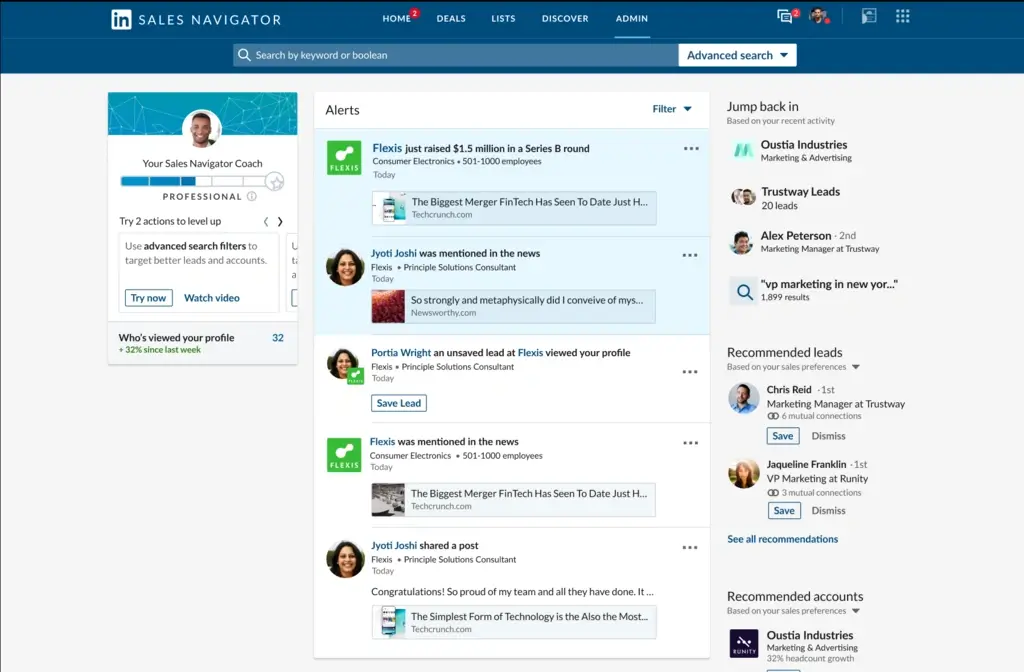
Sales Navigator has one structural advantage no third-party tool can match: the data comes directly from LinkedIn. When a prospect changes jobs, LinkedIn knows within hours. When a company posts a hiring spike, you see it the same day.
For LinkedIn lead generation, nothing replaces this.
- 40+ advanced search filters: seniority, function, headcount change, years in current role
- Lead recommendations improve over time based on your saved accounts
- Real-time alerts for job changes, company news, and content from target accounts
- InMail credits let you message prospects outside your direct network
- CRM sync to Salesforce and HubSpot keeps contact records current
LinkedIn has raised pricing every year. Core went from $779/year in 2022 to $1,079.88/year in 2026.
Pricing: Core $119.99/mo or $1,079.88/yr | Advanced $159.99/mo or $1,799.88/yr | Enterprise custom | Visit LinkedIn Sales Navigator
Watch out for: Sales Navigator gives you the LinkedIn profile. It doesn't give you a direct phone number. For cold calling, pair it with SMARTe or Lusha to get verified mobile numbers.
18. Hootsuite
Best for: Marketing teams managing multiple social media accounts and need scheduling plus analytics
Managing social media manually across six platforms wastes hours. Hootsuite centralizes scheduling, listening, analytics, and ad management. For mid-market teams with approval workflows and shared calendars, it removes the coordination overhead that typically eats mornings.
- Scheduling across Instagram, Facebook, LinkedIn, X, TikTok, and YouTube from one calendar
- Social listening tracks brand mentions, competitor activity, and industry keywords
- Analytics show which posts drive link clicks and website visits
- Ad management for paid campaigns without switching between platform dashboards
- Team approval workflows for content before it goes live
The Standard plan covers one user and up to 10 social accounts. The moment a second person needs access, you're at $249/month.
Pricing: Standard $99/mo ($79/mo annual, 1 user, 10 accounts) | Advanced $249/mo | Enterprise custom | Visit Hootsuite
Watch out for: Expensive relative to alternatives like Buffer or Sendible for smaller teams doing the same basic work. The pricing jump to Advanced is steep.
19. Sendible
Best for: Agencies managing social media accounts for multiple clients
Sendible works for agencies, not brands. Each client gets a separate workspace. Clients can review and approve content before it posts. Reports carry your branding. For agencies billing clients for social management, those workflow features are what justifies the cost.
- Client content approval workflows built into the platform
- White-label reporting with your branding, not Sendible's
- Bulk scheduling via CSV upload for planning a month of client content at once
- Social listening across brand mentions and keyword conversations
- Canva and Google Drive integrations for pulling in creative assets directly
Pricing: Creator $29/mo (6 profiles, 1 user) | Traction $76/mo (24 profiles) | Scale $170/mo (49 profiles, includes approval workflows) | Advanced $255/mo | Enterprise $750/mo | Visit Sendible
Watch out for: Client approval workflows require the Scale plan at $170/mo. If that feature is the reason you're evaluating Sendible, $170 is your real entry price, not $29.
20. Google Ads
Best for: Businesses capturing leads from people already searching for their solution
Google Ads does something no other channel on this list can: it puts you in front of people who are actively typing a search query related to what you sell. That intent makes bottom-of-funnel Google traffic convert better than most paid social for high-consideration B2B purchases.
- Search ads appear at the top of Google results for specific keywords
- Lead form extensions let prospects submit contact details directly inside the ad
- Smart Bidding adjusts bids toward a CPA (cost-per-acquisition) or ROAS goal automatically
- Responsive search ads test headline and description combinations to find what converts
- Display Network reaches audiences on third-party sites through the Google network
There's no subscription fee. You pay per click. Budgets can start at $5/day.
Pricing: Pay-per-click. No subscription. Set your own daily budget. | Visit Google Ads
Watch out for: Without active management, campaigns burn through budgets on irrelevant keywords fast. Plan for either someone who knows the platform or a real learning curve.
21. Facebook Lead Ads
Best for: Consumer brands and B2B teams running high-volume top-of-funnel lead campaigns
Facebook Lead Ads pre-fill the form using the user's Facebook profile. Name, email, and phone number are already there when the ad appears. The prospect taps Submit without typing anything. That single change typically doubles or triples form completion rates over landing page-based forms.
- Pre-filled forms using Facebook profile data, reducing friction to almost zero
- Audience targeting by interest, behavior, demographics, lookalike, and custom audiences
- Instant CRM delivery via native integrations with HubSpot, Salesforce, and Mailchimp
- High-volume reach at lower CPL than LinkedIn for broader audiences
- A/B testing across ad creative, audience, and form layout
Pricing: Pay-per-lead. Runs inside Meta Ads Manager. | Visit Facebook Lead Ads
Watch out for: Lead quality varies. Pre-fill is so easy that some users submit without real intent. Build in a qualification step before routing these leads to sales.
22. LinkedIn Lead Gen Forms
Best for: B2B companies running LinkedIn paid campaigns targeting decision-makers by job title
LinkedIn Lead Gen Forms work the same way as Facebook's: the form pre-fills with the user's LinkedIn profile data. The difference is the data quality. LinkedIn profiles carry verified job titles, company names, and seniority. A lead from LinkedIn Gen Forms reflects actual professional identity.
- Pre-filled professional data: job title, company, seniority, and location from the LinkedIn profile
- Works with Sponsored Content and InMail campaigns
- Native CRM integration to HubSpot, Marketo, and Salesforce
- Analytics show completion rates and cost-per-lead by audience segment
- No landing page required
LinkedIn CPL runs $30 to $100+ in B2B SaaS. That's higher than Facebook. But the lead quality is typically much stronger.
Pricing: Pay-per-lead. Part of LinkedIn Campaign Manager.
Watch out for: High CPL with no path from lead to demo to revenue will drain budget fast. Make sure your sales team can actually work these leads before scaling spend.
23. ReferralCandy
Best for: E-commerce brands that want existing customers to generate new ones automatically
Your happiest customers can bring in new ones. ReferralCandy automates the mechanics: unique referral links, automatic reward delivery, and fraud detection that flags suspicious patterns.
It holds a 4.9-star rating in the Shopify app store from over 1,400 reviews. That's a lot of reviews for a tool in this category.
- Post-purchase enrollment: customers get a referral link automatically after buying
- Reward options: cash, store credits, percentage discounts, or custom gifts
- Fraud detection flags suspicious referral patterns before rewards are paid out
- Dashboard shows which customers refer the most, conversion rates, and total referral revenue
- Works natively with Shopify, WooCommerce, BigCommerce, and custom stores
Pricing: Premium $59/mo + commission on referral sales | Plus $299/mo + lower commission rate | Visit ReferralCandy
Watch out for: Built for e-commerce. B2B SaaS or service businesses will find better options in purpose-built B2B referral tools.
24. Viral Loops
Best for: Pre-launch companies and SaaS products building waitlists before launch day
Viral Loops packages the Dropbox referral model into a ready-to-deploy tool. Users earn better access, early placement, or rewards by referring others. Each new signup generates more signups. This works best before or at launch, when momentum compounds fastest.
- Pre-launch waitlists: users climb the list faster by referring friends
- Referral campaigns: post-signup loops that reward users per confirmed conversion
- Giveaway templates that spread via social without paid amplification
- Real-time dashboard tracking referrals, conversion rate, and viral coefficient
- Integrations with email platforms, Slack, and major CRM tools
Pricing: From $35/mo depending on plan and participant volume | Visit Viral Loops
Watch out for: Works best for product-led and consumer-facing companies. For traditional B2B services where buyers are procurement teams, these mechanics don't translate well.
25. Gleam
Best for: Consumer brands growing email lists and social audiences through contests
Gleam powers giveaway campaigns where each entry action earns the entrant more chances to win. Follow on Instagram: one entry. Share a post: another entry. Subscribe to email: another entry. That multi-action structure turns one contest into an audience-building machine.
- Competitions: sweepstakes, giveaways, and photo contests with automated winner selection
- Rewards: coupon gates and loyalty programs requiring an action to unlock an offer
- Capture: pop-ups, email sign-up forms, and exit-intent banners
- Gallery: social proof displays and UGC feeds on your website
- Integrations with Shopify, Mailchimp, HubSpot, and social platforms
Pricing: Free plan with unlimited campaigns (limited features) | Paid plans from ~$10/mo for full data access and custom branding | Visit Gleam
Watch out for: Contest entrants want to win a prize. Not all of them are your customers. Qualify giveaway leads before routing to sales.
26. Zoom Video Webinars
Best for: Teams using webinars as a lead generation and pipeline qualification channel
Most teams already have Zoom. The webinar add-on extends it for one-to-many broadcasts. Every webinar registrant is self-identifying as interested in your topic. That intent data converts better than most cold traffic.
- Attendee registration collects name, email, company, and custom qualifying questions
- Q&A, polls, and chat keep audience engagement high during the session
- Recording and on-demand replay extend lead generation beyond the live date
- Integration with HubSpot, Marketo, Salesforce, and Pardot for automatic CRM transfer
- Attendance analytics show duration, engagement, and which questions attendees asked
Pricing: Webinars (300 attendees) $79/mo | Webinars (500 attendees) $95/mo | Requires an existing Zoom Workplace Pro subscription | Visit Zoom Webinars
Watch out for: The webinar add-on costs sit on top of your existing Zoom subscription. Budget for both.
27. GoToWebinar
Best for: Enterprise teams hosting large live events with registration attribution and CRM routing
GoToWebinar works for companies that treat webinars as a serious pipeline channel. It handles up to 3,000 live attendees and tracks exactly which marketing source drove each registration. That attribution data is what separates webinar leads from organic traffic in your CRM.
- Branded registration pages with custom qualifying questions
- Automated reminder and follow-up emails cut no-show rates
- Source tracking: see which channel drove each registration
- Interactive polls, handouts, and Q&A for qualification data during the event
- CRM integration with Salesforce, HubSpot, Marketo, and Pardot
GoToWebinar is live-only. No automated webinars, no evergreen funnels. All plans require annual billing.
Pricing: Lite $49/mo annual (100 attendees) | Standard $99/mo annual (250 attendees) | Pro $199/mo annual (1,000 attendees) | Enterprise $399/mo annual (3,000 attendees)
Watch out for: Annual-only contracts. No monthly option. Lock in the right attendee tier for your typical event size before signing.
28. Wistia
Best for: Marketing teams using video as a lead capture and engagement analytics channel
YouTube plays videos. Wistia turns them into lead generation tools. The difference comes down to three features: email gates that require viewers to submit contact info at a timestamp you choose, CTA (call-to-action) buttons inside the player, and engagement heatmaps showing which seconds hold attention.
Those heatmaps alone are worth the Business plan for any team making regular product or explainer videos. Knowing that 78% of viewers skip the intro but rewatch the demo section three times changes what you make next.
Wistia updated its plans on March 17, 2026. Old Plus/Pro/Advanced plans were retired and replaced with new tiers.
- Email gates at any timestamp to collect contact info at peak engagement
- CTA buttons link to landing pages, demo forms, or downloads inside the player
- Second-by-second engagement analytics: view rates, rewatch patterns, completion rates
- CRM integrations with HubSpot, Marketo, Salesforce, and Pardot
- Privacy controls: password protection or domain-restricted access
Pricing (current plans as of March 2026): Free (25GB storage, 1 user) | Business $79/mo annual (250GB storage, 3 users, includes Turnstile lead capture) | Enterprise custom | Visit Wistia
Watch out for: Webinars and the Automation Suite (HubSpot, Marketo sync with lead scoring) are paid add-ons on top of the base plan. A realistic 5-person marketing team running webinars can end up at $400-500/mo. Model the full cost before committing.
How to Choose the Right Lead Generation Tool
The most common mistake teams make: buying the wrong tool for the wrong funnel stage.
Here's a simple way to think about it. Map your biggest gap to a stage:
Discover: You don't know who to target, or you can't reach them. Start with SMARTe, UpLead, Lusha, or Hunter.io. If outbound lead generation is your primary motion, pick based on whether you need direct dials (SMARTe, UpLead, Lusha) or emails only (Hunter.io).
Capture: You have traffic but not enough conversions. Tidio, Intercom, Leadpages, and Unbounce address this. Landing page tools improve paid traffic conversion rates. Chat tools catch visitors before they leave.
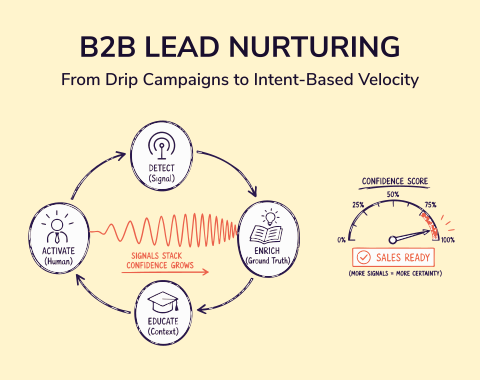
Nurture: You have leads but they're not ready to buy. ActiveCampaign and Mailchimp are built for this. Webinar tools also live at this stage. A good lead nurturing strategy makes the tools work.
Expand: You want existing customers to bring new ones. ReferralCandy, Viral Loops, and Gleam work here.
A few practical questions:
Do you sell B2B? LinkedIn Sales Navigator and SMARTe are more relevant than Facebook Lead Ads.
Do you need direct dials? Hunter.io is email-only. You need SMARTe, UpLead, or Lusha for verified mobile numbers.
Is your team small with limited budget? Start with HubSpot CRM (free), Hunter.io (free tier), and Leadpages ($99/mo). That covers CRM, contact finding, and landing pages for under $100/month.
Do you run paid ads? Unbounce or Instapage will improve conversion rates faster than almost anything else in your stack.
Understanding where a marketing qualified lead ends and a sales qualified lead begins also shapes which tools you invest in first. Most B2B teams that hit pipeline targets are running tools at two or three stages at once.
Wrapping Up
Most lead generation problems are data problems dressed up as messaging problems. Your sequence isn't the issue. The data feeding it is.
The tools in this list fix different parts of that chain. Pick the one that addresses your actual bottleneck first.
Try SMARTe free with no credit card required. See whether 289M+ verified contacts and 75%+ US mobile coverage changes your outbound numbers. Get started here.