TL;DR:
Lead routing is the automated process of assigning inbound leads to the right sales rep based on rules built around territory, account ownership, lead score, or intent signals. Most B2B teams run more than one routing method simultaneously. The biggest reason routing fails is not the logic itself but the contact data the logic reads. Clean, enriched records before the rule fires is what makes any routing platform work accurately.
- The five routing methods are round-robin, territory-based, account-based, score-based, and intent-based
- Top platforms include LeanData (Salesforce/ABM), Chili Piper (speed-to-meeting), Default (mid-market RevOps), HubSpot (native, simple territories), and Salesforce Flows (native, admin-heavy)
- Most routing failures trace back to stale CRM fields and incomplete contact records, not broken assignment logic
- Account-based routing requires reliable lead-to-account matching to work correctly
- Enrich contact records at form submission before the routing rule fires, not after in a nightly batch
- SMARTe provides real-time contact enrichment against 289M+ verified B2B contacts with a 90%+ CRM match rate, so routing rules read accurate data when the assignment fires
Most routing failures don’t look like failures at first.
The tool fires. The lead gets assigned. The rep gets the notification. Everything looks fine in the dashboard. Then the rep opens the record, sees a company they don’t recognize in a territory they stopped covering after the last reorg, and either passes the lead around internally for half a day or quietly ignores it.
By then the prospect has already booked a call with someone else.
I’ve talked to enough RevOps teams to know this isn’t an edge case. It’s the default state for orgs that built routing logic on bad data. Switching to a newer platform doesn’t fix it. Rebuilding the assignment rules doesn’t fix it. The fix starts upstream, at the data layer.
That’s the frame before we get into the tools. Lead routing software amplifies whatever data quality your team already has. Feed it clean, enriched, verified contact records and it works the way the demo showed. Feed it stale CRM fields and partial form entries and it will automate wrong decisions faster than any manual process could.
Alright. Let’s get into it.
What Lead Routing Actually Does (and Where Teams Get It Wrong)
Lead routing is the system that decides which sales rep gets each new inbound contact.
Simple enough on paper. In practice it’s a chain of decisions: how the contact gets identified, how their company data gets enriched, how the system checks whether they’re already linked to an existing account in your CRM, which rule fires to assign them, and what fallback kicks in if that rule can’t resolve cleanly.
Most CRMs handle some version of this natively. Salesforce has assignment rules and territory management. HubSpot has workflow-based assignment. What neither handles well out of the box is ambiguity: a form submission with a personal Gmail address, a company name that doesn’t quite match what’s in your CRM, a territory field still pointing to a rep who left four months ago.
Dedicated routing platforms were built for that ambiguity layer. They add graph-based lead-to-account matching, conditional logic trees, fallback rules, and SLA enforcement that native CRM assignment can’t do cleanly. But even the best platform can only work with what it’s given.
In most B2B orgs, what it’s given isn’t great.
Three failure modes come up constantly.
Wrong data triggers the rule. The industry field says “SaaS” when the company is a consulting firm. Company size was last updated fourteen months ago. The territory assignment still shows the rep who left in March. The rule fires on this data and produces the wrong assignment every single time.
Lead-to-account matching breaks silently. A contact from a company already in your CRM fills out your demo form using their personal Gmail. The system can’t link them to the existing account record. It creates a duplicate. The lead goes to a new-business rep instead of the account executive who’s been in conversation with that company for two months.
No fallback logic exists. The rule fires. The rep is on PTO. There’s no secondary owner defined. The lead sits unassigned, bounces to a generic inbox nobody monitors, and the prospect moves on before anyone picks it up.
These aren’t hypotheticals. Every ops team I’ve spoken to has hit at least two of them.
The Five Routing Methods B2B Teams Use
Before evaluating any platform, it helps to understand the underlying distribution logic. Most tools support multiple methods, and most teams layer two or three together depending on lead type and volume. Knowing which method drives which failure helps you fix the right thing.
Round-Robin
The simplest approach. Leads cycle evenly through a rep pool in sequence: rep A, rep B, rep C, back to rep A. Quick to configure. Equal in distribution, if not in fit.
The problem is that equal distribution and right distribution are not the same thing.
A round-robin doesn’t know Sarah is already managing six open opportunities. It doesn’t know Marcus covers the East Coast and this lead is from a Chicago company with 800 employees. It fires the next person in the queue regardless.
Round-robin works as a fallback. When a lead doesn’t match any specific rule, cycling through available reps beats leaving it sitting unassigned. As a primary assignment method for teams with defined territories or named account lists, it creates mix-ups fast.
Territory-Based Routing
Route based on geography, industry, or company size. A 1,000-person financial services company in New York goes to whoever owns the large enterprise fintech vertical. A 40-person startup in Austin goes to the SMB rep for the Southwest.
The logic is sound. The maintenance is where it falls apart.
Territory definitions change after every reorg, comp plan update, or rep departure. The routing rules often don’t follow. A rep moves from the Southeast to a different role. Her CRM territory record gets updated. The rule referencing her original assignment doesn’t. Leads from Georgia keep going to her for months while she’s covering an entirely different book of business.
The lead record also has to be accurate. Firmographic data like industry classification and company size feed the territory rule directly. If that data is incomplete or outdated in the CRM, the rule fires on wrong attributes and the lead lands with the wrong rep, through no fault of the logic itself.
Account-Based Routing
The most important method for enterprise and account-based marketing-focused teams. And the one most likely to break silently.
When a new contact submits a form, this method checks whether their company already exists in your CRM. If it does, the lead bypasses round-robin and territory rules entirely. It goes directly to the rep who owns that account.
Done right: a contact from a company already in active pipeline goes straight to the AE working that deal. An existing customer’s colleague who wants to expand gets routed to the CSM managing the account. No cold call. Direct assignment to the person with context.
Done wrong, which is more common than most teams realize, the match fails. Personal Gmail addresses break the email domain check. Company name variations prevent the system from linking the contact to the account record. A subsidiary’s domain doesn’t match the parent company’s CRM entry. The lead creates a duplicate and gets treated as cold net-new.
Account-based routing is the method most sensitive to data quality. Without clean contact records and reliable lead-to-account matching, it breaks silently. Nobody notices until a deal gets poached from an account that should have been flagged as owned.
Score-Based Routing
Assign based on a composite score: firmographic fit (company size, industry, job title) layered with buying signals like pricing page visits, product demo views, and content downloads. High-score leads go to your best reps or a fast-track queue with a tighter response SLA. Lower-score leads go to nurture.
Score-based routing makes sense when inbound volume is high enough that you can’t treat every lead the same. I think it’s underused in mid-market B2B, where teams default to round-robin because building a lead scoring model sounds more complicated than it is.
The catch: the model is only as accurate as its inputs. An ideal-fit prospect with an empty industry field and no job title scores artificially low. They get deprioritized into a nurture sequence while a less qualified contact with complete CRM data scores higher and gets the immediate call. This happens constantly in orgs with patchy contact enrichment.
Intent-Based Routing
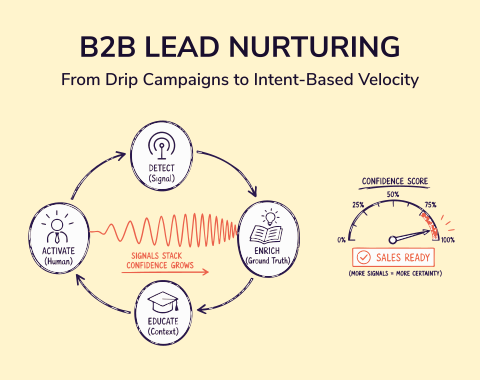
The newest addition to most B2B routing playbooks. Intent data identifies which companies are actively researching your solution category right now. Layer those signals into routing and you create a priority lane for accounts already in buying mode, before they even fill out a form.
A company visiting your pricing page four times this week, showing up in competitor comparison searches, and having just hired a new VP of Sales is not the same as a cold inbound who downloaded a whitepaper once. Intent-based routing treats them differently: the first goes to a senior rep with a same-day response, the second goes into standard sequencing.
The challenge: intent signals tell you which company is active. They don’t give you a verified contact inside that account. Without a reliable way to find the right person at the right seniority level, the signal stalls before anyone can act on it. That gap is exactly what SMARTe closes, but we’ll get to that.
Lead Routing Software Worth Evaluating in 2026
The honest framing before getting into specifics: no routing platform fixes bad data. What these tools solve is the logic and orchestration layer that sits on top of your CRM. Keep that in mind while reading.
LeanData
LeanData is the category leader for Salesforce-heavy orgs with complex account structures and ABM motions.
Its core strength is graph-based lead-to-account matching. It understands parent/child account relationships, subsidiary connections, and territory hierarchies that flat CRM matching fails on. The visual FlowBuilder maps multi-step assignment logic with real depth: exception paths, fallback rules, SLA escalation, capacity-weighted round-robin, all without writing code.
The governance features are genuinely useful at scale. Versioning, audit trails, and sandbox testing make it possible to track what changed and why, which matters a great deal when routing logic touches territory ownership and sales comp.
The honest tradeoff: LeanData is expensive and admin-heavy. You need a dedicated RevOps engineer to configure it properly and keep it current. More critically, it requires clean CRM data to match effectively. Give LeanData a messy Salesforce instance and it will route leads precisely according to that mess. Fix the data before you add the logic layer on top.
Good fit for: Salesforce-heavy orgs running ABM programs with complex account hierarchies and dedicated RevOps capacity.
Chili Piper
Chili Piper does one specific thing extremely well: converting form submissions into booked meetings in real time.
A prospect completes your demo request. Instead of a confirmation page that says “we’ll be in touch,” they see a live calendar and schedule directly. One step. The meeting is locked in at the moment of highest intent, before the window closes.
The speed advantage here is real. The follow-up chase between form fill and first contact essentially disappears.
The complication comes with territory and account ownership routing. Chili Piper routes based on form field values, so those fields need to be accurate and complete. An incomplete company name can send the meeting to the wrong rep. This is solvable with enrichment at form submission, but it requires connecting the right data source upstream.
Good fit for: High-volume inbound teams where demo booking rate and speed-to-first-meeting are the primary KPIs.
Default
Default has become the go-to for RevOps teams that want routing, enrichment, deduplication, and scheduling in one place, without stitching five separate tools together.
The no-code workflow builder is the real differentiator. Routing rules change constantly at growing companies: new reps, territory updates, new product lines, comp adjustments. Updating Salesforce Flows at most orgs means filing a developer ticket and waiting two weeks. In Default, a RevOps manager makes the same change in an afternoon.
That iteration speed compounds over a quarter. Teams that can update routing logic as the org evolves consistently see better rep utilization and lead quality than teams locked behind developer backlogs.
The limitation: Default isn’t built for deep Salesforce governance requirements. Complex approval workflows, regulated change control, and large enterprise CRM customizations are better handled elsewhere.
Good fit for: Mid-market RevOps teams that need a unified inbound stack and change routing logic frequently.
HubSpot Routing
For teams already living in HubSpot, native routing covers a surprising amount. Workflow-based assignment handles round-robin, territory rules, and ownership routing without adding a vendor or an integration. Quick to configure and the logic is visible to anyone on the team.
The ceiling appears when routing complexity grows. Multi-branch fallback logic, parent/child account matching, and intent-triggered priority lanes push past what HubSpot’s workflow builder handles cleanly. Teams that outgrow it usually know: the workflows get unwieldy and edge cases pile up into manual cleanup work.
Good fit for: HubSpot-native SMB and lower mid-market teams with stable, simple territory structures.
Salesforce Assignment Rules and Flows
Every Salesforce license includes routing capabilities. Assignment rules handle territory and property-based distribution. Flows add conditional branches, timers, and cross-object logic. Omni-Channel brings queue-based and skills-based routing for higher-complexity scenarios.
Going native makes sense when your admin has real bandwidth and your routing model doesn’t change constantly. The tradeoff is maintenance discipline. Rules accumulate. Documentation lapses. Testing gets skipped under deadline pressure. Native Salesforce routing rewards teams that are rigorous about change control and punishes teams that aren’t.
Good fit for: Salesforce-first teams with dedicated admin depth and a routing model that stays relatively stable over time.
The Real Problem Most Routing Platforms Can’t Solve
After watching orgs cycle through multiple routing tools and still hit the same assignment failures, I’ve landed on a clear conclusion: the problem almost never lives in the routing logic.
It lives in the data the logic reads.
Routing rules fire on CRM fields. Those fields reflect what was true when someone last updated them, which in most B2B orgs was months to over a year ago. B2B data decay is quiet and relentless. Job titles change. Reps move territories. Companies restructure. Subsidiaries get acquired. The assignment rule doesn’t know any of this.
This creates three specific problems at the routing layer. Wrong territory assignment, because the firmographic field in the record is stale. Failed account matching, because the contact’s company details are incomplete. Inflated or deflated lead scores, because missing data skews the model away from the actual fit.
All three trace back to the same root cause. Bad CRM data dressed up as a routing logic problem. Rebuilding the assignment rules won’t fix them.
The practical fix has two parts. First, enrich contact records at the point of form submission, before the routing rule fires, not after in a nightly batch job that runs eight hours too late. Second, keep CRM records current over time so the fields that routing reads don’t drift away from reality between deals. Most teams do the second inconsistently and the first part not at all.
What to do: Pull your last 90 days of inbound leads. Check what percentage had complete, accurate firmographic records when the assignment fired. Below 80%? The routing platform isn’t your bottleneck. The data feeding it is.
Where SMARTe Fits in Your Routing Stack
SMARTe isn’t a routing platform. It doesn’t replace LeanData, Chili Piper, Default, or HubSpot. I want to be upfront about that.
What SMARTe does is fix the data layer those tools run on. And in my experience, that’s the most overlooked investment in any routing stack. Most RevOps teams spend months configuring assignment logic and almost nothing on the data quality that logic depends on. Every failure mode covered in this piece traces back to a data gap. SMARTe closes most of them.
Real-Time Contact Enrichment Before the Assignment Fires
When a prospect submits a form, SMARTe runs lead enrichment in real time, before the routing rule fires. Job title, company size, industry, verified work email, and direct dial are all confirmed against a database of 289M+ verified B2B contacts across 200+ countries. (Not a batch job that runs at midnight. Real time, at the moment of submission.)
The effect: your routing rules work on complete, verified data instead of whatever the prospect typed in the form field. Company names get standardized. Industry classifications get confirmed against real company data. The lead-to-account matcher has accurate firmographic attributes to work with. The territory rule reads a confirmed company size instead of a blank field.
If the primary data source misses on a record, waterfall enrichment fills the gap from a fallback provider automatically, so you’re not dependent on a single source for completeness.
A 90%+ CRM Match Rate That Makes Account-Based Routing Work
Account-based routing lives or dies on whether the matching logic can correctly connect a new contact to an existing account in your CRM.
SMARTe’s 90%+ CRM match rate means that connection gets made correctly the vast majority of the time. Not because the algorithm is smarter, but because the contact data it’s working with is accurate and complete. Clean inputs produce reliable matches.
For ABM teams with defined target account lists, this is the practical difference between account-based routing that works as designed and account-based routing that theoretically fires but creates rep ownership chaos. New contacts from existing accounts reach the right person. They stop getting cold-called by new-business reps who’ve never touched the account.
75%+ US Mobile Coverage: Getting the Right Rep to the Right Person
Accurate routing gets a lead to the right rep. Verified mobile coverage determines whether that rep can actually reach the person on the other end.
SMARTe’s 75%+ verified mobile coverage across US contacts means direct dials: not switchboards, not office lines routed through three extensions, not voicemail boxes that nobody monitors. When the assignment fires correctly and the rep picks up the phone, there’s an actual person on the other end.
Speed-to-lead matters most when the contact is genuinely reachable. Routing accuracy and contact quality have to work together.
Bombora Intent Signals for Intent-Based Routing
SMARTe integrates directly with Bombora intent data, so intent signals and verified contact data live in the same place.
You can identify accounts showing buying signals in your category and immediately find verified, direct-dial contacts at the right seniority level inside those accounts. The gap that stalls most intent-routing workflows, finding the right person to actually call, closes entirely.
Most intent setups generate a company-level signal and then require a separate research step before a rep can act. SMARTe connects the signal to a verified contact, making the whole motion continuous from signal to call.
How to Choose the Right Routing Tool for Your Team
Start with your CRM, not the routing platform.
If your team runs on Salesforce and your admin has real bandwidth, native assignment rules plus solid contact enrichment cover more scenarios than most people give them credit for. When account hierarchies get complex, ABM at scale requires graph-based matching, or governance becomes non-negotiable, LeanData is the natural next step.
HubSpot teams should stay native until they hit specific limitations. Three or four conditional branches in workflow logic, or account matching that native workflows can’t handle cleanly, are usually the signal that it’s time for a dedicated tool.
Default is worth a serious look when routing logic changes frequently and you want routing, enrichment, and scheduling unified in one place. Chili Piper is the answer when the primary bottleneck is speed-to-meeting on form fills and every hour of delay costs booked demos.
The question most teams skip: how complete is the contact data before any of this? A routing platform running on incomplete records produces incomplete routing, regardless of how well the logic is configured. Before spending a quarter evaluating tools, pull your last 90 days of inbound and check the data quality at the moment of assignment. If it’s below 80% complete, start there.
Lead routing gets treated as a configuration problem. The logic needs tuning. The rules need updating. The tool needs replacing. Teams rebuild the assignment rules, switch platforms, rewrite the playbook. Then they end up in the same loss review six months later asking why the same leads keep going to the wrong rep.
The underlying cause is almost always the same: routing rules working precisely on data that no longer reflects reality.
Stale CRM records. Incomplete firmographic profiles. Outdated territory assignments. Bad data doesn’t produce obvious failures. It produces slightly wrong assignments, slightly cold leads, slightly lower conversion across the board. The slow kind of sales funnel leakage that teams blame on messaging or sequencing for months because nobody checks the data.
Fix the data layer before the logic. Enrich at form submission. Keep contact records current. Verify that the fields your routing rules read are accurate before spending another quarter tuning the rules themselves.
SMARTe gives B2B teams the verified contact foundation (289M+ contacts, real-time enrichment, 90%+ CRM match rates, Bombora intent signals built in) that makes any routing tool work closer to how it’s supposed to.
Book a demo and ask for a sample match against your own inbound leads to see how complete the data is at the moment of assignment.