TL;DR:
LinkedIn rebuilt its ranking system in 2026 around a new AI model called 360Brew, then followed it with a March update that cut reach for engagement bait, comment pods, and polls. Dwell time, saves, and real comment threads decide who sees your posts now, not likes.
- 360Brew ranks content by meaning and topic fit, not hashtags or keywords
- Engagement bait, comment pods, and polls all lost the bulk of their reach in March 2026
- Document posts and short native video are pulling the strongest numbers right now
- Personal profiles are outperforming company pages by a wide margin
- If you post for B2B outbound, your public profile is doing more prospecting work than you think
LinkedIn algorithm changes in 2026 are the reason a lot of accounts went quiet overnight. One week your posts pulled a few hundred views. The next, the same style of post barely cracked fifty. Your writing didn't get worse. LinkedIn changed.
This wasn't a small ranking tweak. LinkedIn rebuilt the system that decides who sees your content. Then it launched a crackdown that killed off a lot of the growth tricks people leaned on for two years. If you're still posting the way you did in 2024, the algorithm is built to spot exactly that.
Here's what changed, the tips moving reach in 2026, and what it means if you're posting for B2B outbound instead of personal branding.
What Changed in LinkedIn's Algorithm in 2026
Two things happened this year, back to back. A lot of the confusion around dropped reach traces back to one of them. Here's each one on its own.
360Brew Replaced the Old Ranking System
For years, LinkedIn's feed ran on a patchwork of separate models. One counted likes. Another checked hashtags. A third tracked your connections. Late in 2025, LinkedIn folded all of it into a single AI system called 360Brew.
360Brew doesn't score a post on its own. It reads your headline, your About section, your job history, and everything you've posted before. Then it checks whether your new post fits that pattern. Write consistently about revenue operations, and 360Brew learns to put your posts in front of people who care about revenue operations, strangers included.
I think this is the part a lot of guides bury too far down. The algorithm isn't just reading your post anymore. It's reading you.
This is also why hashtags stopped pulling weight. 360Brew reads the words in your post to understand the topic. Stacking hashtags at the bottom adds nothing, and a pile of them can read as spam.
The Authenticity Update Shut Down the Easy Tricks
In March 2026, LinkedIn shipped what the industry started calling the Authenticity Update. It targeted the specific shortcuts that had propped up a lot of accounts for two years running.
What it hit:
- LinkedIn now flags and quietly suppresses engagement bait ("Agree? Comment below")
- Comment pods and automation tools trigger a reach penalty that used to require someone reporting you
- Polls dropped to a fraction of a percent in engagement. Not banned, just ignored
- LinkedIn filters out generic, copy-paste comments like "Great post!" so they stop counting as real signals
None of this reads as a manual penalty on any single account. It's closer to a recalibration. LinkedIn stopped rewarding the appearance of engagement and started measuring whether a post gave someone something worth their time.
Knowing the mechanics only helps if you know what to change in your own posting. Here's what's working right now, in roughly the order it pays off.
LinkedIn Algorithm Changes: Engagement Tips for 2026
These aren't theory. They're the practices moving reach on LinkedIn right now, pulled from how 360Brew and the Authenticity Update behave, not recycled advice from two algorithm versions ago.
1. Prioritize Meaningful Conversations
A like costs someone half a second and tells the algorithm almost nothing about whether your post landed. A comment that adds a real thought, or asks something back, carries far more weight. LinkedIn also tracks how you handle the comments that show up on your own posts.
What to do: Reply within the first couple of hours, not the next morning. A thread where you're still part of the conversation tends to outperform a post that racked up comments and went quiet. Twelve real exchanges will usually beat fifty drive-by reactions.
2. Create Content Consistently
Posting once a day, or a few strong times a week, beats a feed cluttered with filler. Posting twice within 24 hours can split your own audience's attention. Your two posts compete for the same pool of people, and neither one gets a clean read on how it performed.
Consistency also means staying in one lane. 360Brew checks new posts against your headline, your job history, and what you've written before. Post about one clear area, and it learns who your content is for. Jump between five unrelated topics in a week, and it can't work out who to show you to. Fewer people see any of it. Reporting on the update backs this up: posts built around a narrow, specific expertise are pulling stronger distribution than broad, generic ones aimed at everyone.
3. Optimize for Dwell Time
The heaviest signal in the current algorithm is dwell time: how long someone spends reading before they scroll past. A post with a modest number of comments can reach tens of thousands of people, as long as it holds attention for three or four minutes. A post with fifty quick "so true" comments in the first ten minutes and nothing else can die just as fast. LinkedIn has said as much directly, describing its goal as connecting knowledge with the people who'll use it, not chasing viral spikes.
The easiest lever for dwell time is your opening line. LinkedIn cuts posts off after roughly three lines on mobile, right where someone decides whether to tap "see more." Open with the actual claim, a specific number, or something someone might push back on. Save the context for line four.
One honest caveat: LinkedIn hasn't published an exact dwell time threshold, and it probably never will. Creators infer every number floating around online by comparing notes with each other, not by reading an official spec sheet.
4. Pick Formats Built to Hold Attention
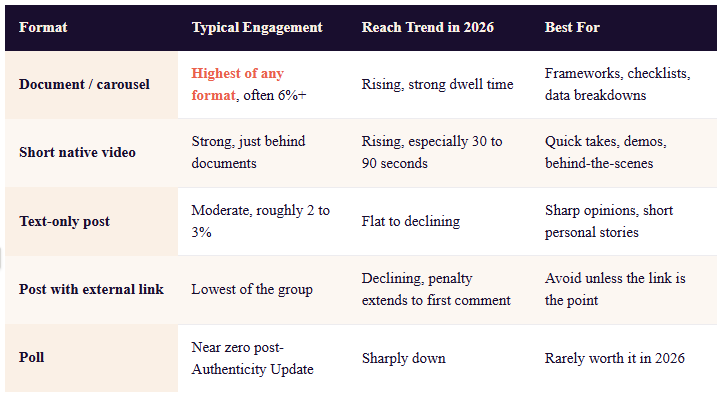
Format is the fastest way to buy yourself more dwell time, and the data on this is fairly consistent. Multi-slide PDF carousels are, by a wide margin, the format pulling the strongest numbers on LinkedIn today. Recent data puts document post engagement well above 6%, ahead of every other native format. The mechanism is simple: a carousel makes someone swipe, and every swipe is another few seconds for the algorithm to measure.
What to do: Keep carousels to eight or ten slides. Past that, completion rates drop hard, which defeats the point. Open with a slide that states the payoff in plain language, then one idea per slide after that.
Native video is the other format LinkedIn is clearly pushing. Uploads straight to the platform, not YouTube links pasted into a post, get a real boost in the feed. View counts are climbing faster than any other format year over year. Thirty to ninety seconds seems to be the sweet spot. Longer clips ask for more attention than a scroller usually gives a stranger.
Text-only posts still work, but they carry less weight than they did two years back, mostly because they're easy to skim past in half a second.
External links are the messiest part of this conversation, and I'll say it straight: the data doesn't agree with itself. One large-scale analysis found a single link in a post cuts median reach by close to a fifth. A separate study covering hundreds of thousands of posts found the opposite in some cases. Link-heavy posts outperformed link-free ones when the links pointed to something worth clicking. My read is that LinkedIn isn't punishing links on principle. It's punishing posts that exist only to route people off the platform. A link attached to real value tends to survive. A link standing in for the value doesn't. Either way, hiding your link in the first comment no longer avoids the penalty. LinkedIn applies close to the same reach hit there as it does to a link in the post itself.
5. Comment on Other People's Posts Before You Post Your Own
This is the tip a lot of people skip, and it might matter more than anything else on this list. Showing up in someone else's comment section with something worth reading builds the exact relevance signals 360Brew is looking for. It also puts your name in front of people before you've posted a single thing yourself.
Five or ten minutes a day, commenting on posts your audience already reads, does more for visibility than people give it credit for.
6. Post From Your Profile, Not Just the Company Page
If your content strategy still runs mostly through a company page, that's probably part of why reach feels flat. Personal profiles are pulling noticeably more distribution than brand pages right now, by a wide enough margin that it's worth rethinking who does the posting.
The practical move: get reps and leaders posting from their own profiles, with the company page reshaping and amplifying instead of carrying the load itself.
Everything above applies whether you're growing a following or running outbound on top of it. If you fall into the second group, a couple of pieces of this update work differently.
What This Means If You Use LinkedIn for B2B Outbound
A lot of guides on this topic stop at content strategy. If you're using LinkedIn for lead generation, not just growing a following, here's where the algorithm changes cut differently.
Cold Connection Notes and InMail Aren't Judged the Same Way
The ranking changes above apply to public posts competing for feed placement. A connection request note or an InMail message isn't fighting for that same spot. Dwell time and document formats don't apply directly there. LinkedIn also caps how many connection requests you can send in a week, so this was never really a volume game to begin with. What does carry over is the platform's broader push against anything that reads templated. A connection note that's obviously copy-pasted across a hundred prospects reads the same way to a person as it does to LinkedIn's spam filters. Tired and generic.
If you're working from a set of message templates, treat them as a starting structure to customize, not a script to paste in as is.
What to do: Reference something specific from the person's profile or recent activity in your first line. If personalizing every note by hand doesn't scale, that's what proper prospecting tools are for, not an excuse to skip the step. It costs thirty extra seconds and it's the difference between a note the prospect accepts and one they scroll past.
Your Profile Is Quietly Doing Prospecting Work
Here's the part I think a lot of sales development reps miss. 360Brew audits your profile against your content to decide who sees your posts. A prospect looking at your profile before accepting a connection runs a similar check by hand. A profile that's vague, generic, or years out of date undercuts a cold message before the prospect even reads it. It's roughly the same idea behind LinkedIn's social selling index, just judged by a person instead of a dashboard.
Reps who post real insight in their specific niche, consistently, aren't just building a personal brand for its own sake. They're warming up every cold touch that follows. Whether you're sending that follow-up by hand or through one of the chrome extensions built for SDR work, the profile still has to hold up first. A prospect who's already seen your name attached to something useful is a different conversation than a stranger showing up cold in their inbox.
Six tips, two updates, one takeaway. Here's the short version to run through before you hit publish next.
A Quick Checklist Before Your Next Post
- Open with your strongest line, not a warm-up
- Stick to one idea per post
- Use short paragraphs with real white space
- Choose a document, carousel, or short video over plain text when you can
- Skip the external link, or make sure it earns its place
- Reply to your first comments within a couple of hours
- Comment on five posts in your niche before you publish your own
The Point Worth Remembering
Every change covered here points to the same shift. LinkedIn stopped rewarding the appearance of engagement. It started rewarding the real thing: attention held, comments that mean something, profiles that back up what they claim. None of that is a trick you can automate around for long.
The fastest way to check if any of this applies to you: pull up your last five posts and run them against the checklist above. If two or three fail, that's not bad luck. That's your reach problem sitting in plain sight.
If outbound prospecting is part of how your team uses LinkedIn, fix the profile before you fix the messaging. Nobody replies to a cold note because it looks polished. They reply because something about the sender told them their problem was already understood. That's the whole point of a solid sales prospecting strategy in the first place.