
TL;DR:
Finding CEO phone numbers and executive emails is easier when you use publicly available business sources first. Most CEO founder contact information public profile data can be found through company websites, LinkedIn profiles, press releases, and verified B2B databases. These sources help sales, partnerships, and GTM teams identify accurate executive contact details faster.
- Check the company's public leadership and team pages first
- Use a verified B2B contact database like SMARTe for scale
- Pull a CEO's number from LinkedIn using a Chrome extension
- Search LinkedIn profiles manually for contact details and posts
- Use Google search operators to find CEO contact information for free
- Check business directories and public databases like Crunchbase and SEC EDGAR
- Dig into a CEO's digital footprint through press releases and WHOIS lookups
- Search social media profiles on X, Facebook, and Substack
- Call through gatekeepers when every other method fails
Finding a CEO phone number comes down to knowing where to look. I've tested every method out there and kept only the ones that actually work, starting with the free methods and moving to tools when I need scale.
Here are the eight methods I use to find CEO phone numbers fast 👇
Method 1: Check the Company's Public Leadership Pages First
Before I touch any tool, I go to the company website.
This sounds obvious. Most people skip it. And that's exactly why it still works.
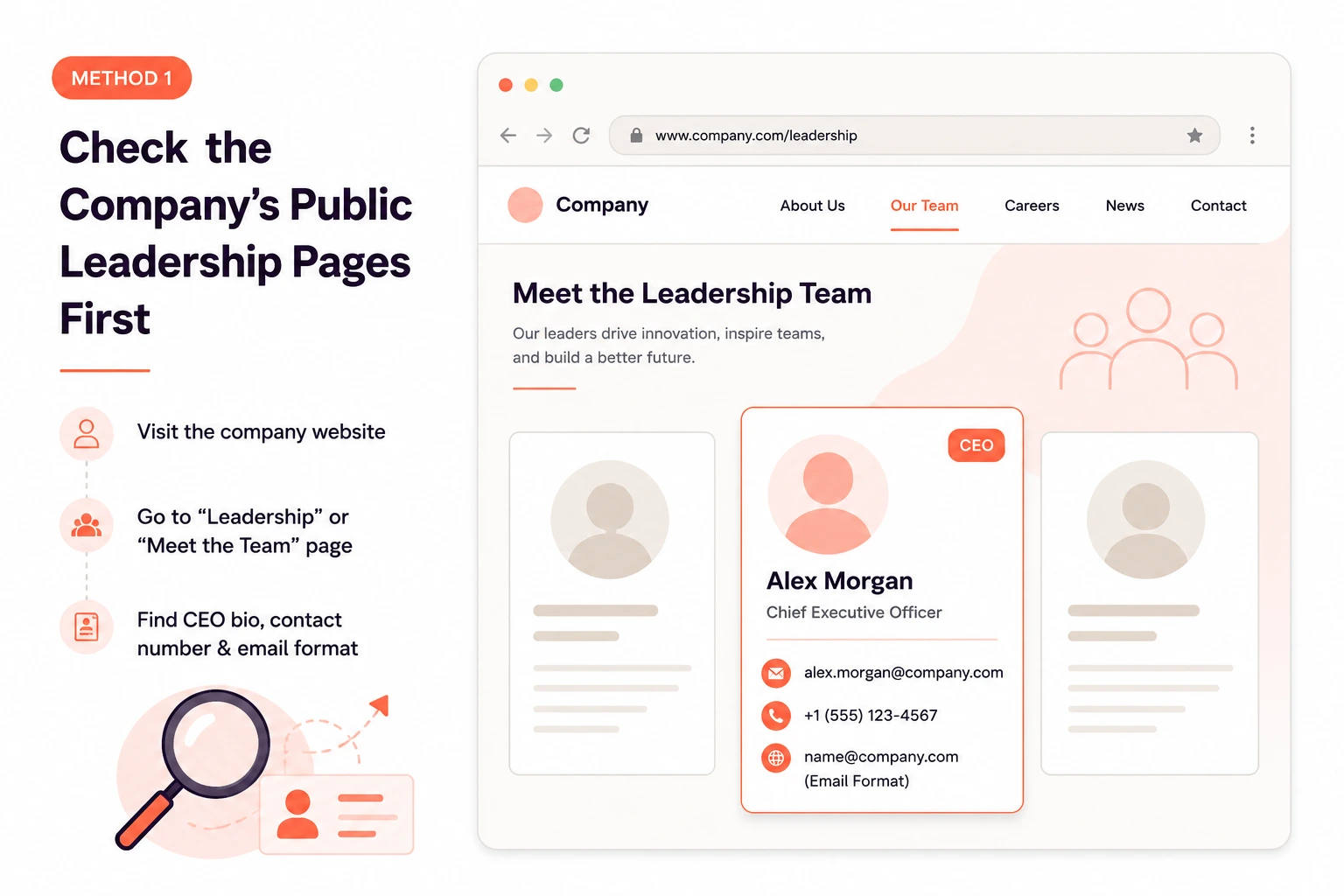
Smaller companies — Series A startups, regional businesses, family-owned operations — often list direct contact details for their leadership team right on the site. I've found CEO mobile numbers on "Meet the Team" pages more times than I expected.
What to Look for on the Leadership and Team Page
Go to the company's "About Us," "Meet the Team," or "Leadership" page. Look for a bio section with a direct contact number, a linked email address (which often reveals the company's email format), links to personal websites or social profiles, and any "Book a Call" button tied to a personal scheduler.
Small and mid-sized companies are far more likely to list this publicly. Enterprise companies almost never do. If you're targeting a Fortune 500 CEO, skip this step and go straight to Method 2.
Investor Relations and Press Sections Most People Miss
If the "About" page comes up empty, check the investor relations and press sections. Press releases almost always list a contact person at the bottom. That person is usually the CEO's EA or a communications lead sitting two desks away from the decision-maker.
I've used this more than I expected. A quick email or call to the press contact, explaining what I'm reaching out about, gets me further than twenty cold calls to the main line. Annual reports and investor pages for public companies sometimes list board-level contact details too. Worth a five-minute scan.
What to Do When the Number Isn't There
If no number is listed, note the email format. Most companies use first.last@company.com or firstlast@company.com. Once you know the pattern, you can construct the CEO's email, verify it with a tool, and request a call directly. It adds a step, but it's not a dead end.
Method 2: How I Find CEO Phone Numbers at Scale With a B2B Database
For anything beyond a handful of names, manual research doesn't work.
I need a B2B contact database that gives me verified direct dials, not office switchboard numbers that route to receptionists.
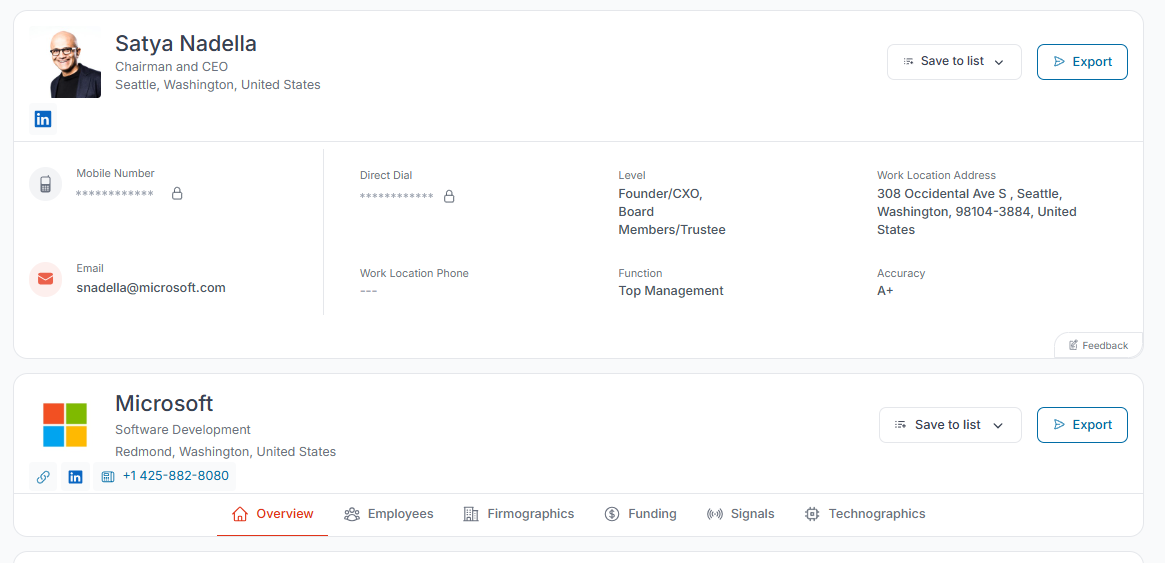
SMARTe is what I use for this. With 289M+ verified contacts and 75%+ US mobile coverage, it gives me actual B2B direct dials for the executives I'm targeting. That mobile coverage number matters a lot in practice. Most phone number lookup tools give you a number. SMARTe gives you the number the CEO actually picks up.
Setting Up Your C-Level Filters
Log in and go to the main search dashboard. Set the Seniority filter to C-Level or Executive, the Job Title field to CEO or Chief Executive Officer, and then layer in industry, company size, or geography to match your ICP. The platform pulls a matching list instantly. You can add technographic filters and Bombora intent signals on top of that (and yes, buying signals are built directly into the platform, not bolted on separately).
Revealing the Direct Dial and Pushing to CRM
Click "Reveal" next to any contact. SMARTe pulls the verified mobile number and direct email in real time, not from a static database. That matters because executive contact data decays fast. People change roles, companies get acquired, numbers go stale.
Once revealed, push the contact straight to Salesforce, Outreach, or whatever CRM your team uses. No spreadsheet in the middle.
If you're building a cold calling database built specifically around C-suite contacts, this is the fastest path I've found.
Method 3: How I Pull a CEO's Number From LinkedIn in Under 60 Seconds
I don't always need a list of 500 contacts. Sometimes I just need one number for the specific CEO I'm researching right now.
For that I use the SMARTe Chrome Extension. Install it from the Chrome Web Store, navigate to the CEO's LinkedIn profile, click the SMARTe icon, and hit Reveal. The extension scans SMARTe's database in real time and surfaces the verified mobile number and email. It takes about 45 seconds.
You can save the contact directly to a list or push it to your CRM from the sidebar without leaving the tab.
In my experience, this is the best method for targeted one-at-a-time prospecting. Quick, no context-switching, and the number you get is real-time verified rather than pulled from a list someone built eighteen months ago.
Method 4: What I Actually Check on LinkedIn Before Calling Anyone
Even when I'm using a tool, I still run a quick LinkedIn scan first. It takes three minutes and occasionally saves me from calling a number that's been disconnected for six months.
The Contact Info Tab
Go to the CEO's profile and click "Contact info" below their headline. Most people look at this once and move on. Go deeper. Check for a personal website link, since these often have direct contact pages. Look for a linked X (Twitter) handle, then check that bio for a number or link. Some executives list a phone number here directly, especially if they're actively seeking business development conversations.
Activity, Posts, and Featured Documents
I check the CEO's recent posts. CEOs in active hiring mode or looking for partnerships sometimes drop a contact number in a post. "Building out our sales team — text me at..." shows up more than you'd think.
The "Featured" section is worth a look too. Some executives pin a PDF resume, a media kit, or a speaking bio. Those documents almost always include direct contact information at the top.
Using Google to Search LinkedIn Profiles
LinkedIn's internal search has real limits. Google doesn't.
Try: site:linkedin.com/in "CEO Name" "Company Name"
This surfaces profiles that LinkedIn's own search buries. If you want to go deeper into getting email addresses from LinkedIn using operators, my guide on LinkedIn prospecting covers the full process step by step.
Method 5: How I Use Google Search Operators to Find CEO Contact Information
Google is one of the most underused free research methods for finding executive contact details. A basic search for "John Smith CEO phone number" gives you nothing. The operators are what make this work.
The Filetype Trick for PDFs and Spreadsheets
Companies leave contact directories, event programs, and media kits online in PDF and spreadsheet formats. These documents sometimes list CEO mobile numbers that were never meant to be public.
Try these:
- "CEO Name" "phone" filetype:pdf
- "Company Name" "leadership" "contact" filetype:xls
- site:companyname.com "CEO" "contact" filetype:pdf
I've found direct dial numbers in conference speaker bios, trade event programs, and old press kits this way. It costs nothing and takes five minutes.
Site-Specific Operators for Hidden Pages
This limits your search to a single domain, which helps surface contact pages that don't appear in normal search results.
Try:
- site:linkedin.com/in "CEO Name" "call me at"
- site:companyname.com "CEO" "direct"
- "CEO Name" "reach me at"
For anyone doing a broader search on how to look up a cell phone number using public sources, these operator combinations are a solid starting point before moving to paid tools.
Method 6: Business Directories and Public Databases Worth Checking
This is the method most articles skip. I think that's a mistake.
Public databases and business registries often hold executive contact details that don't appear anywhere else online.
Crunchbase and Startup-Focused Databases
Crunchbase is my first stop for startups and venture-backed companies. It surfaces company leadership, funding history, and sometimes direct contact details for founders and CEOs. The free version is worth a scan even if it doesn't always go deep enough.
Other directories worth checking: Manta for US SMBs, Inc. 5000 lists for fast-growing private companies, and trade association directories for niche industries. These lists regularly include contact details for executives who aren't active on LinkedIn and don't have much of a public web presence.
SEC EDGAR for Public Companies
If you're targeting the CEO of a publicly traded company, SEC filings are genuinely useful. Proxy statements (DEF 14A) and annual reports (Form 10-K) list the company's full executive team by name. They also include the business address and investor relations contact, which is often a direct line into the executive office.
Go to sec.gov/edgar, search the company name, and pull the most recent 10-K or proxy filing. You won't always find a mobile number directly. But you get verified names, roles, and contact pathways that most SDRs never use.
Method 7: How I Dig Into a CEO's Digital Footprint
CEOs leave traces online that most people never bother to check.
Press Releases and Media Kits
When a company raises funding, launches a product, or announces a key hire, they issue a press release. These always list a contact person at the bottom. Usually it's the CEO's EA or a communications lead.
Search Google for "[Company Name] press release" or "[Company Name] funding announcement." The person listed at the bottom is an inside track. One polite email explaining what you're reaching out about gets you further than twenty unanswered calls to the main line.
WHOIS Domain Lookup for Smaller Companies
Every website domain gets registered, and small business owners often do it without turning on privacy protection. Go to who.is or lookup.icann.org and type in the company's domain. If the CEO registered the domain personally (common for companies with fewer than 30 employees), their direct contact details sometimes appear in the registrant section.
This doesn't work for large companies. They use privacy proxies. But for SMBs and early-stage startups, I've found mobile numbers here that weren't listed anywhere else online.
Method 8: Social Media Profiles Beyond LinkedIn
Most SDRs stop at LinkedIn. That's leaving leads on the table.
X (formerly Twitter) is where a lot of CEOs are active and less guarded than on LinkedIn. Check the bio for a contact link or Linktree. Use X's advanced search to look for tweets from the CEO containing "call me," "reach me at," or "DM for." CEOs in fundraising mode or hiring mode often drop contact details in posts they forget about later.
Facebook business pages sometimes list a WhatsApp number or a "Call Now" button tied to a mobile. Check the "About" section.
If the CEO runs a Substack or personal newsletter, subscribe. Many authors reply from their personal inbox, which gives you a real email address in the "from" field.
I'll be honest: I don't expect to find a verified mobile number on social media most of the time. But when it works, it takes all of ten minutes to check. And occasionally it opens a door that every other method missed.
How I Navigate Gatekeepers When Every Other Method Fails
Sometimes you've run through all eight methods above and still don't have the number. At that point, I call the main line.
The goal isn't to trick the gatekeeper. It's to give them a real reason to help you. Two approaches I've had consistent success with:
The specific question approach: "Hi, this is [Name]. I had a quick question for [CEO Name] about the post they shared on LinkedIn last week about [topic]. Do you have a direct number I could try?"
The mobile ask: "I've got their office number but I know they travel a lot. Is there a direct mobile I could try to avoid missing them?"
Both work because you sound like someone with context, not a cold caller asking for access.
Timing matters too. Call before 8:30am or after 5:30pm. Gatekeepers work standard hours. CEOs often don't. Early morning calls sometimes ring through directly.
I've written a full collection of cold calling scripts and a detailed guide on how to get past the gatekeeper that covers the trickier edge cases.
One note on compliance: if you're calling into Europe, make sure you understand the rules on GDPR and cold calling before you dial. Personal mobile numbers sit in a different legal category than business lines in several EU countries.
How I Build a CEO Phone Number List for a Full Outbound Campaign
Single lookups work for targeted outreach. But if I'm running a campaign across a segment, say 300 fintech CEOs in North America, manual research doesn't scale.
Here's how I build a prospecting list at that scale using SMARTe:
Set the ICP filters first. Seniority (C-Level), title (CEO), industry, geography, company size, revenue range. Layer in technographic filters if I'm targeting companies using specific tools in their stack. Then add intent signals. SMARTe has Bombora signals built in, so I can prioritize CEOs at companies that are actively researching a category related to what I sell. A CEO who's already in buying mode is a completely different conversation.
Then reveal and export. Verified direct dials and emails push straight to your CRM without a spreadsheet in the middle.
I always build a CEO email list alongside the phone list. A direct dial is my first attempt. If I can't connect by phone, I follow up by email. Having both means no dead ends in the sequence.
The quality difference between a list built this way and a static cold calling list from a database that hasn't been updated in a year is significant. Fewer wrong numbers. Fewer bounces. More conversations that actually happen.
To see how many of your target accounts already have verified CEO contact details ready to go, book a demo and ask for a sample match against your own target list.
Bottom Line
Finding a CEO phone number is mostly a research problem. Get the process right and it stops feeling like the hard part.
The hard part is the 20 seconds after they pick up. A verified number buys you one shot. What you say determines whether that shot becomes a meeting.
The teams that win at phone prospecting are not the ones with the longest lists. They're the ones with the right numbers, the right message, and the discipline to run the process every single day.
Data is the foundation. The conversation is the work.