
TL;DR:
Revenue intelligence platforms capture every email, call and meeting your reps create. They match each one to the right deal in your CRM, then score that deal against the ones you already closed. So you find out what will happen instead of reading a report on what did.
Here are the top revenue intelligence platforms for B2B sales in 2026:
- SMARTe: Best for verified contact data, buying group discovery and intent signals. Enterprise only, from $15,000 a year.
- Gong: Best for call coaching depth on conversation-led deals. Quote only.
- Clari (now Salesloft): Best for enterprise forecast submission and pipeline inspection. Quote only.
- Salesforce Revenue Intelligence: Best for teams standardized on Sales Cloud. $220 per user a month.
- Backstory (formerly People.ai): Best for CROs tracking stakeholder coverage. Quote only.
- Aviso AI: Best for consumption and usage-based revenue. Quote only.
- Terret (formerly BoostUp): Best for renewal, expansion and product-led forecasts. Quote only.
- Avoma: Best for teams of 10 to 100 reps who want published pricing. From $19 a seat.
- Revenue Grid: Best for Salesforce shops with activity logging gaps. From $30 a user.
- HubSpot Sales Hub: Best for mid-market teams already running HubSpot. From $15 a seat.
I have been in the trenches of B2B sales long enough to know that a basic CRM will not cut it in 2026. If you still rely on gut feelings to forecast, you are flying blind.
When evaluating the top revenue intelligence platforms for B2B sales, I look for systems that predict the number accurately and track real buyer behavior. I used to pull my hair out over messy spreadsheets and blind spots.
Today the right software flags hidden deal risks before things go south. Here is my breakdown of the best platforms to help you plug pipeline leaks and hit your targets.
One thing I checked myself rather than trusting other roundups: five of these ten publish a price. Five want a call. And one quietly pulled its pricing page after a rebrand.
What A Revenue Intelligence Platform Does
A revenue intelligence platform sits above your CRM and predicts which open deals close. It runs four steps.
- Capture. It logs email, meetings, calls and calendar events without asking a rep to type anything.
- Match. It ties every activity to the right contact, account and opportunity.
- Score. It compares each open deal against the shape of deals you already won and lost.
- Act. It fires a risk alert, updates a field, or feeds a forecast roll-up.
CRM reporting counts what a rep entered and looks backwards. Revenue intelligence counts what the buyer did and looks forward. Those two numbers disagree more often than anyone enjoys admitting.
Three Terms Buyers Keep Blending Together
Vendors use these three as synonyms. They are not, and mixing up revenue intelligence and sales intelligence is the error I hear on nearly every evaluation call.
- Sales intelligence covers outside data on companies and people. It tells you who to chase before an opportunity exists.
- Conversation intelligence records and reads calls. It surfaces objections, competitor mentions and coaching moments.
- Revenue intelligence absorbs both, adds CRM activity, and turns the lot into deal scores and a forecast.
Four platforms below began life as call recorders and added forecasting later. That history explains why they need call volume before they say anything useful about a deal.
Ask one question on every demo. If a deal had zero recorded calls this quarter, can you still score it? The pause tells you more than the answer.
Revenue Intelligence Platforms Compared
Prices below reflect what each vendor published in September 2026. Where a vendor publishes nothing, I have written quote only rather than guessing.
| Platform | Best for | What it reads | Starting price | Free plan or trial |
|---|---|---|---|---|
| 1. SMARTe | Signals and buying groups before the deal exists | Verified contacts, intent, technographics, job changes | Enterprise only, from $15,000/year | No free tier, sample match on your accounts |
| 2. Gong | Coaching depth on call-led deals | Calls, email, meetings | Quote only | No |
| 3. Clari (now Salesloft) | Enterprise forecast submission | CRM, email, calendar, engagement | Quote only | No |
| 4. Salesforce Revenue Intelligence | Teams standardized on Sales Cloud | Sales Cloud records and activity | $220 per user/month | No trial for the add-on |
| 5. Backstory | CROs who answer for the number | Email, meetings, calls, chat | Quote only | No |
| 6. Aviso AI | Consumption and usage-based revenue | CRM activity plus calls | Quote only | No |
| 7. Terret | Renewals, expansion and product-led motions | CRM, calls, activity | Quote only since the rebrand | No |
| 8. Avoma | Teams of 10 to 100 reps | Meetings, calls, email | $19 per seat/month | 14-day trial, no card |
| 9. Revenue Grid | Salesforce shops with logging gaps | Email and calendar activity | $30 per user/month | No |
| 10. HubSpot Sales Hub | HubSpot-native mid-market teams | CRM, email, call recordings | $15 per seat/month | Free tier |
The 10 Best Revenue Intelligence Platforms For B2B Sales
1. SMARTe
Best for: revenue teams whose forecasting problem starts earlier than the forecast, meaning thin account records, unmapped buying groups and missed in-market signals.

SMARTe is a global go-to-market data platform built in 2005 and rebuilt for the AI era. It covers 289M+ verified B2B contacts and company profiles across 200+ countries, with 75%+ US mobile coverage and 66M+ companies mapped. The other nine score the pipeline you already have. SMARTe decides what enters it, then keeps those records honest. That difference is why I put it first.
What SMARTe brings to a revenue intelligence stack
- Verified contact and company data across 200+ countries, with 86% verified email reach into US decision makers.
- 75%+ US mobile and direct dial coverage, plus 50%+ global direct dial coverage across EMEA, APAC and LATAM.
- Buying Group Agent that discovers every stakeholder on an account instead of leaving reps to guess.
- Research Agent and Talking Points that handle account prep before a call rather than after it.
- Buying signals covering intent, company growth and funding events, so in-market accounts surface early.
- Job change tracking, which catches a departed champion in days instead of at the quarterly review.
- Technographics across 64K+ products, useful for replacement and displacement plays.
- Real-time enrichment with 90%+ CRM match rates, running through native Salesforce and HubSpot integrations.
- Discover, Enrich and Signals APIs plus SMARTe MCP, which hands verified data to AI assistants directly.
- Chrome extension and website visitor enrichment for reps who work outside the CRM.
What I like about SMARTe
- Credit rates are stated up front, from $0.30 per credit down to $0.20 at 1M credits. Rare enough in this category to matter.
- A sample match runs against your own target accounts, so you can audit coverage before anyone signs anything.
- Billing runs by credit rather than by seat, so the whole team shares one pool instead of paying for five licenses.
- International depth is real. LATAM and APAC coverage holds up where US-first vendors thin out.
- SOC 2 Type II certified, GDPR aligned and CCPA compliant, which shortens the security review.
- Customers include Finastra, Dell, Accenture, Informatica and Uber. The data holds up at that scale.
Where SMARTe falls short
- No forecast roll-ups or submission workflow. If your CRO needs a weekly commit number, you still need one of the platforms below.
- No call recording or conversation scoring. SMARTe reads accounts and signals, not transcripts.
- Enterprise only, with no free or self-serve tier, so you evaluate through a sample match rather than a login.
- Credit-based pricing takes a cycle to model. Teams used to flat per-seat billing find the first month odd.
How much SMARTe costs
SMARTe is enterprise only, starting at $15,000 a year. It runs unlimited users and prices by volume: $0.30 per credit at 50K down to $0.20 per credit at 1M. The maximum you pay on a two-year subscription is $0.30 per credit. There are no per-seat license fees, so the whole team shares one credit pool. There is no free or self-serve tier.
My verdict on SMARTe
If your deals stall because reps reach the wrong person or miss a buying committee entirely, this is where the money goes first. Forecasting tools sharpen the picture of a pipeline. SMARTe changes what enters it, then keeps the record accurate enough for everything downstream to mean something. I would ask for a sample match against 50 of my own target accounts before I signed a five-figure forecasting contract. That test settles the argument fast.
2. Gong
Best for: teams of 50 or more reps where deals are won on calls and managers coach every week.
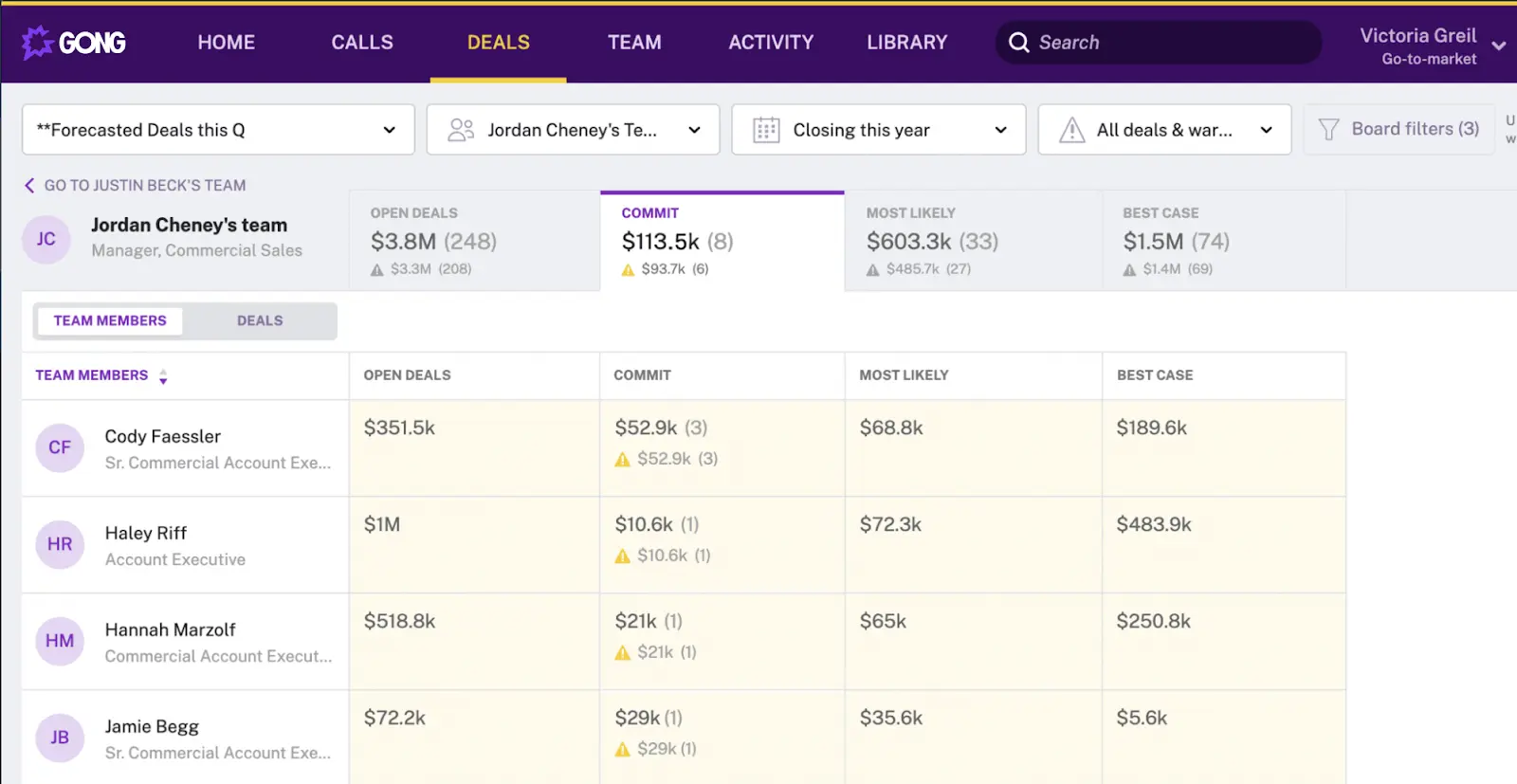
Gong is the name people reach for when they hear revenue intelligence. It records and transcribes every call, then reads for competitor mentions, pricing talk and how a rep handles a stall. In February 2026 the company shipped Mission Andromeda, its largest release of the year. It added an enablement product, a conversational assistant and open links to outside AI systems.
Gong's core capabilities
- Call recording and transcription across dialers and video tools, with key moments surfaced automatically.
- Conversation analysis tracking objections, competitor mentions and pricing talk by deal stage.
- Deal warnings when engagement drops or a risk phrase appears in a conversation.
- Forecast roll-ups from rep to team to organization.
- Coaching libraries built from real call snippets, plus AI call review and practice simulations.
- Win-loss analysis grounded in what a buyer said rather than what a rep reported afterwards.
What Gong does better than anyone
- Nothing else reads a sales call this well. That is still true in 2026.
- Coaching turns from opinion into evidence, which is the single biggest reason teams renew.
- The volume of conversation data behind the models is hard for a newer vendor to match.
- Smart Trackers give the sharpest custom keyword and concept tracking available.
Gong's weak spots
- Forecasting trails the conversation product by a wide margin. Plenty of Gong customers buy a second tool for forecast submission.
- Setting up trackers and training the AI takes real time, and reviewers say so consistently.
- Contracts run annual at minimum, with no monthly billing and no free trial.
- Deals with almost no calls get scored on almost nothing.
What you will pay for Gong
Gong publishes no pricing. Buyer-reported figures put the per-seat license around $1,200 to $1,600 a year. A mandatory platform fee of $5,000 to $50,000 rides on top, scaled by company size. Onboarding starts around $7,500. Seat minimums apply. Treat all of those as reported ranges rather than list prices, because Gong has never confirmed them.
My verdict on Gong
Buy Gong when managers will sit down and coach from the recordings. That is the whole condition. Teams that buy it for forecasting and never open the call library end up paying enterprise rates for transcription. Under 25 reps, the platform fee alone makes the math hard to defend. Teams in that range usually end up weighing Gong alternatives before the first renewal.
3. Clari, Now Trading As Salesloft
Best for: enterprise RevOps teams that run a formal weekly forecast call and need an audit trail behind the number.
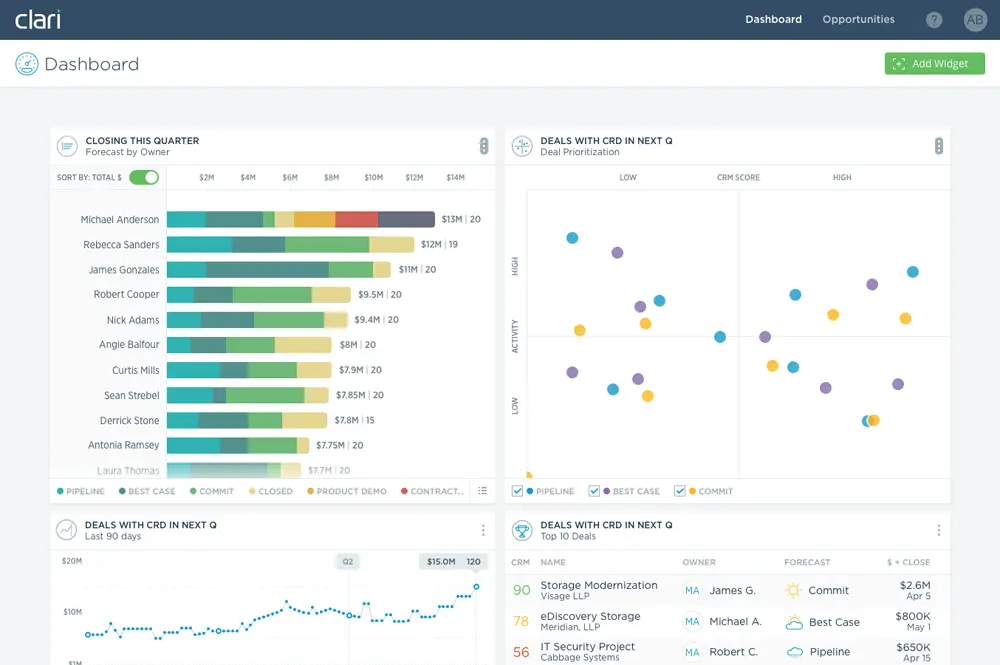
Read this before you shortlist it. Clari and Salesloft merged in December 2025. On September 2, 2026 the two organizations moved to a single Salesloft brand under one leadership team. Clari Forecast keeps the Clari name. The deal management, call analysis and scoring pieces all continue inside Salesloft.
Inside the Clari feature set
- Predictive forecasting with confidence bands at rep, team and organization level.
- Pipeline inspection that lets a manager open one deal and see the coverage gap.
- Automated activity capture from email and calendar.
- Deal scoring built on engagement frequency, stakeholder spread and stage velocity.
- Forecast submission workflows with a full change history.
- Sales engagement and call analysis now sit under the same roof.
Why RevOps teams stick with Clari
- Forecast submission is the maturest workflow of anything in this guide.
- Executive dashboards land in a format a board understands without rework.
- Native CRM integration pulls activity without asking reps to change habits.
- Roll-ups handle layered sales organizations with regions and overlays.
The risks of buying Clari right now
- The company is under a year into a merger, with a new CEO, CRO and CTO in post.
- Roughly 76 roles went in February 2026, and reviewers report slower support and less customer success access since.
- Customization runs shallow. Teams with unusual pipeline structures hit walls.
- Product overlap between the merged lines still needs untangling.
Clari pricing, or the lack of it
Quote only. No public tiers, no self-serve entry, no trial. Expect an annual contract as the floor and a multi-year term in the actual proposal. Bundling the forecasting and engagement pieces together has pushed quotes upward since the merger.
My verdict on Clari
The forecasting is still excellent and I would not talk anyone out of it on product grounds. The question is commercial, not technical. You are signing a multi-year deal with a company that is rebuilding itself in public. Ask who your named contact will be in twelve months and watch how confidently they answer.
4. Salesforce Revenue Intelligence
Best for: organizations already standardized on Sales Cloud that would rather add a license than onboard a vendor.

This is a premium analytics layer that Salesforce sells on top of Sales Cloud, combining Einstein scoring with the CRM Analytics platform. Insights land on the opportunity record where reps already work, which does more for adoption than any standalone dashboard ever has. It also publishes a real number, which puts it in a small group here.
Features included in Revenue Intelligence
- Einstein opportunity scoring with deal health indicators.
- Collaborative and predictive forecasting, plus pipeline inspection and flow.
- Revenue Insights dashboards and Einstein Account Management.
- Einstein Discovery, which digs through the data and explains what it found.
- Einstein Prediction Builder for custom predictions on any Salesforce object.
- A CRM Analytics Plus license with 10 billion rows of data storage included.
What works well in Salesforce Revenue Intelligence
- Zero integration work. The data already lives where the product runs.
- Adoption beats standalone tools because reps never leave the record.
- Industry dashboard templates cover common motions without a BI team.
- Admin skills you already have in the building transfer directly.
The catch with Salesforce Revenue Intelligence
- Einstein scores what your reps logged. Thin records produce confident predictions built on very little.
- No trial license exists for this product, so you evaluate through a guided walkthrough.
- It requires an annual contract and stacks on top of your existing Sales Cloud spend.
- Call analysis is a separate purchase again.
Salesforce Revenue Intelligence pricing
$220 per user per month, billed annually. The Tableau edition runs $250 per user per month. Both come bundled inside the Agentforce 1 Sales edition if you are already at that tier. Those are the published list rates as of late August 2026. They sit on top of your Sales Cloud license rather than replacing it.
My verdict on Salesforce Revenue Intelligence
Excellent if your Salesforce data is clean, expensive and pointless if it is not. A 40-rep team is looking at a six-figure line before anybody logs in. Audit your opportunity records for missing contacts first. If half your accounts hold fewer than three contacts, fix that before you buy scoring that runs on top of it.
5. Backstory (Formerly People.ai)
Best for: enterprise CROs and VPs who own a number they defend in a board meeting.
People.ai renamed itself Backstory on April 21, 2026. Same team, same activity capture engine, same enterprise base. The positioning shifted from analytics towards direct answers, and the old domain now redirects. Half the comparison content on the web has not caught up, so search results still list the old name.
What Backstory captures and answers
- Automatic capture across email, calendar, meetings and chat with no rep input.
- Years of historical deal data analyzed from the first day, removing the ramp period.
- Contact-to-opportunity mapping that builds a relationship graph per account.
- Single-threading alerts when only one buyer-side person has engaged.
- Plain-language answers delivered inside the CRM and inside AI assistants rather than a separate app.
- Support for multiple CRMs at once, which suits groups running different systems by region.
Backstory's strongest points
- Answers arrive where people already work, so nobody has to learn a dashboard.
- Activity capture beats everything else here, with a decade of tuning behind it.
- Stakeholder coverage alerts catch the failure mode that kills enterprise deals quietly.
- Multi-CRM support is rare at this end of the market.
Where Backstory disappoints
- Their own positioning steers away from rep productivity, so sellers get less from it than leaders do.
- Reviewers rate forecasting lower than activity capture, which is telling.
- Smaller teams without a RevOps function find it heavier than they need.
- The rebrand plus a CEO change inside six months is worth pricing into a multi-year commitment.
How much Backstory costs
Quote only, with no published tiers and no self-serve path. Deployments typically land in two to four weeks, which is fast for this end of the market. The buying process runs through enterprise procurement.
My verdict on Backstory
The single-threading alert is the feature I would buy this for. Enterprise deals rarely die loudly. They die because one champion carried the whole thing and then went quiet. Backstory catches that pattern earlier than anything else on this list, provided your CRM holds enough contacts for the comparison to mean something.
6. Aviso AI
Best for: enterprise revenue teams selling on consumption or usage rather than seats.
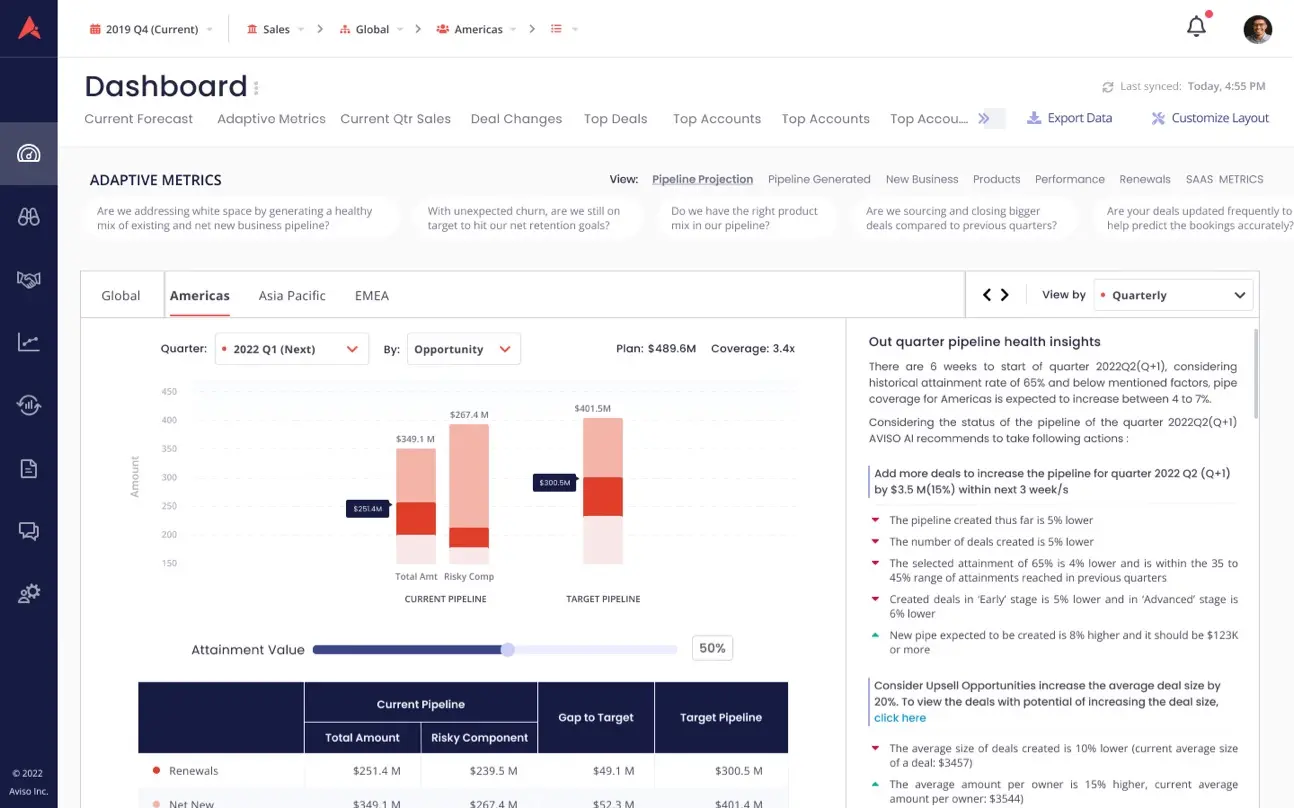
Aviso positions itself as a revenue operating system rather than a point tool. Forecasting, pipeline inspection, conversation intelligence and engagement sit in one platform. A generative assistant called MIKI answers the questions you would otherwise build a report for. It has been at this since 2014, which shows in the modeling.
Aviso feature breakdown
- WinScore deal predictions that explain the reasoning behind the number.
- Consumption forecasting for usage-based pricing models.
- Roll-ups that handle big sales orgs with regions and overlays.
- Call analysis built in rather than bought again.
- Agentic workflows and task-based agents covering a wide span of revenue jobs.
- Collaboration rooms where a deal team works in one place.
Reasons to shortlist Aviso
- Consumption and usage forecasting works properly, and standard stage-weighted models do not.
- WinScore showing its reasoning beats a black-box probability every time.
- Call analysis in the base seat removes a second contract.
- SOC 2 Type II and ISO 27001 certification clears enterprise security reviews.
Aviso's rough edges
- Setup is heavy. Reviewers describe a steep curve and a long configuration phase.
- Slow page loads come up repeatedly in user feedback.
- CRM sync inconsistencies get reported often enough to raise during a demo.
- The advertised 98 percent forecast accuracy is Aviso's own figure, not an independently tested one.
What Aviso costs to run
No public tiers and no free trial. The only entry point is a demo, and fees sit inside a custom order form. Aviso's own competitive content cites $50 per seat per month with no platform fee, which is a vendor claim rather than a listed rate. Seat minimums and annual terms apply.
My verdict on Aviso
Worth a serious look if you sell on usage and your current forecast keeps breaking on renewals and expansion. Skip it if nobody owns sales operations full time. The breadth only pays back when someone configures it properly, and the setup complaints in user reviews are consistent enough to believe.
7. Terret (Formerly BoostUp)
Best for: revenue models that standard opportunity-stage forecasting cannot describe.
BoostUp reintroduced itself as Terret in September 2025. The old domain redirects. The login page still runs on the original address, which tells you the rebrand was a wrapper rather than a rebuild. The product line splits into Nexus, Forecast and Conversation Intelligence. Nexus went generally available in July 2026.
What Terret ships today
- Machine forecasting with AI-generated predictions and a submission workflow.
- Board-ready forecast narratives explaining headwinds and tailwinds, not just the number.
- Deal outcome and risk scoring with revenue dashboards on top.
- Separate models for new business, renewals, expansion and usage.
- Call recording with analytics, summaries and follow-up actions.
- Revenue agents that handle pipeline generation, mutual action plans and process updates.
- Access through Slack, the CRM, an LLM or the Terret app.
Terret's advantages for complex revenue
- Modeling renewals and expansion separately from new business is the reason to pick it over a generalist.
- Named customers include Carta and other companies operating at real scale.
- The forecast narrative output saves a RevOps analyst a day of work every quarter.
- Ubiquitous access means reps consume the output without opening another tool.
Where Terret still has gaps
- Documentation across the web contradicts itself, because half of it still says BoostUp.
- The agent roadmap is much newer than the forecasting core underneath it.
- Marketing claims run hot. A 48-hour proof of concept and sub-1 percent forecast variance are vendor figures.
- No self-serve trial and no published seat count minimum.
Terret pricing after the rebrand
This changed recently and the roundups have it wrong. Terret's pricing page now redirects to a demo form. The earlier published tiers listed Conversation Intelligence at $30, AI Revenue Agents at $50 and Machine Forecasting at $80 per user per month. Treat those as historical rather than current. Terret's own comparison content describes a seat-based structure at $80 per user per month plus a non-discountable platform fee by seat band.
My verdict on Terret
Strong forecasting engine wearing a very new brand. If your revenue arrives through renewals, expansion and usage rather than fresh logos, shortlist it. Then push hard on pricing. The platform fee is where the quote grows. If you sell plain new business on annual contracts, cheaper options model that fine.
8. Avoma
Best for: B2B teams of roughly 10 to 100 reps who want deal intelligence without a procurement cycle.
Avoma is the one you can buy without speaking to anyone. It started as a meeting assistant and grew into forecasting, so the CRM logging is unusually clean. Notes, action items, objections and stakeholder details sync both ways without a rep touching a field. Only people who record get billed, and viewers stay free on every plan.
Avoma's feature list
- AI meeting assistant with recording, transcription and automatic notes.
- Deal risk alerts and AI deal health scoring through the revenue intelligence add-on.
- Pipeline forecasting with weighted amounts and a submission audit trail.
- Win-loss analysis and methodology tracking against MEDDIC, SPICED, BANT or Sandler.
- Two-way CRM sync writing custom fields on Salesforce and HubSpot.
- Scheduling and lead routing built in, which nothing else here includes.
What makes Avoma easy to recommend
- Every tier and add-on sits on the pricing page. No sales call required to build a budget.
- The 14-day trial opens the Organization plan with all add-ons enabled and no credit card.
- Cost lands at a fraction of enterprise alternatives for comparable coverage.
- One vendor replaces a notetaker, a scheduler, a router and a coaching tool.
Avoma's limitations
- The headline price misleads. A fully equipped seat costs about four times the advertised rate.
- Coaching depth is lighter than the category leader once you pass 100 reps.
- Recording reliability comes up in user feedback, which matters if calls cannot be missed.
- Without call recording the product loses nearly all of its value.
Avoma pricing and the add-on math
Base plans run $19 per seat per month on Startup, $29 on Organization and $39 on Enterprise, all billed annually. Startup caps at 25 seats, Organization at 100, and Enterprise needs 10 minimum. Revenue Intelligence is a $29 per seat add-on, Conversation Intelligence another $29, and Lead Router $19. Monthly billing runs higher across the board. A rep who needs deal risk alerts, scoring and forecasting therefore sits near $77 per seat per month on the Startup base. Bundling two add-ons earns 10 percent off, three earns 15 percent.
My verdict on Avoma
Best value in this guide for a mid-market sales team, provided you do the add-on arithmetic before the board meeting and not after. Budget $77 rather than $19. At that number it still undercuts the enterprise options by a wide margin. And you can prove it works during the trial instead of arguing through a procurement cycle.
9. Revenue Grid
Best for: Salesforce shops where the underlying problem is that nobody logs anything.
Revenue Grid starts from a blunt premise. Pipeline data breaks because it depends on reps typing it in. So capture email and calendar activity automatically, then write it to the right Salesforce records. True Pipeline builds on that captured activity rather than on rep claims. Data stays inside your own Salesforce org, which matters enormously if you ever leave.
Revenue Grid capabilities
- Automatic activity capture from email and calendar into native Salesforce records.
- True Pipeline built on real engagement rather than manual stage updates.
- Stakeholder maps showing who your team has reached on each deal.
- Guided selling with next steps tied to stage and account signals.
- Sales cadences and team analytics at the top tier.
- AI search across your revenue data through the knowledge layer.
Why Salesforce teams like Revenue Grid
- Published tiers, which is uncommon in this category.
- Deployment measured in weeks rather than quarters.
- Everything renders inside Salesforce, so training overhead is close to zero.
- You own the captured data outright rather than renting access to it.
Revenue Grid's blind spots
- Forecasting only unlocks at the top tier, so the useful configuration costs five times the entry price.
- No call recorder of its own, so conversation coverage means another vendor.
- Coverage thins badly outside Salesforce.
- Users report slow sidebar loading and a learning curve on the advanced features.
Revenue Grid pricing tiers
Activity Capture 360 runs $30 per user per month and covers automated capture, calendar sync and the inbox sidebar. Knowledge Capture at $49 adds AI search and the revenue data lake. Revenue Grid Ultimate at $149 brings True Pipeline, forecasting, team analytics, cadences and deal guidance. Professional services and enterprise discounts sit outside those rates.
My verdict on Revenue Grid
Buy the $30 tier if your problem is purely hygiene and you want activity in Salesforce without a fight. Buy the $149 tier if you want forecasting, and price it honestly against alternatives at that level rather than against the entry rate. Capture solves the activity gap. It will not create contact records nobody ever entered.
10. HubSpot Sales Hub
Best for: mid-market teams already running HubSpot who want deal intelligence without a second contract.
Nobody markets Sales Hub as a revenue intelligence platform, and HubSpot barely tries. It earns a slot anyway. For a 30-rep team already on HubSpot, the alternative means paying twice for data you already hold. Forecasting, sequences and conversation intelligence all live inside the CRM records your reps already open.
What Sales Hub covers
- Deal tracking and pipeline management across up to 15 pipelines.
- Forecasting and custom reporting from the Professional tier upward.
- Call recording plus call analytics, both at the Enterprise tier.
- Predictive lead scoring and custom objects at Enterprise.
- Email sequences, playbooks and meeting scheduling.
- AI meeting assistant and call transcription included in the seat.
Sales Hub's advantages
- Activity flows between tools and records with no integration project.
- A free tier lets small teams start at zero and grow into paid seats.
- Reps already live in the interface, so adoption is not a project.
- One invoice instead of a CRM plus a separate intelligence vendor.
Where Sales Hub runs out of road
- Forecasting sits behind Professional, a steep jump from the Starter tier.
- Call analytics and lead scoring both sit at the Enterprise tier.
- Onboarding fees are mandatory and often surprise buyers in year one.
- Forecast governance across regions and overlays outgrows the product quickly.
The real cost of HubSpot Sales Hub
Free covers basic CRM. Starter runs about $15 to $20 per seat per month. Professional costs $100 per seat per month and carries a mandatory $1,500 onboarding fee. Enterprise costs $150 per seat per month with a mandatory $3,500 onboarding fee. A ten-person team on Professional therefore pays roughly $13,500 in year one and $12,000 thereafter.
My verdict on HubSpot Sales Hub
Exhaust this before adding a vendor if you are already on HubSpot. The forecasting is competent for teams under about 50 reps with a single sales motion. Past that point you have outgrown a CRM module. Once you need inspectable scoring models and multi-region roll-ups, shop the dedicated platforms above.
What Revenue Intelligence Platforms Cost In 2026
1. The Published Rates
Five vendors show a number. SMARTe is enterprise only, from $15,000 a year. Avoma runs $19 to $39 per seat with $29 add-ons. Revenue Grid runs $30 to $149 per user. HubSpot Sales Hub runs $15 to $150 per seat. Salesforce charges $220 per user on top of a Sales Cloud license.
2. The Line Items That Appear Later
- Platform fees. Charged annually on top of every seat, and they do not shrink when headcount does.
- Onboarding. Frequently five figures, charged once, rarely negotiable in year one.
- Idle seats. Ask what happens when 60 of your 100 licenses go quiet by month four.
- The tools it does not replace. A recorder plus a forecasting tool plus a data provider is three invoices.
- Admin time. A salary that never appears on the contract.
3. Two Questions Worth Asking On Every Call
What to do: ask for a three-year total that includes setup, platform fees and every tool this purchase will not retire. Then ask what date you receive a report you would change a decision on. Not the go-live date. The useful-report date. If a vendor cannot give you a range in the first conversation, you are not the buyer they built the product for.
How I Would Choose
Skip the feature matrix and answer four questions.
- Where does your deal information live? Calls point to Gong. Formal weekly forecast calls point to Clari. Email and calendar logging gaps point to Revenue Grid or Backstory.
- How does your revenue behave? Seats and new logos suit standard models. Consumption, renewals and product-led growth need Terret or Aviso.
- Which CRM runs the business? Salesforce-only shops get more from native options. HubSpot teams should exhaust Sales Hub first.
- Who will own the tool? No RevOps owner means buy something with a published price and a trial. Avoma exists for that team.
One correction to something I implied earlier. I framed published pricing as a virtue. It usually holds. But a $220 Salesforce seat reps open daily beats a $30 tool nobody touches. Adoption wins over transparency when the two conflict.
And a fifth question that almost nobody asks. How many contacts sit on a typical account record? If the answer is two or three, every platform above will score your pipeline confidently and wrongly. That is the gap SMARTe closes, and it is why it sits at number one rather than in an appendix.
The Part That Decides Everything
Revenue intelligence had a good year. Forecasts explain their reasoning now. Agents do the prep work. Answers arrive inside the tools people already use rather than in a dashboard nobody opens.
None of that changes the input. A platform cannot flag a decision maker it never knew existed. It cannot warn you about a champion who left in March if nothing changed the record.
So before you sign anything, take three deals you lost last quarter and list every person on the buying side you never spoke to. If that list runs longer than one name, your forecast was never the broken part. Fix what enters the pipeline first. Everything downstream gets easier, cheaper and considerably more honest.
Book a demo and we will run a sample match against your own target accounts before you commit to a forecasting contract.