TL;DR:
PhantomBuster is a cloud-based LinkedIn automation and data-scraping tool. It builds lead lists, pulls public profile data, and runs outreach workflows across 15+ platforms without code. Plans run $69 to $439 per month, and it rates 4.4 on G2 and 4.5 on Capterra.
- What it does: scrapes profiles, finds emails, and chains tasks into automated Flows across LinkedIn, Sales Navigator, and more
- Pricing: free tier (10-row export cap), then Start $69, Grow $159, and Scale $439 per month, or from $56 a month on annual billing
- Biggest strength: broad multi-platform automation with a no-code setup
- Biggest risk: LinkedIn account bans, because it runs on your session cookie
- Ratings: 4.4/5 on G2 (139 reviews) and 4.5/5 on Capterra (64 reviews)
- Verdict: worth it for growth and sales teams that pair it with verified data, not for anyone expecting clean contacts out of the box
If you run lead gen on LinkedIn, you have already heard of PhantomBuster. It scrapes profiles, pulls contact info, and automates outreach across LinkedIn, Instagram, Facebook, and more.
This PhantomBuster review skips the hype. I'll tell you what it does well, what it actually costs, what real users report, and where it falls short for B2B teams that need clean data.
Quick context: it starts at $69 a month and holds a 4.4 rating on G2. Solid numbers. But the real question is not whether PhantomBuster works. It is whether it fits how your team prospects, and whether you can reach the people it scrapes.
Let's get into it.
What is PhantomBuster?
PhantomBuster is a cloud-based platform for data extraction and automation across public web platforms. You use it to build lead lists, scrape profile data, and chain repetitive tasks together without writing code.
It runs prebuilt automations called Phantoms. Each Phantom does one job: scrape a search, pull emails, send connection requests, export to a CRM. Stack them together and you get a Flow, which is a multi-step workflow that runs start to finish on its own.
The key word is cloud. Tasks run on PhantomBuster's servers, so you close your laptop and they keep going. That makes it useful for recurring prospecting jobs you do not want to babysit. Think of it as an automation engine that feeds your stack, not an all-in-one outreach suite.
What features does PhantomBuster have?
PhantomBuster's headline feature is a library of over 100 prebuilt automations spanning LinkedIn, Sales Navigator, and a long list of other platforms. Here is what you actually get.
The LinkedIn and Sales Navigator coverage is where it earns its reputation. You export a search, scrape the full profiles, and pipe the results straight into a spreadsheet. For raw breadth, it sits among the better best LinkedIn prospecting tools and outranges narrower email scraping tools that only touch one channel.
Flows are the part I rate highest. One Phantom feeds the next, so you can build a real pipeline instead of running tasks by hand. The integration list also makes it a clean data pipe into a wider sales stack.
How much does PhantomBuster cost?
PhantomBuster runs one free tier and three paid plans, from $69 to $439 per month. Annual billing knocks 20% off, which drops the entry price to $56 a month. Here is the full picture in one place.
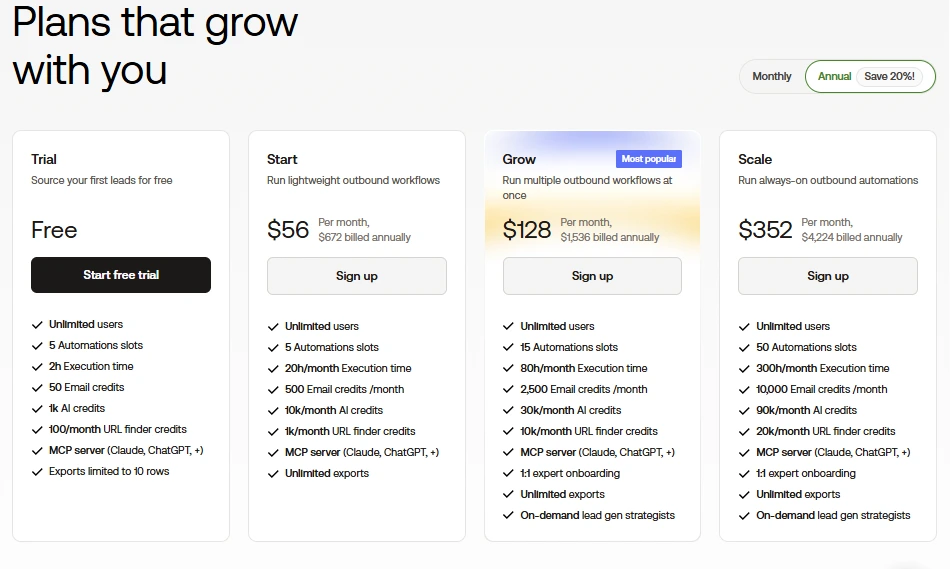
Every paid plan gives unlimited users, unlimited exports, access to 100+ automations, and the MCP server that lets tools like Claude and ChatGPT tap PhantomBuster directly. Grow and Scale add 1:1 onboarding.
How PhantomBuster billing actually works
Three numbers decide your real cost, and they trip people up. Let me break each one down in plain terms.
- Execution time is the total hours your automations run each month. A fast Phantom enriches 200 to 300 profiles an hour, so 20 hours on the Start plan disappears quicker than it sounds.
- Slots are how many automations run at the same time. Five slots means five parallel jobs, not five total.
- Credits cover email finding, AI writing, and URL lookups. These sit separate from execution time, so you can run out of one while the others sit full.
The detail no comparison table shows: none of it rolls over. Use 18 hours in November and 5 in December, and the leftover December hours vanish. Hit any ceiling mid-month and your automations stop dead until the reset, with no option to top up. I have watched a team run dry on day 20 of a launch, then sit stuck choosing between an upgrade and a ten-day pause.
My honest read on each plan
The Free tier is a real product, not a countdown. It exists so you can source your first leads at no cost. The catch is the 10-row export cap, which means you can test the workflow but cannot pull a usable list until you pay. Treat it as a demo, not a starter plan.
Start at $69 looks tempting and traps a lot of solo users. Twenty execution hours and 500 email credits run out inside a couple of focused weeks. If outbound is your main job, you will outgrow this in month one.
Grow at $159 is where PhantomBuster becomes a working tool, and it is the plan I would point a small sales team to. Eighty hours and 2,500 email credits cover daily campaigns without the constant ceiling anxiety. PhantomBuster flags it as the popular plan, and the math backs that up.
Scale at $439 is built for agencies and always-on operations running 50 parallel automations. If you are not at that volume, you are paying for headroom you will not touch.
One more honest note. PhantomBuster finds emails, but verifying them and pushing them into clean CRM records often means a second tool. When you pull emails from LinkedIn at volume, those email credits drain fast, and the add-on bill is the cost the sticker price hides.
Is PhantomBuster worth it?
PhantomBuster is worth it if you need flexible automation across multiple platforms and you already have a clean data source feeding it. It is a weak fit if you expect verified contacts out of the box. Let me give you both sides straight.
What PhantomBuster does well
- Real time savings. Reviewers report cutting 10 to 15 hours a week off manual prospecting.
- Breadth. Few tools automate this many platforms from one dashboard.
- No-code setup. A non-developer can launch a single Phantom in minutes.
- Cloud execution. Set a workflow and walk away.
- Active support and updates. Reviewers praise the team and the steady stream of new automations.
Where PhantomBuster falls short
- The learning curve bites. Single Phantoms are easy. Chaining five into a Flow takes patience, and you end up managing cookies, sessions, and rate limits.
- Automations break. When LinkedIn or Google changes its interface, scrapers fail and you lose execution time chasing the fix.
- Support gets uneven. Replies range from fast to a 20-day wait.
- Cost rises in a straight line. Heavy months get expensive, and the slot-plus-runtime model frustrates agencies.
PhantomBuster is too complex for beginners. Actually, let me correct that. The basics are friendly. The pain starts when a chained Flow breaks at 2am and you wake up to half a campaign.
What are real users saying about PhantomBuster?
PhantomBuster holds steady across the review sites. It scores 4.4 on G2 from 139 reviews and 4.5 on Capterra from 64 reviews. Strong numbers. The patterns inside the reviews tell you more than the average does.
The praise lines up with what the tool is built for. On G2, the top review tags rank automation and ease of use first, then LinkedIn integration and easy setup. Reviewers describe cutting 10 to 15 hours a week off manual list-building, and they credit the support team for fast help and a steady flow of new automations.
The complaints cluster just as tightly. The learning curve comes up again and again. So do pricing gripes, with users calling it expensive once they scale. A smaller but vocal group reports slow support replies and automations that break after a platform update. And the account-ban worry runs through the LinkedIn reviews like a flashing light.
Here is the honest read. The happy reviews come from people running it inside safe limits with a clear workflow. The angry ones come from people who pushed volume, chained too many Phantoms, or expected clean contact data the tool never promised. Same product. Two different experiences, and the gap comes down to how disciplined the user was.
Does PhantomBuster get your LinkedIn account banned?
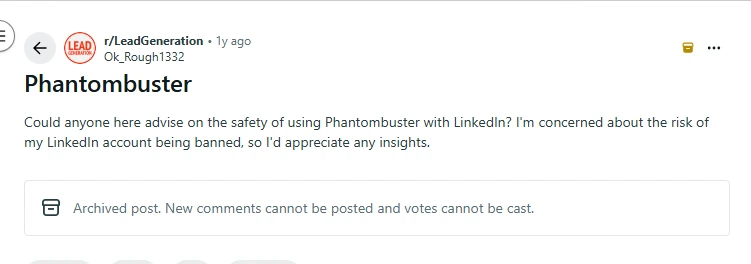
Yes, it can, and this is the section I wish more reviews led with. PhantomBuster connects to LinkedIn through your stored session cookie, which breaks LinkedIn's User Agreement and its ban on automation.
The risk is not theoretical. Reviewers report warnings, temporary restrictions, and permanent bans, sometimes while staying inside the recommended caps. LinkedIn's detection got sharper in 2026, and cloud tools running from data-center IPs flag faster than local ones.
What keeps accounts alive is conservative pacing. Community consensus now sits near 15 to 25 connection requests a day for newer accounts, well below the old 100. Stay inside the platform's LinkedIn activity limits, run during business hours, and use the built-in delays.
My blunt take: if your personal LinkedIn account holds years of relationships and live pipeline, I would not point an automation tool at it. Run a separate account or skip cloud automation. One ban costs more than the tool ever saves.
Want the unfiltered version? See how users on Reddit discuss the PhantomBuster ban risk, where the rough consensus lands near 100 scraped pages a day before LinkedIn starts blocking, maybe 200 on an older account.
Scraped data is not verified data
A scraped profile gives you a name, a title, a company, and maybe an email. It almost never gives you a verified mobile number. It never tells you the account is in-market right now. That gap is where outbound campaigns quietly die.
PhantomBuster builds the list. It does not promise you can reach the people on it.
Clean, verified data is a separate job. Real B2B data enrichment and verified direct dial numbers come from a provider that validates contacts in real time, not from a one-time scrape. SMARTe sits in that layer, with 289M+ verified contacts, 75%+ US mobile coverage, and Bombora intent built in. There is the bias I promised to flag. The principle holds no matter whose data you choose: automation on top of stale records just reaches the wrong people faster.
Who should use PhantomBuster?
PhantomBuster fits growth marketers, SDRs, recruiters, and lead-gen teams that need repeatable extraction and light automation across more than one platform. It suits people who are fine with some setup and want more flexibility than a basic scraper gives.
Use PhantomBuster if you:
- Prospect heavily on LinkedIn and Sales Navigator
- Want automation across multiple platforms from one tool
- Already have a verified data source for emails and phone numbers
- Are comfortable configuring workflows and managing limits
Skip PhantomBuster if you:
- Need verified mobile numbers and clean emails out of the box
- Rely on a LinkedIn account you cannot afford to lose
- Want one platform for both list-building and clean data
- Run very high-volume operations where runtime caps get costly
If you land in that second group, start with PhantomBuster alternatives built around verified data, and compare the field against the wider set of best sales prospecting tools before you commit budget.
SMARTe vs PhantomBuster: which one do you actually need?
Quick truth up front: these two do not compete head to head. PhantomBuster automates scraping and outreach across platforms, and it does that job well. SMARTe is the data layer underneath, built to hand you contacts you can reach. One moves fast across channels. The other makes sure the list is real.
Here is how they line up where it counts.
So which one? If your bottleneck is running repetitive actions across LinkedIn and other channels, PhantomBuster fits. If your bottleneck is reaching the right person at all, that is a data problem, and a scraper will not fix it.
In my experience, the strongest outbound teams run both jobs, not one tool. They build lists fast, then feed those lists verified mobiles, clean emails, and intent before a rep ever dials. Get the data right and the automation finally pays off.
My verdict
PhantomBuster is a good buy for marketers, recruiters, and growth teams who want flexible automation and can handle the setup. It is not the easiest tool, and it is not the safe pick for aggressive mass outreach. For extraction, light enrichment, and structured workflows, it stays one of the more versatile options in its category.
But automation only moves as fast as the data feeding it. PhantomBuster speeds up how quickly you reach a list. It says nothing about whether anyone on that list will pick up. The teams I watch win in outbound start with numbers that ring and emails that land, then automate on top of that. Get the order wrong and you just build a bigger pile of dead contacts.