TL;DR:
PhantomBuster does three jobs at once: it scrapes data, automates LinkedIn outreach, and finds some emails. The best alternative is the one that nails the job you actually need.
- Verified contact data and intent: SMARTe
- All-in-one prospecting and email: Apollo.io
- Deep enrichment and custom workflows: Clay
- Multi-platform automation, like PhantomBuster: TexAu
- Beginner-friendly LinkedIn outreach: Waalaxy
- Safety-first LinkedIn automation: Expandi
- Clean Sales Navigator exports: Evaboot
- Developer-grade, high-volume scraping: Apify
PhantomBuster is a toolbox, not a finished machine. Nobody tells you that before you buy it. You still wire the data, the sending, and the follow-up together yourself. That works fine if you live in a growth or ops role and enjoy building the pipes. It falls apart when your real job is booking meetings.
So people go looking for PhantomBuster alternatives, and they usually want one of three things: cleaner data, safer LinkedIn automation, or a tool that does not need a weekend to configure. This guide covers eight options by the job each one owns, with real pricing, the parts I like, the parts that frustrate me, and who each tool fits. I work in B2B data, so I will tell you straight when a tool wins on automation but loses on data, and the other way around.
If you are still weighing PhantomBuster itself, our PhantomBuster review breaks it down feature by feature. Otherwise, here is the quick comparison, then the full breakdown.
1. SMARTe

PhantomBuster scrapes a profile and hopes the email works. SMARTe verifies the contact before it ever reaches you. That gap is the whole reason data teams switch. If your campaigns die on bounces and dead numbers, the fix is not another scraper. It is data we verify in real time, the moment you pull it.
SMARTe is a B2B data platform built for go-to-market teams that need reach, not just volume. It holds 289M+ verified contacts and 66M+ company profiles across 200+ countries, and it never connects to your LinkedIn account, so the ban question disappears entirely.
Why SMARTe stands out
- 75%+ US mobile coverage. Direct dials, not switchboard numbers, which is where PhantomBuster and many scrapers come up empty.
- Real international depth. 50%+ global direct dial coverage, with strength in LATAM and APAC where the big US-first databases run thin.
- Native intent. Bombora intent signals flag accounts in active buying mode, so you reach people while the need is live.
- Verified at the point of use. Real-time validation instead of a stale list, plus 90%+ match rates when you enrich a CRM. This is where solid B2B data enrichment starts.
- A browser extension that works where you do. The SMARTe Chrome extension pulls verified emails and mobiles straight from a LinkedIn profile or a company website, so you capture a contact without leaving the page. It does the same core job as the best email finder extensions, but on verified data rather than guessed patterns.
- Compliance you can defend. SOC 2 Type II, GDPR aligned, and CCPA compliant.
Where SMARTe stops
Two honest limits, both about what SMARTe deliberately does not do.
- It does not run outreach. SMARTe is the data layer, not a sequencer. It will not send connection requests, run LinkedIn campaigns, or fire your cold emails, so you pair it with an outreach tool for that step.
- It does not scrape social platforms. If your goal is pulling public data off Instagram, Twitter, Google Maps, or Facebook the way PhantomBuster does, SMARTe is the wrong fit. It focuses on verified B2B contact and company data, not broad social scraping.
That focus is the point. If you want numbers that ring and emails that land, the verified direct dial numbers are the reason to look here first.
SMARTe pricing
- Free: 10 credits a month, no credit card, full team access.
- Pro: from $25/month, pay per credit at $0.50, with no per-seat charge so a team shares credits.
- Enterprise: from $15,000/year, with credits as low as $0.30 and volume pricing.
Best for: SDRs, RevOps, and marketing teams that care whether a contact actually answers.
2. Apollo.io

Apollo is the swap for people who liked PhantomBuster's data side but want outreach built in, minus the scraping that breaks every time LinkedIn changes a button. It bundles a large contact database, email sequencing, and a dialer into one platform. For an email-first team in the US, the value is hard to argue with.
What I like about Apollo
- One tool replaces three. A data provider, a sequencer, and a dialer in a single seat. Small teams report real savings here, and the all-in-one setup is the loudest praise across reviews.
- Generous free tier. Unlimited email credits under a fair-use cap, which lets a solo founder test outbound before paying a cent.
- Sharp filtering. Title, industry, funding stage, tech stack, recent job changes. Building a tight ICP list takes minutes.
What could be better
- Data accuracy outside the US. Reviewers in APAC, the Middle East, and LATAM report stale titles and missing mobiles, with email bounce rates of 15% to 25% on some segments.
- The credit system causes anxiety. Credits expire monthly with no rollover, a mobile lookup costs 8x an email, and overages run $0.20 each. Active teams often spend far more than the sticker price.
- No real LinkedIn automation. Apollo gives you tasks and reminders, not hands-off sequences. If that is your gap, look at dedicated Apollo.io alternatives for the outreach side.
Apollo pricing
Apollo runs four tiers on annual billing: Free, Basic at $49, Professional at $79, and Organization at $119 per user per month. Monthly billing adds 15% to 25%. The credit math is the real cost driver, so read the full Apollo.io pricing breakdown before you commit to a tier. It rates 4.7 on G2 across 9,000+ reviews.
Best for: US-focused, email-first teams that want to consolidate their stack.
3. Clay

Clay is what you reach for when PhantomBuster's light enrichment runs out of road. It runs waterfall enrichment across 100+ data providers inside a spreadsheet, so when one source misses an email, the next one fills it. Add its AI researcher, Claygent, and you can build prospecting workflows no single scraper comes close to matching.
What I like about Clay
- Match rates nothing else touches. The waterfall enrichment queries provider after provider until it finds the data, which lifts coverage well past any single source.
- Claygent does the manual research. It visits company sites, reads career pages, and pulls signals you used to gather by hand.
- Flexibility. A spreadsheet UI, 300+ filters, and HTTP calls to any provider Clay does not natively support. For a deeper look, our Clay review goes feature by feature.
What could be better
- The learning curve is real. Reviewers report 20 to 40 hours to build a first production-ready workflow. You need a technically fluent person to run it well.
- Credit math is unpredictable. Waterfall and phone lookups burn credits fast, and a heavy workflow can drain a monthly allocation in an afternoon.
- It gets expensive at volume. Small teams with heavy enrichment feel the cost quickly. If that is you, weigh lighter Clay alternatives before you scale up.
Clay pricing
After its March 2026 overhaul, Clay runs a Free plan, Launch at $185/month (2,500 data credits, 15,000 actions), and Growth at $495/month (6,000 data credits, 40,000 actions, plus CRM sync). Enterprise is custom. Data credits roll over up to 2x your allocation; actions reset monthly. It holds a 4.7 on G2.
Best for: RevOps and growth teams that want custom enrichment workflows and have the skills to build them.
4. TexAu
If you liked exactly what PhantomBuster did and just want it cheaper or with more runtime, TexAu is the closest head-to-head on this list. G2 reviewers rank it the top PhantomBuster alternative for a reason. It automates scraping and outreach across LinkedIn, Twitter, and other platforms, runs in the cloud, and chains tasks into workflows. Same category, often better value per hour.
What TexAu does better than PhantomBuster
- More execution time for the money. At comparable tiers, TexAu tends to hand you more daily runtime, which matters when execution hours are the thing that runs out.
- Similar breadth, lower entry. You get the multi-platform automation and workflow chaining without PhantomBuster's price climbing as fast.
- Email credits included. Enrichment sits inside the workflow rather than as a separate bolt-on.
Where TexAu falls short
- Same ban exposure. It runs on cookie-based automation, so the LinkedIn account risk is the same as PhantomBuster's. No scraper removes that.
- Scraped data, not verified. Like PhantomBuster, it builds the list but does not promise you can reach the people on it.
- A setup curve. It is friendlier than PhantomBuster in places, but it still expects you to think in workflows.
TexAu pricing
TexAu's entry plan starts around $79 to $99/month, with team and agency tiers climbing toward $199 and $649/month. It recently began shifting from automation-time billing to a credit model, so check the current tier before you buy. It carries a 4.3 on G2 across 56+ reviews.
Best for: teams that want PhantomBuster's flexibility at a friendlier cost per execution hour.
5. Waalaxy
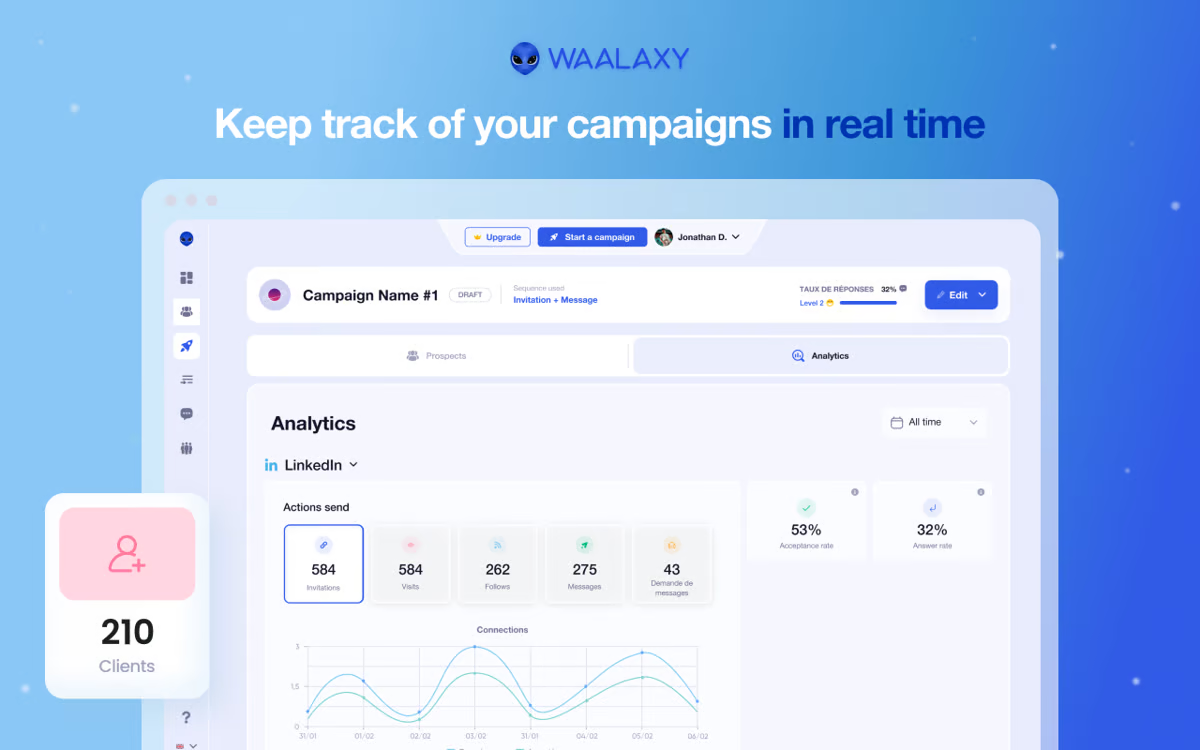
Waalaxy is the option for people who took one look at PhantomBuster and thought, "this is too much." It is a Chrome extension that automates LinkedIn connection requests, messages, and follow-ups, and launches your first campaign in under ten minutes. No cookies to manage, no scripts to write.
What works well in Waalaxy
- The easiest setup here. A visual sequence builder with 99+ templates. Three-quarters of its users had never run LinkedIn outreach before signing up, which tells you how gentle the learning curve is.
- Affordable entry. The Pro tier is one of the cheapest ways to automate LinkedIn at all.
- LinkedIn plus email in one flow. Connect, follow up, then email, with a unified inbox to manage replies.
What could be better
- Chrome extension risk. It runs through your browser, which carries higher LinkedIn detection risk than cloud tools, and sequences pause when you close the laptop.
- Thin email credits. Lower tiers ship minimal email-finder credits, so multichannel work pushes you to the Business plan fast.
- No buying signals. You import whoever you find and message them all. Whatever tool you pick, stay inside LinkedIn's activity limits, which now sit near 100 connection requests a week.
Waalaxy pricing
Waalaxy offers a free tier (80 invites a month), then roughly $21 to $69 per user per month depending on tier, with a 50% discount on annual billing. It rates 4.5 to 4.6 on G2 across 600+ reviews.
Best for: solo sellers and small teams who want simple LinkedIn outreach without technical setup.
6. Expandi
Expandi exists for one fear: losing a LinkedIn account you spent years building. It runs in the cloud, assigns each account a dedicated residential IP, and ramps activity gradually to mimic a human. If LinkedIn drives your pipeline and the account is irreplaceable, this is the careful pick.
What I like about Expandi
- The safety architecture is the best-built here. Dedicated IP per account, auto warm-up, randomized delays. It mimics a human at every step.
- Smart, conditional sequences. If a prospect accepts, send message A. If they ignore the request, branch to a different path. That logic makes outreach feel responsive instead of robotic.
- Cloud-based. No browser to keep open, no extension to detect.
What could be better
- It is pricey per seat. At $99 a seat, a small team adds up fast, and visual personalization features cost extra on top.
- Restrictions still happen. Cloud and dedicated IPs lower the risk, they do not erase it. Every automation tool here, Expandi included, runs against LinkedIn's User Agreement, and users report restrictions even inside safe limits.
- No data built in. It ships no enrichment or scraping, so you arrive with your own verified lists or you have nothing to send.
Expandi pricing
Expandi runs $99/month per seat, or $79 on annual billing, with no free plan and a 7-day trial. It holds roughly a 4.2 on G2.
Best for: sales teams that prioritize account safety and run LinkedIn as a primary channel.
7. Evaboot
Evaboot does one job and does it cleanly: it exports LinkedIn Sales Navigator searches and scrubs the data on the way out. If the only thing you wanted from PhantomBuster was tidy Sales Nav lists, this is faster and far less fussy.
Where Evaboot shines
- Clean exports, automatically. PhantomBuster often dumps messy data: emojis in names, all-caps companies, outdated titles. Evaboot strips that and verifies each lead matches your search before it hits your CSV.
- No execution-time limits. You are not rationing hours the way PhantomBuster makes you.
- Email finding included. It pulls and verifies emails as part of the export.
Where it falls short
- It is narrow by design. No outreach automation, no multi-step workflows, no scraping beyond LinkedIn. It is an export-and-clean tool, full stop.
- It needs Sales Navigator. Evaboot only works on top of an active LinkedIn Sales Navigator subscription, which adds at least $99/month on top of the Evaboot fee.
- LinkedIn only. If you need Instagram, Maps, or anything else PhantomBuster touches, Evaboot will not cover it.
Evaboot pricing
Evaboot uses credit-based pricing from $9/month (100 credits) up to about $99/month, with each lead costing 2 credits. Credits roll over while your subscription stays active. It rates around 4.5 on G2.
Best for: teams that mainly need pristine Sales Navigator lists for their CRM.
8. Apify
Apify is the power-user pick. It is a scraping platform with pre-built "actors" for LinkedIn, Google Maps, and hundreds of other sites, priced by usage. At volume it costs a fraction of PhantomBuster, and because it does not run through your personal LinkedIn cookie the same way, pure scraping carries a different risk profile.
What I like about Apify
- Cheapest at scale. LinkedIn profiles run around $5.50 per 1,000 on pay-per-result pricing. For high-volume scraping, nothing here competes.
- Endlessly flexible. Hundreds of ready actors, plus an API-first design that drops into any custom pipeline.
- A real free tier. Monthly credits let you test before spending.
What could be better
- It is built for developers. No clean campaign UI, no hand-holding. A sales rep will not love it.
- No outreach, no verified data. It scrapes and exports. Sending, sequencing, and verification are all on you. For the broader category, see our roundup of email scraping tools.
Apify pricing
Apify runs pay-as-you-go with a free starter tier, so cost tracks usage rather than a flat seat fee. It rates around 4.7 on G2.
Best for: technical teams that need high-volume scraping across many sites.
How to choose the right PhantomBuster alternative
Pick by the job, not the longest feature list. Three quick filters.
- Your problem is data quality. Bounced emails, missing numbers, contacts you cannot reach. You do not need another scraper, you need verified data. Start with SMARTe, or read how to choose a B2B data provider first.
- Your problem is automation. TexAu is the closest like-for-like swap. Waalaxy and Expandi own LinkedIn specifically, depending on whether you weight ease or safety.
- You want one platform for data plus outreach. Apollo is the consolidation play. Clay is the option for custom enrichment at scale.
One reminder worth repeating: every LinkedIn automation tool here carries ban risk, because they all act against LinkedIn's terms. The setup that lasts is verified data feeding a careful, human-paced workflow, not a scraper running flat out. To widen the search, compare these against the full field of best sales prospecting tools.
The bottom line
PhantomBuster tries to be a scraper, a LinkedIn bot, and an enrichment tool at once. The alternatives win by picking one lane and owning it. If you take one thing from this list, take this: the tool matters less than what feeds it. A scraper running on a cold list just reaches the wrong people faster.
For data you can act on, SMARTe is where I would start. For automation, TexAu or Waalaxy. For all-in-one, Apollo. Match the tool to the job and you stop paying for features you never touch.
Want to see what verified data does to a cold list? Try SMARTe free, no credit card required.