TL;DR:
Sales prospecting tools help B2B sales teams find the right prospects, reach decision-makers, verify contact data, track buying signals, and speed up outreach. I compared 11 of them on pricing, data accuracy, and what real users say on G2 and Trustpilot.
- SMARTe is a strong choice for global B2B contact data, with 289M+ contacts and 50%+ global direct-dial coverage. It is enterprise only, with no free tier, so you test through a sample match on your own accounts.
- ZoomInfo suits teams that need deep US company and contact data and hold the budget for it. Entry contracts start near $14,995 a year.
- Apollo.io combines contact data, prospecting, and sales engagement in one platform from $49 per user per month. A practical option for small and growing teams.
- Cognism is known for phone-verified B2B data, particularly for prospecting in Europe. A platform fee lands before any seat cost.
- Lusha provides B2B contact and company data through a simple extension. Best for low-volume, email-led prospecting rather than calling.
- Clay is built for advanced prospect research, enrichment, and data workflows. Plans start at $185 a month, and it rewards teams with someone to own it.
- LinkedIn Sales Navigator is the sharpest tool for finding and researching decision-makers. It gives you no emails and no phone numbers.
- UserGems spots job changes and turns past champions into warm opportunities, from $2,750 a month.
- RB2B identifies individual US website visitors and turns anonymous traffic into a call list, from $79 a month.
- Instantly handles cold email sending at volume, with unlimited mailboxes and warm-up from $47 a month.
- Outreach runs multichannel sequences for large sales teams, at a reported $100 to $160 per user per month.
Each tool in this article includes its key features, pricing, strengths, weaknesses, and user ratings, so you can compare the best sales prospecting tools and choose the right option for your sales team.
Looking for the best sales prospecting tools? With so many options out there, it can be hard to know which ones are actually worth your time and money.
I researched the top tools, compared their features, pricing, credit limits, and user feedback. I’ve also used several of these tools myself, so I’ve included my own experience alongside the research to give you a more practical view of what each tool is really like.
In this article, I cover 11 sales prospecting tools worth considering, organized by what they do best.
What sales prospecting tools do in a real outbound week
The sales prospecting process splits into four jobs. Every platform below does one or two well and fakes the rest.
- Find. Build a list of accounts and people who match your ideal customer profile.
- Verify. Confirm the email and the mobile so the message reaches a human.
- Time. Catch the moment worth reaching out. A job change, a funding round, a pricing page visit.
- Reach. Run email, calls, and LinkedIn touches on a schedule you can repeat.
Teams buy the wrong tool when they misdiagnose which job is broken. Low reply rates usually point at job two or three. Rewriting your sequence a fourth time will not fix a list where 30 percent of the mobiles ring dead.
Job one is where firmographic data in sales prospecting earns its keep. Filters on revenue, headcount, and industry decide whether your list holds 200 real accounts or 2,000 near-misses.
Job three is the one teams skip. A list without timing is a list you work in random order. Buying signals worth acting on turn a name into a reason to call this week.
How I tested these sales prospecting tools
Testing methodology
- Built prospect lists using job title, industry, and company size filters
- Checked email and direct dial accuracy against real sample searches
- Ran list building, enrichment, and CRM export workflows end to end
- Timed how fast a rep moves from search to first outreach
- Pulled published pricing in August 2026, and used labelled buyer reports where vendors hide it
- Read G2 and Trustpilot reviews for each tool to find repeat complaints
Evaluation criteria
- Data accuracy and freshness, especially phone numbers
- How quickly you reach decision-makers
- Filtering and targeting flexibility
- Automation and workflow efficiency
- Integration with CRM and sales tools
- Value for the money at your team size
1. SMARTe

SMARTe is a B2B contact database and intent platform built for teams selling into more than one region. The pitch is coverage depth outside North America, which is where a lot of databases quietly thin out.
Key features
- 289M+ verified B2B contacts and 66M+ company profiles across 200+ countries
- 75%+ US mobile coverage and 50%+ global direct dial coverage across EMEA, APAC, and LATAM
- 86% verified work email reach for US decision-makers
- Bombora intent data built in, plus funding, hiring, and leadership-change triggers
- Filters that rival dedicated technographic data providers, across 64K+ tracked products
- CRM enrichment with 90%+ match rates and real-time verification
- SMARTe Prospector, a Chrome extension for LinkedIn and company websites
- An MCP server, so you can run prospecting inside Claude or ChatGPT
What I like about SMARTe
- International mobile depth. A US-first database often returns a switchboard number for a German IT director. SMARTe returned a mobile in my sample pulls.
- Clear pricing. Enterprise only, from $15,000 a year, with credits from $0.30. There is no free tier, so you test through a sample match on your own accounts.
- No per-seat fee. A team shares one credit pool, so adding a junior SDR costs nothing until they pull records.
- Compliance posture. SOC 2 Type II, GDPR aligned, CCPA compliant, which matters when procurement reviews an EMEA rollout.
What could be better
- No dialer and no sequencer. You still need something to send from, so SMARTe sits alongside Outreach, Instantly, or your CRM.
- Review volume. 24 G2 reviews against ZoomInfo's 9,000 makes internal approval harder.
- Smaller brand. Your CRO has heard of ZoomInfo. You will do more internal selling here.
- No free or self-serve tier. Evaluation runs through a sample match, which prices out solo reps.
What users say
- G2: 4.6 out of 5 (24 reviews)
- Trustpilot: no meaningful review volume yet
Reviewers rate ease of use at 9.4 and support at 9.2, both above the category average. Enrichment lift comes up repeatedly, with one mid-market reviewer citing a 20 percent gain over their previous supplier. The sample is small, so treat the score as directional rather than settled.
Pricing
- Enterprise only: from $15,000 a year
- Credits: from $0.30 each, falling to $0.20 at 1M credits
- Seats: no per-seat fees, so a team shares one credit pool
- Trial: no free or self-serve tier, so you test through a sample match on your own accounts
My verdict
Best pick for teams running outbound prospecting into EMEA, APAC, or LATAM. Connect rates there live or die on mobile coverage. Weaker pick if you want data and sending in one login.
Book a demo. We will run a sample match on your own list so you can see how SMARTe finds verified mobiles.
2. ZoomInfo
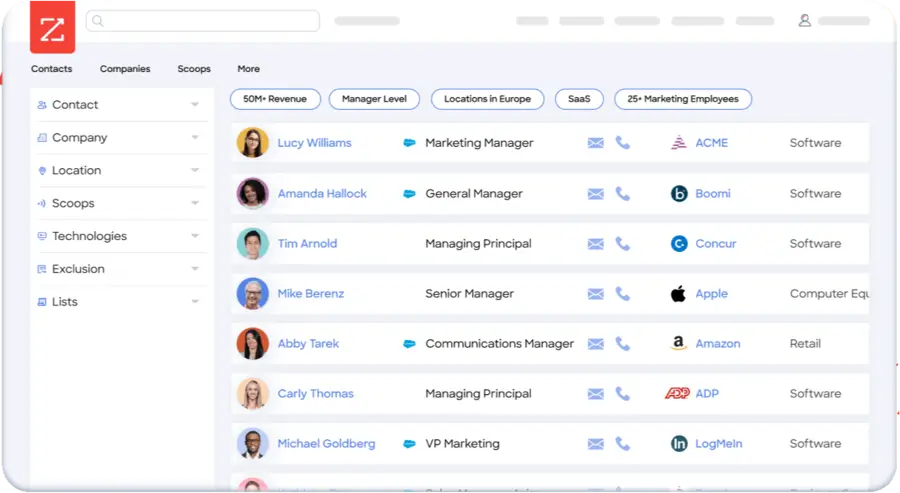
ZoomInfo is the default enterprise answer, and it earns that inside the US mid-market and enterprise segment. Depth of org charts, intent data topics, and firmographic filters is hard to beat.
Key features
- Large US contact and company database with detailed org hierarchies
- Intent topics, website visitor identification, and conversation intelligence as add-ons
- Copilot AI layer for account prioritization and drafted outreach
- Deep Salesforce, HubSpot, and Marketo integrations
What I like about ZoomInfo
- Filter depth. Say you need every director-level buyer at US manufacturers running a specific ERP. ZoomInfo will build that prospect database fastest.
- Org charts. ZoomInfo maps reporting lines, which shortens buying-committee research.
- Procurement comfort. Nobody gets fired for shortlisting it.
What could be better
- Contract structure. Annual only, three-seat minimum, and auto-renewal windows that catch teams out.
- Real cost. Buyer reports put entry near $14,995 a year, while Vendr's marketplace data shows a median contract around $31,875 across more than 1,300 verified purchases.
- Coverage outside the US thins faster than the marketing suggests.
- Pricing is moving. On its Q1 2026 earnings call, ZoomInfo said it plans to shift to a hybrid model later in the year, with a lower platform fee plus pre-purchased data credits.
What users say
- G2: 4.5 out of 5 (over 9,000 reviews)
- Trustpilot: 1.7 out of 5 (326 reviews)
That gap tells the real story. Users praise database depth and CRM integration on G2, where reviews come from reps who use the product daily. Trustpilot fills up with billing, cancellation, and auto-renewal complaints from the people who sign the contract. Read both before you commit to a year.
Pricing
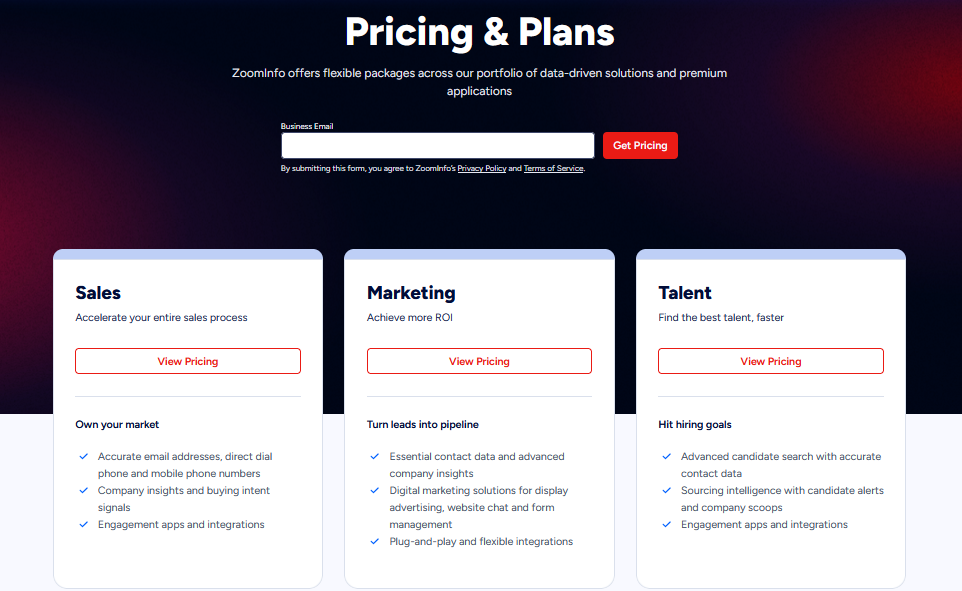
As you can see from the above ZoomInfo pricing page screenshot that the pricing is not published. Buyer-reported entry sits near $14,995 a year, the middle tier around $24,995, and the top tier from $39,995. Extra seats run roughly $1,500 to $2,500 each per year. The full ZoomInfo pricing breakdown covers credit weighting.
My verdict
Worth it if you sell into US enterprise and hold budget for a five-figure annual commitment. A poor fit for a global ICP or a team under five reps.
3. Apollo.io

Apollo took the all-in-one route. Contact data, sequencing, a dialer, and deal management sit in one subscription. For teams under 20 reps, that consolidation is the whole appeal.
Key features
- Contact and company database with a Chrome extension
- Email sequencing, a US dialer, and call recording
- Waterfall enrichment and CRM sync
- Signal-based prioritization, deepened by the Pocus acquisition in March 2026
What I like about Apollo.io
- One bill, one login. Reps live in a single tab instead of four.
- Published prices, which forces the rest of the category to justify their demo walls.
- The Pocus deal. Apollo bought a revenue intelligence layer that scores accounts on CRM and behavioral signals.
- Free tier that works. Enough to test the database before you spend anything.
What could be better
- Credit weighting. An email reveal costs 1 credit and a phone number costs 8 on Apollo's published table. Phone-first teams burn an annual allocation in a quarter.
- Credits expire at the end of your billing cycle, which pushes teams to spend just to avoid waste.
- Regional gaps. European users report thin dialing coverage and weak filters in smaller markets.
- Seat minimum. The top tier needs three seats, so its real entry price is closer to $4,300 a year.
What users say
- G2: 4.7 out of 5 (over 9,500 reviews)
- Trustpilot: 3.1 out of 5 (over 1,200 reviews)
G2 reviewers call out data accuracy and the time saved on prospect research, and the sample size makes that score meaningful. Trustpilot skews toward billing disputes and complaints about contact records going stale. The pattern across both: strong for volume, weaker when you need one specific hard-to-find mobile.
Pricing
Free tier available. Paid plans run $49, $79, and $119 per user per month on annual billing. Monthly billing runs $59, $99, and $149. See the Apollo pricing tiers explained for the credit math.
My verdict
The strongest value for a small outbound team that wants everything in one place. Test the mobile numbers hard before you build a calling motion on it.
4. Cognism

Cognism built its reputation on phone-verified mobiles and GDPR-defensible European data. For a calling team in the UK, DACH, or the Nordics, it is a serious contender.
Key features
- Diamond Data, its phone-verified mobile set
- DNC list screening across European markets
- Bombora-powered intent topics
- Chrome extension, Sales Navigator export, and CRM sync
What I like about Cognism
- Phone verification you can hear. When a Diamond-verified number connects, it connects. Teams doing phone prospecting in Europe report connect rates that justify the premium.
- Compliance depth. DNC screening across European lists gives legal teams less to worry about.
- No credit burn on suppressed numbers, which makes usage easier to forecast.
What could be better
- The hidden platform fee. A platform access charge lands before any seat cost. Buyer reports put it between $15,000 and $25,000 a year.
- Seats stack on top, at a reported $1,500 to $2,500 per user per year.
- North American coverage is the weaker half of the product.
- Diamond verification is a subset. The headline accuracy does not apply to every contact on your list.
What users say
- G2: 4.5 out of 5 (over 1,300 reviews)
- Trustpilot: 3.0 out of 5 (387 reviews)
European reviewers consistently rate the mobile accuracy and the browser extension highly. The recurring complaint on both platforms is cost, particularly the platform fee buyers only meet at proposal stage. Support quality scores 9.1 on G2, among the highest here.
Pricing
Not published, and Cognism renamed its tiers in 2026, so older comparisons go stale fast. Reported: a platform fee of $15,000 to $25,000 a year plus per-seat licenses, onboarding of $500 to $1,500, and intent topics priced separately. The Cognism pricing structure has reported numbers by team size.
My verdict
A premium worth paying for phone-first teams selling into Europe. Hard to justify for email-only outbound or a US-only ICP.
5. Lusha

Lusha is the fastest tool here to get value from on day one. Install the extension, open a profile, click reveal.
Key features
- Chrome extension for LinkedIn and company sites
- Contact reveals with credit-based pricing
- Bulk enrichment and CRM push
- Job change and funding alerts on higher tiers
What I like about Lusha
- Zero learning curve. A new SDR gets useful data in their first hour, with no implementation call.
- Rep adoption. It sits among the Chrome extensions for SDRs that reps use without being told to.
- Low entry price for a founder testing outbound before hiring anyone.
What could be better
- The credit math punishes callers. An email reveal costs 1 credit. Reports through 2026 put a phone reveal at 5 to 10 credits.
- Advertised credit counts mislead once you run that arithmetic against a phone-heavy month.
- No rollover on many plans, and mid-month top-ups stay limited.
- Gated features. Job change alerts, intent, and API access sit behind higher tiers.
What users say
- G2: 4.3 out of 5 (over 1,600 reviews)
- Trustpilot: 1.2 out of 5 (768 reviews)
The widest gap on this list. G2 reviewers like the interface and the LinkedIn workflow, and ease of use scores 9.2. Auto-renewal charges, refund refusals, and cancellation friction fill Trustpilot. If you buy Lusha, diary the renewal date the same day.
Pricing
Free tier with 40 credits a month. Self-serve tiers sit around $49.90 and $69.90 a month, with a higher tier near $399.90 and credit sliders above that. Lusha has changed both prices and credit weighting more than once, so check the live page. This Lusha review and credit math goes deeper.
My verdict
Fine for founders and small teams doing low-volume, email-led prospecting. The economics fall apart for a calling team.
6. Clay

Clay is less a database and more a workbench. You bring a list, then run it through 100+ data providers in sequence until something returns a verified result.
Key features
- Waterfall enrichment across 100+ providers
- Claygent, an AI agent that reads websites and returns structured answers
- Spreadsheet-style tables with conditional logic
- Native CRM sync on the Growth tier and above
What I like about Clay
- The waterfall. Instead of trusting one vendor's coverage, you query five and keep the first hit.
- Unlimited seats. Pricing scales with usage, not headcount.
- Ceiling. For a GTM engineer building lists nobody else can build, nothing here competes.
What could be better
- You pay per attempt, not per success. Run a three-provider waterfall against a stale list and you pay for all three misses.
- The learning curve. G2 reviewers report 20 to 40 hours to build a first production workflow, and ease of use scores 7.8.
- Owner risk. With nobody assigned to it, Clay becomes shelfware inside a month.
- CRM sync sits behind the higher self-serve tier.
What users say
- G2: 4.7 out of 5 (around 200 reviews)
- Trustpilot: poor, but from fewer than 20 reviews
Clay splits its audience. Technical RevOps reviewers on G2 rate support at 9.3 and call the waterfall the reason they renew. The negative reviews, wherever they appear, repeat three things: credit burn, bugs, and difficulty getting help when a workflow breaks. Patience with the tool predicts satisfaction better than team size does.
Pricing
Clay rebuilt its pricing on March 11, 2026. The old Starter, Explorer, and Pro tiers retired for new customers. Current self-serve plans are Launch at $185 a month and Growth at $495, with Enterprise reported from around $30,000 a year. Credits now split into Data Credits and Actions. Existing customers keep legacy pricing. This full Clay review covers the new credit split.
My verdict
Buy it if someone on your team wants to own it. Skip it if you need lists this week.
7. LinkedIn Sales Navigator
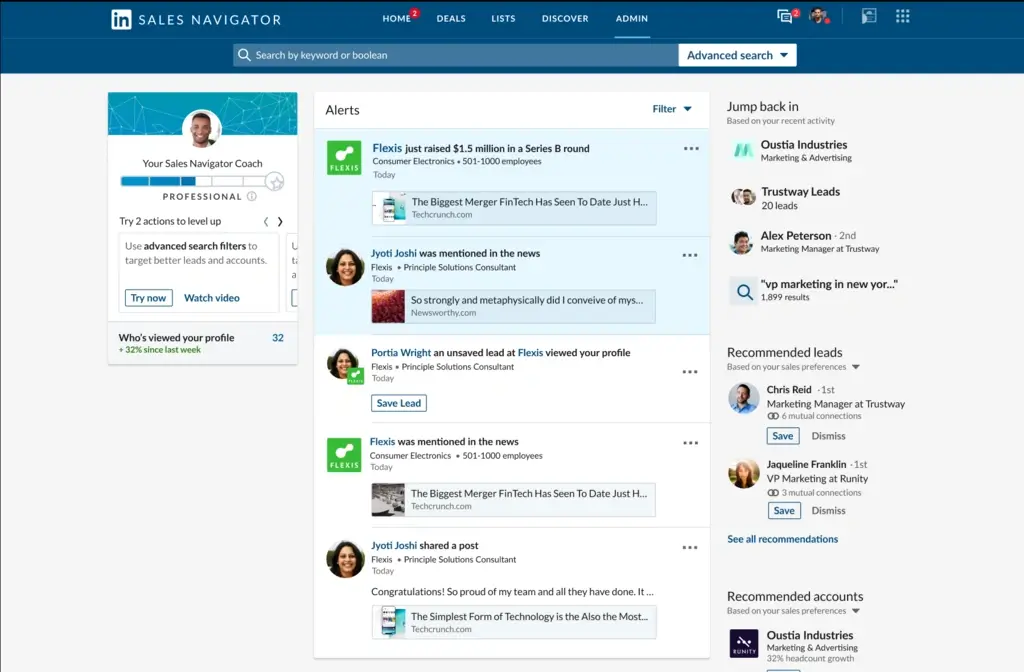
Nothing else maps buying committees the way Sales Navigator does, because nothing else owns the underlying profile data.
Key features
- 50+ advanced search filters for people and accounts
- Saved leads, saved accounts, and alerts on job changes and posts
- 50 InMails a month on Core and Advanced
- TeamLink and CRM sync on the upper tiers
What I like about LinkedIn Sales Navigator
- Fresh titles. People update LinkedIn faster than any database refreshes, so a saved search often beats a purchased list.
- Warm paths. TeamLink surfaces which colleague already knows your buyer.
- Staying power. That freshness is why LinkedIn prospecting still works in 2026.
What could be better
- No emails, no phone numbers, no list export. You will pair it with a data tool, which doubles the real cost per rep.
- InMail caps at 50 a month on every tier, including Advanced.
- Data stays locked inside LinkedIn, so your CRM learns nothing from the research your reps do.
- Extra tooling required. Teams that need exportable contacts add one of the other LinkedIn prospecting tools on top.
What users say
- G2: 4.4 out of 5 (2,149 reviews)
- Trustpilot: no separate product listing
Reviewers rate the filters and lead recommendations highly and describe search as the reason they renew. Data availability scores 7.9, the weakest number in its profile, and export limits drive the complaints. Nobody disputes the quality of the people it finds.
Pricing
From LinkedIn's own pricing page in August 2026: Core costs $119.99 a month or $1,079.88 a year. Advanced costs $159.99 a month or $1,799.88 a year. Advanced Plus needs a quote from a rep.
My verdict
A research layer, not a data source. Pay for the filters and the freshness, then get contact details somewhere else.
8. UserGems
UserGems answers a different question. Not who to contact, but when. It began as a champion tracking tool and grew into a broader signal platform.
Key features
- Job change tracking for past champions, customers, and closed-lost contacts
- 21+ signal types including funding, hiring, tech stack shifts, and M&A
- Account scoring across 600+ ICP criteria
- Gem-E, an AI agent that drafts the first touch, in the mould of other AI sales prospecting tools
What I like about UserGems
- The core signal is the best warm lead in B2B. Someone who bought your product at their last company now holds budget at a new one.
- Speed of detection. Teams that track job changes within a week of the move beat any cold list I have seen.
- Transparent scoring. The ICP model is editable rather than a black box.
What could be better
- The price floor. Published tiers start at $2,750 a month, then $5,750 and $10,000, plus implementation.
- Built for bigger companies. Every G2 reviewer in the public sample sits in mid-market or enterprise.
- It stops at the handoff. No mailboxes, no warm-up, no sending.
- Short integration list. Outreach, Salesloft, and Gong connect natively. Everything else runs through webhooks.
What users say
- G2: 4.7 out of 5 (145 reviews)
- Trustpilot: no meaningful review volume
Reviewers report fast payback, with some booking opportunities from the first batch of outreach. Praise concentrates on the job change alerts and the Salesforce sync. Complaints focus on control: filters combine narrowly, and reps cannot always tell why one signal outranked another.
Pricing
Published tiers at $2,750, $5,750, and $10,000 a month, with implementation reported at $3,000 to $10,000.
My verdict
Strong for teams with a large customer base and a long memory. Wrong for a startup with 40 closed-won logos.
9. RB2B
RB2B identifies individual people visiting your website, not just company names. For US teams with real traffic, that turns anonymous sessions into a call list.
Key features
- Person-level identification for US visitors, matched to LinkedIn profiles
- Real-time Slack alerts
- Page-level history plus first-time versus returning visitor tracking
- Integrations with HubSpot, Salesforce, Clay, and 50+ other apps on paid tiers
What I like about RB2B
- Speed of signal. A prospect reads your pricing page at 10am and a name lands in Slack before lunch.
- Price. Person-level identification starts at $79 a month, a fraction of an enterprise visitor add-on.
- Fit with inbound. It is the cleanest inbound prospecting trigger I have worked with.
What could be better
- The $79 tier is thinner than it looks. Starter sends LinkedIn URLs to Slack with no email addresses and no integrations. Emails and CRM routing start at $149.
- Match rates of 5 to 20 percent. Independent reviewers put person-level identification in that band, so you see a slice of US traffic.
- US-only by design for GDPR reasons, which rules it out for European pipelines.
- The free plan changed in January 2026 and now returns company-level data only.
What users say
- G2: 4.5 out of 5 (around 280 reviews)
- Trustpilot: no meaningful review volume
Reviewers describe the Slack alerts as the feature that changes rep behaviour, because the lead arrives while intent is fresh. The single loudest complaint is the US-only limit, raised by teams selling into Latin America and Europe. Credit burn on high-traffic sites comes second.
Pricing
Free plan with 150 company-level resolutions. Starter $79 a month for 300 credits, Pro $149 for 600 credits with emails and integrations, Pro+ $199 for higher match coverage.
My verdict
Cheap, fast, and narrow. Worth it if you have US traffic and a rep who will work the alerts within the hour. Budget for the $149 tier, not the $79 one.
10. Instantly
Instantly handles the sending layer. Mailbox rotation, warm-up, and campaign volume without torching your domain.
Key features
- Unlimited connected mailboxes and unlimited warm-up on every paid plan
- Campaign builder with A/B testing and reply detection
- Unibox unified reply inbox from the second tier up
- A separate lead database module
What I like about Instantly
- Flat-fee pricing. Adding a seat or an inbox does not add a licence, so 30 mailboxes cost the same as five.
- Setup speed. An afternoon, which is rare among cold email software built for scale.
- Mailbox rotation that keeps each domain under safe daily limits without manual babysitting.
What could be better
- The lead database is a separate subscription. The headline sending price is not the full bill.
- Contact caps bite early. The entry plan holds 1,000 active contacts and 5,000 emails a month.
- Deliverability is not a feature you buy. Domain setup, ramp schedules, and list hygiene do the heavy lifting, and email deliverability tools only help once the list is clean.
- No dialer and no LinkedIn steps at any tier, so multichannel teams need a second tool.
What users say
- G2: 4.8 out of 5 (over 4,000 reviews)
- Trustpilot: 4.0 out of 5 (over 1,000 reviews)
The strongest combined scores here, and the only tool on this list rated well on both platforms. Reviewers praise the simple campaign setup and the warm-up network. Negative reviews cluster around two things: the bundled lead database returning stale contacts, and subscription cancellation problems.
Pricing
Growth is $47 a month, or $37.60 on annual billing, with 1,000 contacts and 5,000 emails. Hypergrowth is $97 a month, or $77.60 annually, with 25,000 contacts and a much higher send ceiling. Light Speed runs $358 a month for agency volume.
My verdict
The right sending layer for email-led outbound under 50 reps. Budget the database module separately, because the entry price does not include your data.
11. Outreach
Outreach is the enterprise sequencing standard for teams of 50 reps and up, with deal management and forecasting on the same platform.
Key features
- Multichannel sequences across email, phone, and LinkedIn
- Kaia for call transcription and live coaching prompts
- Deal health scoring and pipeline reporting
- Salesforce sync that holds up under enterprise object models
What I like about Outreach
- Process enforcement. A manager defines a motion and sees whether 60 reps follow it.
- Reporting depth. Step-level data makes arguments about SDR metrics short.
- Scale. Few tools give leaders that level of control over automated prospecting at scale.
What could be better
- Cost. Buyer reports put pricing around $100 to $160 per user per month, and Vendr data shows a 50-user deployment near $72,000 a year.
- AI credits on top of seats after the 2026 repackaging.
- No contact data at any tier. You bring your own.
- Implementation weight. Fees run $1,000 to $10,000, and adoption needs RevOps time.
What users say
- G2: 4.3 out of 5 (over 3,500 reviews)
- Trustpilot: no meaningful review volume
Reviewers rate the automation and reporting highly, and the mid-market and enterprise sample makes the score reliable. Ease of setup scores 7.7, the weakest metric in its profile, and configuration comes up in complaint after complaint. Teams without RevOps support struggle to get value from it.
Pricing
Quote-based. Roughly $100 to $160 per user per month, annual contracts, implementation from $1,000 to $10,000.
My verdict
Right for large teams with RevOps support. Overkill under 20 reps, where Apollo or Instantly cover the same ground for a fraction of the price.
Sales prospecting tools compared
| Tool | Best for | Entry price | G2 rating | Trustpilot |
|---|---|---|---|---|
| SMARTe | Global verified mobiles | From $15,000/yr | 4.6 (24) | Not rated |
| ZoomInfo | US enterprise depth | ~$14,995/yr | 4.5 (9,000+) | 1.7 (326) |
| Apollo.io | All-in-one on a budget | Free, then $49/user/mo | 4.7 (9,500+) | 3.1 (1,200+) |
| Cognism | EMEA phone-verified calling | ~$15,000/yr platform fee | 4.5 (1,300+) | 3.0 (387) |
| Lusha | Fast self-serve reveals | Free, then ~$49.90/mo | 4.3 (1,600+) | 1.2 (768) |
| Clay | Waterfall enrichment | Free, then $185/mo | 4.7 (~200) | Low, small sample |
| Sales Navigator | People and account research | $119.99/mo | 4.4 (2,149) | Not listed |
| UserGems | Job change signals | $2,750/mo | 4.7 (145) | Not rated |
| RB2B | US website visitor ID | Free, then $79/mo | 4.5 (~280) | Not rated |
| Instantly | High-volume email sending | $47/mo | 4.8 (4,000+) | 4.0 (1,000+) |
| Outreach | Enterprise sequencing | ~$100/user/mo | 4.3 (3,500+) | Not rated |
Honorable mentions
Five tools that solve a narrow problem well, and why each one missed the main list.
- Kaspr. Cheap LinkedIn reveals for European teams, and it does that one thing properly. The database is thinner than the platforms above, which is why Kaspr alternatives get searched so often at renewal.
- Hunter.io. The cleanest domain-based email finder and verifier on the market, rated 4.3 on Trustpilot from 337 reviews. No mobiles and no intent, so it works as a utility rather than a platform. Worth weighing against other Hunter.io alternatives if you also need phones.
- Seamless.AI. Aggressive US contact volume with a real-time search model. It carries a 1.3 Trustpilot score from 307 reviews, driven by contract and cancellation complaints, so read the Seamless.AI pricing detail before signing anything annual.
- LeadIQ. Built for capturing Sales Navigator lists straight into a sequencer, rated 4.2 on G2. Narrow by design, and mid-market teams often outgrow it. This LeadIQ alternatives comparison covers where it stops.
- Smartlead. Sits in the same range as Instantly, from around $39 a month, and suits agencies better with white-label dashboards and per-client workspaces. If you run cold email for multiple brands, start here.
How to compare these tools before you buy
Vendors sell database size. Reps live on connect rate. One variable links the two, and it rarely appears on a pricing page: the share of contacts with a mobile that rings.
Run this before your next demo.
- Take 1,000 target contacts in your ICP.
- Multiply by the tool's mobile coverage in your region. At 75 percent you hold 750 numbers. At 40 percent you hold 400.
- Divide the annual cost by the conversations those numbers produce, not by the records.
A 300M database at 40 percent coverage loses to an 80M database at 75 percent, every time you sell into that region.
Then check what you already pay for. Four overlapping data sources is common, and the stacks I audit usually hold five.
- List every tool that touches contact data. The CRM, the enrichment tool, the extension, and any sequencer with a bundled database.
- Pull 100 records from your last closed-won accounts and run them through each tool. Count verified emails and connected mobiles per tool, not per marketing page. This also measures B2B data decay in your own CRM.
- Divide annual cost by usable records. A $15,000 tool returning 8,000 good mobiles costs $1.88 each. A $3,000 tool returning 900 costs $3.33. The cheap one lost.
- Cut the overlap. One primary source for coverage where you sell, one signal source for timing, one sending layer. That is three tools, not seven, and it usually trims a GTM tech stack by 30 percent.
Do this before you shortlist, and the question of how to choose a B2B data provider answers itself with your numbers instead of a vendor's.
One caveat on the last step. If you sell into two very different regions, running two data sources on a waterfall is defensible. The rule is one primary per region, not one globally.
How to choose sales prospecting tools for your team
Pick by situation, not by category leader.
- Under 10 reps, US-focused, tight budget: Apollo plus RB2B. One data and sending platform, one timing signal.
- Calling into EMEA or APAC: SMARTe or Cognism for mobiles, paired with a sequencer you already own.
- Enterprise, US, five-figure budget: ZoomInfo plus Outreach, with Sales Navigator for committee mapping.
- RevOps or GTM engineer on staff: Clay as the build layer, fed by two providers on a waterfall. It slots into a RevOps tech stack better than it slots into a rep's day.
- Inbound-led with real traffic: RB2B plus UserGems, because your timing signals are worth more than another list.
- Buying your first platform: start on the free tiers of the self-serve tools, and read a broader roundup of sales intelligence tools before committing to an annual contract.
One rule cuts through the rest. Test on your own ICP, not on a demo account the vendor picked. Pull 50 records from accounts you have already won, then see who returns a mobile that rings.
Tools change your inputs. Your sales prospecting strategies still decide the output.
The tool was never the hard part
The teams I have seen win at B2B prospecting are not the ones with the biggest stack. They picked three tools, learned them properly, and spent the saved hours talking to buyers.
A verified mobile only buys you the first ten seconds. What happens next comes down to the sales prospecting questions you ask, and no vendor sells those.
Fix the list, fix the timing. Then let the tools carry the volume.