I have talked to hundreds of SDRs who blame their messaging when sequences bomb. They rewrite the subject line. They swap out the opener. They try a different call to action. But nine times out of ten, the messaging is fine. The problem is the list they are sending to.
Here is what I see constantly. An SDR builds a "database" by dumping 3,000 names into a spreadsheet. Half of them have wrong job titles. A quarter have emails that bounce. A third of those people have left those companies entirely. Then they wonder why their connect rate is 2%.
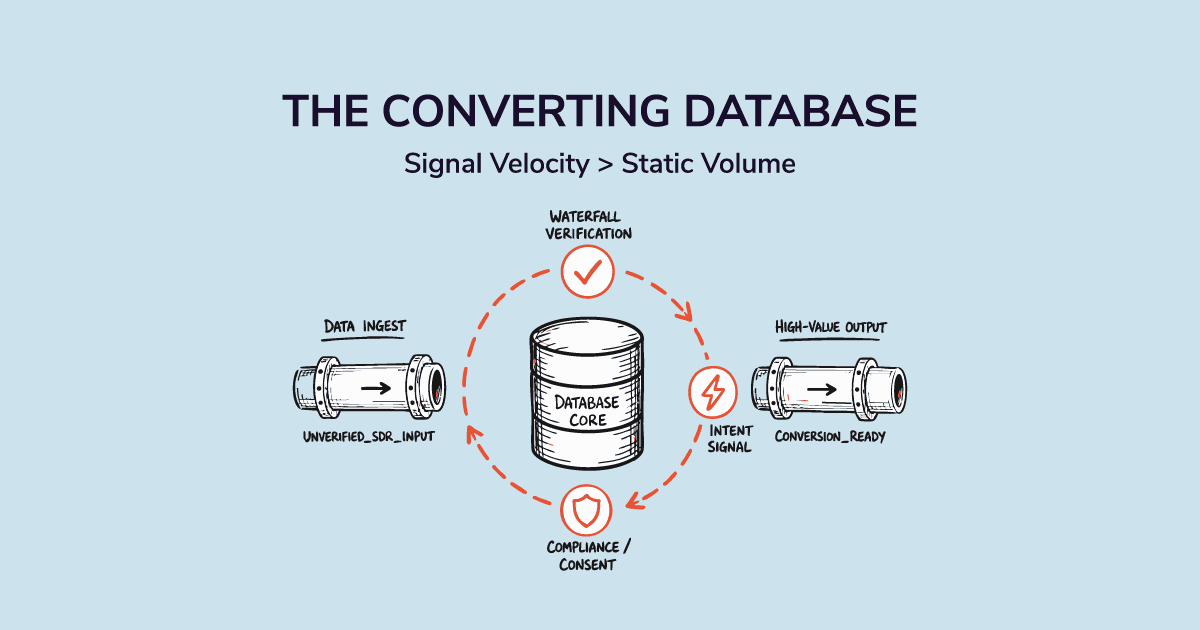
A prospect database is not a list. A list is static. A database is living. It has structure, segments, and a maintenance rhythm. When you build it right, your sequences stop feeling like cold outreach and start feeling like precision targeting.
This guide covers how to build a prospect database from scratch and how to keep it accurate long enough to actually drive pipeline.
Let's get into it.
Start With Your ICP Before You Touch Any Contact Data
Most teams build their database backwards. They pull a big list, load it into the CRM, and then figure out who they actually want to reach. That is not prospecting. That is data hoarding.
The ICP comes first. Every time.
Define the Account Criteria First
Start at the company level. What does a perfect account look like? Get specific. Not just "SaaS companies" but "B2B SaaS companies with 50 to 500 employees, using Salesforce as their CRM, and selling to enterprise customers." Your firmographic data in prospecting does the heavy lifting here. Industry, company size, annual revenue, geography, and growth stage are the filters you apply before a single contact goes into your database.
Then Layer in the Contact Criteria
Account fit is step one. Contact fit is step two.
Once you know which companies belong in your database, define who inside those companies you want to reach. Job title, seniority level, department, and buying committee role. For most outbound teams, you target at least two to three personas per account. The decision maker, the champion, and the technical evaluator.
Validate Your ICP Against Your Best Closed Deals
Here is what most teams skip. Before you lock in your ICP criteria, go back to your last 20 closed won deals and look for patterns. What did those companies have in common? Which personas actually signed? Which companies moved fastest?
Your ideal customer profile for sales should be built from evidence, not assumptions. If your best customers are VP-level buyers at 200-person SaaS companies using HubSpot, that is your signal. Use it. And if you want to see how ICP thinking shapes day-to-day outbound execution, read our piece on ICP in your outbound sales motion.
How to Build a Prospect Database From Scratch
Now you know who belongs in your database. The next step is finding them and getting them in.
Source 1: A Verified B2B Data Platform
This is the highest-leverage source for most outbound teams. A good B2B contact database provider lets you apply your ICP filters and pull verified contact records with emails, direct dials, and firmographic details already attached.
The key word is verified. A lot of platforms sell you a snapshot of contact data that was accurate 18 months ago. You want real time verification, not a static export.
SMARTe gives you access to 289M+ verified B2B contacts across 200+ countries. The platform verifies data at the point of use, not in batch cycles, so what you pull is current. For US accounts, 75%+ of contacts include verified direct dials. That matters when your SDRs are making calls. If your reps are dialing heavily, also check out our guide to building a cold calling database for outbound. And for the structural setup once you have your contacts, our guide on how to build a CRM database covers the right way to do it.
Source 2: LinkedIn and Browser-Based Prospecting
LinkedIn is a powerful sourcing layer, especially for niche verticals or hard to find personas. The friction is manual copy and paste. Every minute spent transcribing contact details is a minute not spent selling. Browser extensions that capture verified emails and mobile numbers directly from LinkedIn solve this. Check out our full breakdown of LinkedIn prospecting workflows for specifics on how to make this work at scale.
Source 3: Intent Signals and Buying Triggers
This one changes the quality of your database completely.
Not every company that fits your ICP is ready to buy right now. Intent data for sales teams tells you which accounts are actively researching topics related to your product. Buying signals that matter and buying triggers to watch tell you which accounts just had an event that makes them more likely to buy. Think funding announcements, leadership changes, headcount spikes, and tech stack additions.
When you use these signals to decide who enters your database, you prioritize pipeline that is actually ready to move. Not just a list of accounts that fit your ICP on paper.
Source 4: CRM Win Data and Warm Referrals
Your existing CRM is a source too. Past conversations, lost deals that went dark, former champions who switched companies. These are warm contacts who already know your brand. They deserve a separate segment in your database, not a cold sequence.
How to Segment Your Prospect Database for Outbound
Here is something almost no one talks about when they write about prospect databases. Building the database is step one. Segmenting it is step two. And segmentation is what turns a contact list into an actual outbound asset.
Firmographic Segmentation
Group your prospects by company characteristics. Industry, size, geography, and growth stage. This is the baseline layer. It lets you run industry-specific sequences, tailor case studies to verticals, and route accounts to the right reps based on territory. Understanding the difference between firmographic and technographic data helps you decide which layer to prioritize for your specific motion.
Technographic Segmentation
This is the layer most outbound teams ignore. Knowing that a prospect uses Salesforce, HubSpot, or a specific data tool tells you something real about their budget, their workflow, and their buying behavior. If you sell a product that replaces or integrates with specific tools, technographic segmentation strategy is not optional. It is how you find replacement opportunities and complementary fit. Our guide to technographics data for targeting shows you exactly what signals to look for.
Intent and Behavioral Segmentation
Which prospects in your database are showing active buying signals right now? Which ones visited your pricing page? Which ones downloaded a competitor comparison?
Intent and behavioral data let you create a hot segment inside your database. This is the group your SDRs should hit first, every week, before touching anything else.
Stage-Based Segmentation
Not every prospect is at the same point in their journey. Cold prospects get an introductory sequence. Warm prospects get a different approach. Prospects who went dark six months ago get a re-engagement play. Stage-based segmentation makes sure each group gets the right message at the right time. Without it, you blast the same sequence to everyone and wonder why response rates are flat. See our guide to building a clean prospecting list for more on structuring your list before segmenting it.
What to do: Before you launch any sequence, check which segment each prospect belongs to. Cold, warm, re-engage, or hot intent. Then match the sequence to the segment. One size does not fit all.
The Real Cost of a Stale Prospect Database
Let me give you a number that should make you stop and think.
HubSpot reports that B2B contact data decays at a rate of 22.5% per year. That means nearly one in four contacts in your database will be wrong by next year. Wrong email. Wrong job title. Wrong company. Just wrong.
Gartner puts the global business data decay rate at approximately 3% per month. That is not a future problem. That is a problem happening right now, in your CRM, while you are reading this.
And it compounds. 30% of employees switch jobs every year. When someone changes roles, their email changes, their phone number changes, their title changes. Sometimes all three at once.
Read our deep dive on how B2B data decay affects pipeline if you want the full picture on what this costs your team in real dollars.
What Data Decay Actually Looks Like in Practice
You launch a campaign. You get a 45% bounce rate on day one. Your sender reputation takes a hit. Gmail starts routing your emails to spam. Now the next campaign suffers too, even if the data is cleaner. Or an SDR dials a number, gets a disconnected message, and burns five minutes updating the record manually. Multiply that by 50 dials a day. Our breakdown of what bad CRM data costs your team puts real numbers on this problem.
Three Signals That Tell You a Record Is Dead
A record is likely dead when any of these happen:
- The email has hard bounced at least once
- The contact's LinkedIn profile shows a new employer
- The phone number disconnects on the first dial
If any of these hit, that record needs to be updated before anyone touches it again.
Why Static Lists Kill Sender Reputation and Connect Rates
An unverified database is a liability. High bounce rates hurt your domain score. Low connect rates burn your SDRs' time and morale. And once your domain gets flagged, recovering your sender reputation takes weeks, not days.
This is not a data problem you can fix later. You fix it before the campaign goes out.
Tips to Maintain a Prospect Database That Stays Clean
This is the part most teams skip. They build the database, load it up, and never maintain it. Six months later, they wonder why their sequences are underperforming.
Maintenance is not a one time event. It is a rhythm.
Set a Quarterly Data Hygiene Routine
Every quarter, run a data audit. Flag records that have not been engaged in 90 days. Remove hard bounces. Update job titles for contacts you have not reached in six months. You do not need to delete bad records immediately. Flag them as stale, move them to a separate segment, and run them through an enrichment pass before deciding what to do. Our guide to CRM data enrichment at scale covers how to structure that enrichment pass efficiently.
Use Job Change Tracking as a Maintenance Signal
This is the single most underused tactic in B2B prospecting maintenance. When a champion or a decision maker changes jobs, two things happen at once. The old record goes stale. And a new opportunity opens up at their new company. Job change tracking tools alert you the moment a contact switches employers. That alert triggers two actions: update the old record and add the new contact to a warm segment. Here is how tracking job changes in real time works in practice.
What to do: Set up job change alerts for every Tier 1 account in your database. When an alert fires, reach out to the contact at their new company within 48 hours. They know your brand. The timing is right. This is one of the highest-converting touches in outbound.
Enrich Records Before You Reach Out
Most teams enrich reactively. They get a bounce, go looking for the right email, and find it three days later. The moment is gone. Enrich proactively. Before any sequence goes out, run the target list through an enrichment pass. Verify emails. Confirm mobile numbers. Update job titles. This takes minutes with the right tools. See our breakdown of the B2B data enrichment process, our list of the best data enrichment tools, and what lead enrichment for outbound actually looks like inside a real sales workflow.
SMARTe's CRM enrichment delivers 90%+ match rates and real time validation, not batch processing. So the data you get back is current, not a snapshot from six months ago.
Build a Re-engagement Segment for Cold Records
Not every stale record is dead. Some prospects just were not ready when you first reached out. Conditions change. Budgets open up. New pain emerges. Build a dedicated re-engagement segment in your database. Run a light touch sequence every quarter. Something short, human, and low pressure. You will be surprised how many deals come back from this pile. Make sure those emails actually land by checking your list against solid email verification tools for campaigns before you send.
Common Mistakes That Ruin a Prospect Database
I have seen teams make the same mistakes over and over. Here are the three that hurt the most.
Treating Data Like a One Time Download
You buy a list. You use it. You move on. That is the most expensive mistake in outbound sales.
Data is not a one time purchase. It is a living asset that needs ongoing investment. The teams that treat their prospect database as a finished product end up with a graveyard of stale records and wonder why their numbers are falling.
Building by Volume Instead of Fit
Bigger is not better. A database of 5,000 well qualified, well segmented prospects outperforms a list of 50,000 random contacts every single time.
When you optimize for volume, you take shortcuts on ICP criteria. You add accounts that kind of fit. You lower the bar on contact quality. And the whole database suffers for it.
Quality beats quantity. Always.
Skipping Compliance Until It Is Too Late
GDPR covers EU contacts. CCPA covers contacts based in California. Both have teeth. Sending outbound emails to contacts without appropriate consent can get your domain blacklisted and your company fined. Make compliance part of your database setup, not an afterthought. Use verified, compliant data sources, document your data origins, and give contacts a clear opt-out path. Our guide to compliant B2B data practices is a good place to start.
Your Prospect Database Is Infrastructure, Not a List
Here is the thing that most prospect database guides will never tell you.
The database is not the destination. The database is infrastructure.
Teams that treat their prospect database as a strategic asset, built carefully, segmented intelligently, and maintained consistently, outperform everyone else in their market. Not because they have more contacts. Because they know exactly who they are reaching, why that person is relevant right now, and what to say to them.
A great sequence with bad data is still a wasted sequence. But a focused, well-maintained database turns even an average sequence into something that books meetings.
Book a demo and we'll run a sample match against your own target accounts, so you can see what a verified, real time prospect database feels like to work from.