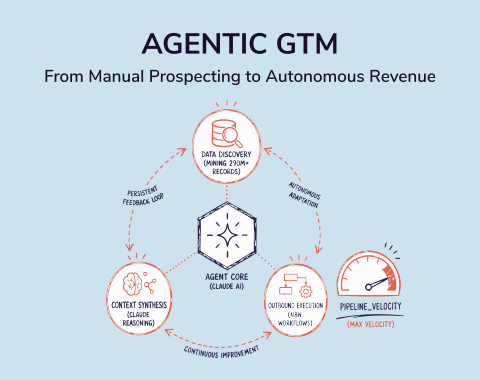
There are two types of teams right now.
The first type spends hours every week copying data between tools, manually updating their CRM, and chasing status updates in Slack. The second type built a few smart automations and freed up half their week for actual selling, strategizing, and closing.
AI workflow automation is what separates them. And honestly, the gap is growing fast.
I've gone deep on the tools in this space. Not just the feature lists, but what they actually do for GTM teams, SDRs, RevOps, and marketers trying to move faster without burning out. If you're wondering which platform deserves a spot in your GTM tech stack, this is the guide for you.
Let's get into it.
What Is AI Workflow Automation?
Before I get into the tools, here's a quick definition.
Traditional automation moves data from Point A to Point B. An email comes in, a row gets added to a spreadsheet. That's useful, but it's dumb. It doesn't think.
AI workflow automation goes further. It can read an email, understand the intent, decide what to do next, and then take action across multiple tools. It handles unstructured data. It makes judgment calls. And it does this at a scale no human can match.
For sales and RevOps teams, this matters a lot. Think about how much time gets lost to manual research, stale CRM records, and repetitive outreach prep. That's exactly the kind of work AI sales tools and automation platforms are now replacing.
Okay, here's my breakdown of the best options available today.
1. SMARTe
Best For: GTM, sales, and RevOps teams who need clean, verified B2B data powering every automated workflow
Most teams building automation workflows obsess over the tools and forget about the data. That's backwards. Every pipeline in this list such as n8n, Clay, Zapier depends on accurate contact data to function. Stale emails bounce. Outdated roles waste reps' time. Wrong numbers kill call cycles. SMARTe fixes that at the source. It's a B2B sales intelligence platform with 289M+ verified contacts, 75%+ US mobile coverage, and real-time verification that keeps data fresh at the point of use, not just at the time of export.
What makes it directly relevant to AI workflow automation is the SMARTe MCP server. It gives AI tools like ChatGPT and Claude live access to verified contact and company data. No CSV exports. No copy-pasting into prompts. You connect it once, and your AI assistant can pull verified contacts, firmographics, and intent signals in real time. For teams doing AI sales prospecting, that's the difference between automation that works and automation that wastes cycles on bad data.
Top Features:
- 289M+ verified B2B contacts across 200+ countries
- 75%+ US mobile coverage and 50%+ global direct dial coverage
- SMARTe MCP Server for real-time data access inside ChatGPT, Claude, and other LLMs
- Real-time verification (not a static database refreshed on a schedule)
- Bombora intent signals for identifying accounts actively in a buying cycle
- AI Agents for buying group mapping and automated account research
- CRM enrichment with 90%+ match rates and automated job change tracking
- Native Salesforce and Outreach integrations plus open API
- Browser extension for capturing verified contacts from LinkedIn
What Is Good:
- 75%+ US direct dial coverage is significantly above the industry average
- MCP integration lets AI assistants run prospecting workflows with live, verified data
- Real-time verification means less data decay compared to batch-processed databases
- Strong international coverage in LATAM and APAC where most competitors are thin
- No per-seat pricing, so the whole team shares one credit pool
- SOC 2 Type II, GDPR, and CCPA compliant
What Could Be Better:
- Not a standalone workflow builder, it's the data layer that powers other tools
- Enterprise only from $15,000 a year, so there's no self-serve tier for smaller teams
Pricing:
- Enterprise only, from $15,000/year
- Credits start at $0.30 each and fall with volume, reaching $0.20 at 1M credits
- No per-seat cost, one shared credit pool across the team
Book a demo to get a quote based on your credit volume.
Where SMARTe Fits in the Automation Stack
Think of SMARTe as the data layer underneath every other tool on this list.
Automation tools move data. They route it, enrich it, sequence it, and trigger actions off it. But none of that matters if the underlying contacts are wrong. SMARTe is what ensures the data feeding your workflows is verified, current, and complete.
The MCP angle is worth understanding properly. Most teams using ChatGPT or Claude for sales research are still doing it manually, pasting company names into a chat window and getting back generic summaries. SMARTe's MCP server changes that. Your AI assistant gets live access to verified contact data and company signals without any manual steps. If you want to understand how that plays out in practice, the ChatGPT for sales and Claude prospecting pages break it down in detail.
For any team serious about building an automated GTM motion, SMARTe isn't optional. It's the foundation.
Rating: 4.5/5
2. n8n
Best For: Technical teams and developers who want full control and deep AI capabilities
n8n is an open-source workflow automation platform that has been gaining serious traction, and for good reason. It lets you self-host your automations on your own servers, which means your data never touches a third-party cloud. For teams handling sensitive prospect data or working in regulated industries, that alone is a huge deal. n8n ships with 70+ dedicated AI nodes and native LangChain integration, which means you can build sophisticated multi-step agent workflows that most cloud-only platforms simply cannot match.
Top Features:
- 70+ AI nodes with native LangChain and vector database support
- Self-hosting option for full data sovereignty and privacy control
- Execution-based pricing (a 20-step workflow costs the same as a 2-step one)
- Support for custom JavaScript and Python directly inside workflows
- 400+ native integrations plus open HTTP node for any API connection
- Visual workflow builder with branching, looping, and conditional logic
- RAG (retrieval-augmented generation) workflow support
- Active community with 4,000+ workflow templates
What Is Good:
- Dramatically cheaper at scale because pricing is per execution, not per step
- Best AI agent architecture in the no-code space right now
- Full data residency control (critical for GDPR and compliance-heavy teams)
- You can run private LLMs alongside your workflows
- Free self-hosted version with unlimited executions
What Could Be Better:
- Steep learning curve for non-technical users
- Fewer native integrations compared to Zapier's 8,000+
- Self-hosting requires server management knowledge
- Cloud-hosted version has no free tier (only a trial period)
Pricing:
- Self-hosted: Free (open-source, unlimited executions)
- Cloud Starter: Around $20/month
- Cloud Pro: Around $50/month
- Enterprise: Custom pricing
Why n8n Stands Out for GTM Teams
Here's what I find genuinely exciting about n8n for sales and RevOps use cases. Most teams don't realize that n8n can plug directly into your CRM, pull intent signals, run AI enrichment on incoming leads, and push the enriched record back to Salesforce or HubSpot. All in one workflow. No manual steps.
It works well with tools like OpenAI, Anthropic, Mistral, and even self-hosted models. If you're building a lead scoring agent or an automated research workflow for your SDRs, n8n gives you more horsepower than anything else on this list. I've seen teams use it to automatically prep account summaries before discovery calls. That's a real time-saver.
The honest caveat: if your team doesn't have someone comfortable with JSON and APIs, n8n will feel overwhelming at first. It rewards technical investment. But once you're in, the ceiling is very high.
Rating: 4.5/5
3. Zapier
Best For: Non-technical teams who want to automate simple to mid-complexity tasks quickly
Zapier is the most recognized name in automation. It built the no-code automation market and still dominates it in terms of sheer breadth. With 8,000+ integrations, if a SaaS tool exists, Zapier almost certainly connects to it. It recently added AI features including Zapier Copilot (which builds automations from plain English prompts) and Zapier Agents (for autonomous multi-step task execution). For teams who want to get an automation running in under an hour, Zapier is still the fastest path.
Top Features:
- 8,000+ pre-built app integrations (the largest library in this category)
- Zapier Copilot: build workflows by describing them in natural language
- Zapier Agents for autonomous multi-app task execution
- Tables, Interfaces, and data tools for richer automation logic
- AI Copilot that generates Zaps from conversational prompts
- Multi-step Zaps with branching paths, filters, and conditional logic
- Extensive documentation and templates for fast onboarding
What Is Good:
- Fastest time-to-first-automation in this category, often under 30 minutes
- Covers practically every mainstream and niche SaaS tool
- No technical background needed
- Trusted by 69% of Fortune 1000 companies
- Great for simple email, CRM, and Slack-based automations
What Could Be Better:
- Pricing gets expensive fast. Each action in a workflow counts as a separate task
- Limited customization for complex AI agent workflows
- Not ideal for high-volume automations at scale
- AI capabilities are more surface-level compared to n8n
- Enterprise security and governance require higher-tier plans
Pricing:
- Free: ~100 tasks/month
- Professional: ~$19.99/month (billed annually), ~750 tasks/month
- Team: ~$69/month (billed annually), 2,000+ tasks/month
- Enterprise: Custom
Why Zapier Still Belongs in the Conversation
Zapier is the right choice when speed and simplicity matter more than depth. For a sales team that wants to automatically log new Typeform leads into HubSpot and send a Slack notification to the SDR, Zapier is perfect. No setup time. No learning curve. Done in 20 minutes.
Where it breaks down is when you start building more intelligent workflows. The per-task pricing model punishes complexity. A 15-step workflow that runs 1,000 times a month gets expensive quickly.
Still, for teams newer to automation or with limited technical resources, Zapier earns its place. And for email marketing automation use cases where you're just connecting a few apps, it's genuinely great.
Rating: 4/5
4. Gumloop
Best For: Growth and marketing teams who want AI built into every step of their workflow, not just added on top
Gumloop is an AI-native automation platform. That label gets thrown around a lot, but Gumloop earns it. In tools like Zapier or Make, AI is a node you add to a step. In Gumloop, AI logic can live inside every node. You can analyze text, score data, generate copy, and make conditional decisions all on the same visual canvas without switching to an external API or wiring up a separate model call. It's backed by $50M from Benchmark and used by companies like Shopify, Gusto, and Ramp. The team recently shipped Gummie, a meta-agent that builds entire workflows from plain English descriptions.
Top Features:
- Visual node-based builder where every step can contain AI logic
- Gummie meta-agent: describe what you want automated, it builds the workflow
- Built-in LLM support for GPT-4, Claude, and other models without managing API keys
- Chrome extension for triggering workflows directly from the browser, including LinkedIn scraping
- Subflows for building reusable logic components inside larger automations
- 125+ integrations including Salesforce, HubSpot, Slack, and Google Workspace
- Unlimited nodes and flows across all paid plans
- SOC 2 Type II, GDPR, and HIPAA compliant, with VPC deployment available
What Is Good:
- AI is a first-class part of every workflow, not an afterthought
- Gummie makes it accessible for non-technical users who think in plain English
- Chrome extension is genuinely useful for LinkedIn prospecting and web scraping
- No per-node AI fees, LLM calls are included in the credit model
- Strong compliance posture for enterprise teams handling sensitive data
What Could Be Better:
- Credit costs escalate fast when running AI-heavy or high-volume workflows
- 125+ integrations lags behind Zapier and Make significantly
- Learning curve is real, you still need to think in systems and workflow logic
- Monitoring and analytics are basic compared to more established platforms
Pricing:
- Free: 14-day trial, 2,000 credits
- Starter: ~$37/month
- Pro: ~$97/month
- Team and Enterprise: Custom
Where Gumloop Shines
Gumloop is the tool I'd recommend to a growth or marketing team that wants AI doing real cognitive work inside their automations, not just moving data between apps.
Here's a practical example. Take a list of prospects from a Google Sheet. Run each one through an AI node that pulls recent news and summarizes their company context. Generate a personalized first line for outreach. Push the result into HubSpot. The whole thing runs automatically, no code, no developer. That kind of workflow is painful to build in Make and awkward in Zapier. In Gumloop, it's straightforward.
The Chrome extension adds another useful layer for individual reps. Spot a LinkedIn profile worth targeting? Click the extension. It triggers an enrichment workflow and drops the contact into your outreach queue.
Credit costs are the honest gotcha. Advanced LLM calls are more expensive per node, and those credits disappear quickly at scale. Plan your workflows around which steps actually need GPT-4 and which can use a lighter model. But if AI doing the actual thinking is what you need, Gumloop delivers it.
Rating: 4/5
5. Relay.app
Best For: Teams that need automation with human oversight built in, including approvals, collaborative handoffs, and review checkpoints without building workarounds
Most automation platforms treat human involvement as the enemy. The goal is to remove people from the process. Relay.app disagrees with that premise, and it shows in how the product is built. You can design a workflow that runs automatically up to a decision point, then pauses, assigns a task to the right teammate, and waits for their input before continuing. No email notification hacks. No Google Form workarounds. The approval step is native. For teams where some decisions genuinely need a human in the loop, that's a real structural advantage.
Top Features:
- Native Human-in-the-Loop steps, so you can pause any workflow for human approval or input
- AI actions using GPT-4o, Claude 3.5 Sonnet, and Google Gemini built in
- Branching paths with conditional logic for multi-outcome workflows
- Shared team inbox for tracking and completing collaborative tasks
- 100+ integrations including HubSpot, Salesforce, Slack, Notion, and Google Workspace
- All integrations included on every plan, no connector paywalls
- AI steps for summarization, data extraction, classification, and content generation
- Clean visual builder with a minimal learning curve
What Is Good:
- Human-in-the-loop is native and polished. Nobody else handles this as well
- Easiest UI in this category, non-technical users are productive within an afternoon
- All integrations available on every plan, including free
- Built-in AI credits mean no external API keys to manage
- Responsive support team with a fast shipping cadence
What Could Be Better:
- 100+ integrations is small compared to Zapier and Make
- Cloud-only, with no self-hosting for teams with data residency requirements
- Hard monthly step caps can pause active workflows mid-month if you hit the limit
- Agentic capabilities (memory across runs, adaptive planning) are limited
- No workflow export or import, which creates friction for consultants or team migrations
Pricing:
- Free: 200 steps/month, 500 AI credits, all integrations included
- Professional: From $19/month (750 steps, 5,000 AI credits)
- Team: From $59/month (2,000 steps, 5,000 AI credits, up to 10 users)
- Enterprise: Custom
Where Relay.app Earns Its Place
Most automation tools are built for a single person's workflow. Relay is built for how teams actually operate.
Think about a contract discount approval. An opportunity comes in above a certain deal size. The AE needs a sign-off before sending the proposal. In Zapier or Make, you're stitching together email alerts and Slack messages and hoping someone catches it. In Relay, you build one workflow with a pause step, assign it to the right approver, and the automation holds. Clean and auditable.
That same logic applies to content reviews before outreach goes out, RevOps sign-offs on CRM updates, or any process where a human decision sits in the middle of an otherwise automated flow. Relay handles all of it without the workarounds.
The integration list is the honest limitation. If your stack includes niche or industry-specific tools, you may need a workaround. But if your team runs on HubSpot, Salesforce, Slack, and Google Workspace, Relay covers everything you need.
For pure automation horsepower, choose n8n or Clay. But if your workflows need human judgment built in, Relay is the right call.
Rating: 4/5
6. Make (formerly Integromat)
Best For: Teams that need visual, multi-step workflows without paying Zapier prices
Make sits right between Zapier and n8n in terms of complexity and power. Its canvas-based, drag-and-connect interface is one of the clearest visual workflow builders out there. You can see exactly how data flows across every step, which makes it much easier to debug and build complex logic than Zapier's linear editor. Make recently launched AI Agents (via its Maia assistant) which can build scenarios from natural language prompts. And importantly, it costs about a third of what Zapier charges for similar operations.
Top Features:
- Visual scenario builder with drag-and-connect interface and real-time data preview
- Maia AI assistant for building workflows from natural language
- 1,500+ app integrations with strong API and HTTP modules
- Operations-based pricing (each module step costs one operation)
- Advanced error handling, iterators, and aggregators for complex logic
- Parallel processing and branching paths
- AI Agents feature (launched October 2025)
- Strong data transformation tools
What Is Good:
- Best price-to-power ratio in the no-code automation space
- Visual builder makes complex workflows easy to understand and audit
- More flexible data transformation than Zapier
- Generous free tier (1,000 operations/month)
- Strong community and template library
What Could Be Better:
- Operations pricing can add up for workflows with many steps
- AI capabilities are less advanced than n8n
- Smaller integration library than Zapier
- Steeper learning curve than Zapier for first-time users
- Enterprise governance features lag behind Zapier
Pricing:
- Free: 1,000 operations/month
- Core: ~$9/month (billed annually)
- Pro: ~$16/month (billed annually)
- Teams: ~$29/month (billed annually)
- Enterprise: Custom
Why Make Is Worth a Serious Look
Make is the tool I'd recommend most often for mid-size sales and marketing teams who have outgrown Zapier but don't want to go full-developer-mode with n8n.
Its visual builder is genuinely great for building outbound automation workflows. You can map out a sequence where a new lead from a webform gets enriched, scored, routed to the right SDR queue, and logged in your CRM, all in one scenario. You see every step on a canvas. Editing is intuitive.
It connects well with tools like Salesforce, HubSpot, Slack, and Google Workspace. For teams building outbound prospecting workflows that need more logic than Zapier can handle, Make is a smart middle ground.
Rating: 4/5
7. Clay
Best For: GTM engineers, RevOps, and SDR teams building automated prospecting and enrichment workflows
Clay is not a general automation tool. It's purpose-built for GTM. And in that lane, it's the most powerful thing I've seen. Clay pulls from 150+ data providers, uses its AI agent (Claygent) to research prospects from the web, and lets you build waterfall enrichment logic that automatically falls back to the next provider if one fails. The result is a flexible, logic-based enrichment engine that turns a raw list of domains into a fully enriched, scored, and segmented prospect table. Without a developer.
Top Features:
- 150+ data provider integrations in one unified workspace
- Claygent AI agent for custom web research on any prospect or company
- Waterfall enrichment logic (fallback across multiple providers automatically)
- AI Formula Generator for building logic without code
- Job change and buying signal tracking
- Native sequencer for email outreach built into the platform
- CRM sync with Salesforce and HubSpot
- MCP server support for connecting Gong, Google Docs, and other tools
What Is Good:
- Best-in-class for GTM data enrichment workflows
- Claygent can find unique data points no standard database has
- Waterfall approach maximizes data coverage while minimizing credit waste
- Flexible enough to build almost any GTM workflow logic
- Works natively with SMARTe, Apollo, Clearbit, and 100+ other providers
What Could Be Better:
- Significant learning curve, especially for non-technical reps
- Credit costs can escalate quickly for large volumes
- Pricing is high for smaller teams
- Not the right tool if you just want a simple plug-and-play solution
- CRM integrations (Salesforce, HubSpot) are locked to higher-tier plans
Pricing:
- Free: 100 data credits/month
- Launch: Starting at $185/month (2,500 credits, 15,000 actions)
- Growth: Starting at $495/month
- Enterprise: Custom
Why Clay Is a GTM Team's Best Friend
Clay changed how outbound prospecting works. Full stop.
Before Clay, an SDR spent hours manually researching accounts, enriching lists in one tool, copying to another, and cleaning the data before sequencing. Clay automates all of that. You set the logic once. The workflow runs continuously.
Here's a real example. You take a list of company domains. Clay finds the decision-makers, enriches their contact info using a waterfall across SMARTe, Apollo, and Clearbit, scores each lead by ICP fit, and routes high-priority accounts directly into your outreach sequence. That entire process used to take an SDR two full days. With Clay, it runs overnight.
SMARTe integrates directly with Clay, which means you can layer our 289M+ verified contact database right into your enrichment logic. If you're running Clay data enrichment workflows, SMARTe is one of the strongest data sources you can pull from.
The learning curve is real. If your team has a RevOps person or a GTM engineer, Clay is a no-brainer. If you don't, budget for some ramp-up time. It's worth it.
Rating: 4.5/5
8. IFTTT
Best For: Individuals and small teams seeking simple, cost-effective automation for consumer apps and IoT devices with AI.
IFTTT (If This Then That) is the intuitive veteran of the automation space. While others skew toward complex enterprise workflows, IFTTT excels at connecting 1,000+ apps and physical hardware. Its native AI services, for summarization and content generation, make it a sleeper hit for GTM teams needing lightweight, set-it-and-forget-it distribution.
Top Features:
- 1,000+ integrations including ChatGPT, Claude, and Gemini
- AI Content Creator and AI Summarizer nodes
- Multi-step Applets with JavaScript filtering
- Native mobile app for location-based triggers
What Is Good:
- Lowest barrier to entry; highly intuitive UI
- More affordable than Zapier for simple tasks
- Unrivaled for connecting physical devices (IoT)
What Could Be Better:
- Free tier is limited to 2 Applets
- Basic data mapping compared to Make or n8n
Pricing:
- Free: $0, 2 Applets
- Pro: From $2.99/month, 20 Applets
- Pro+: From $8.99/month, unlimited Applets
Why IFTTT Stands Out
IFTTT is perfect for those who want AI automation without the learning curve. Whether summarizing news with GPT-4 or syncing a smart office, it delivers value for the price of a coffee.
Rating: 4/5
9. HubSpot Workflows
Best For: Marketing and sales teams already running on HubSpot who want native automation without switching tools
HubSpot Workflows is not a standalone automation platform. It's the automation engine baked inside HubSpot's CRM. But it deserves a spot on this list because for HubSpot users, it eliminates the need for a third-party tool entirely. You can build multi-step automated workflows that fire based on contact properties, deal stages, form submissions, email behavior, and dozens of other triggers, all without leaving your CRM. HubSpot has added AI features including AI-assisted workflow building and Breeze AI agents for more autonomous marketing and sales tasks.
Top Features:
- Native CRM automation without any third-party tool
- AI-assisted workflow builder (Breeze Copilot)
- Contact-based, deal-based, and company-based triggers
- Automated lead nurturing sequences tied to lifecycle stage
- Enrollment criteria with behavioral and property-based logic
- Email send optimization powered by AI
- Native integration with HubSpot CRM, Sales Hub, and Marketing Hub
- Reporting built directly into each workflow
What Is Good:
- Zero data migration headaches (everything lives in one platform)
- Native workflows tightly connected to CRM records and deal stages
- Great for lead nurturing and lifecycle automation
- Reporting on workflow performance is built in
- Easy to use for non-technical marketers and SDRs
What Could Be Better:
- Only works inside the HubSpot ecosystem (not a general automation tool)
- Advanced features require higher-tier HubSpot plans (which are expensive)
- Limited flexibility compared to n8n or Make for complex logic
- AI capabilities are still catching up to standalone automation tools
- Getting value out of it requires substantial HubSpot adoption across your team
Pricing:
- Included in HubSpot's Marketing Hub and Sales Hub plans
- Starter: From $15/month/seat
- Professional: From $90/month/seat
- Enterprise: From $150/month/seat
Why HubSpot Workflows Makes Sense for the Right Team
If your team already lives in HubSpot, this is the first automation tool you should be using. It's already there. No integration setup. No extra subscription. Just build the workflow.
For b2b lead generation teams using HubSpot as their CRM, automating lead scoring, lifecycle stage transitions, and follow-up sequences inside the platform is genuinely powerful. You can enroll a lead in a nurture workflow the moment they download a piece of content, then automatically alert the SDR when they hit a score threshold.
That said, HubSpot Workflows is not where I'd go if I need complex data enrichment, multi-provider fallback logic, or deep AI agent capabilities. For those use cases, you need Clay or n8n.
Rating: 3.5/5
10. Lindy
Best For: Teams that want to delegate recurring tasks to AI agents with minimal setup
Lindy takes a different approach to automation. Instead of connecting triggers and actions, you define goals. You tell Lindy "qualify leads from my inbox and update the CRM" and it figures out how to execute that across Gmail, HubSpot, and Slack. Think of it less like building a workflow and more like onboarding a digital assistant. Lindy uses a credit-based model and connects to 50+ tools with a growing library of pre-built agents (called Lindies) for common use cases.
Top Features:
- Goal-based AI agent setup (describe what you want, not how to do it)
- Pre-built Lindies for email triaging, meeting prep, lead qualification, and more
- 50+ integrations including Gmail, HubSpot, Notion, and Slack
- Context-aware decision-making across multiple tools
- No-code setup that most non-technical users can handle in under an hour
- Credit-based pricing with a generous free tier
- Team collaboration features for shared agents
What Is Good:
- Fastest time-to-value for AI agent automation
- No workflow building required, just describe the goal
- Great for inbox management, scheduling, and CRM updates
- Works immediately for non-technical users
- Strong for personal productivity and delegation use cases
What Could Be Better:
- Fewer integrations than Zapier or Make
- Less flexible for complex multi-step business logic
- Less suitable for data-heavy GTM workflows
- Smaller ecosystem compared to established platforms
- Less evidence of enterprise-scale deployments
Pricing:
- Free tier available (credit-based model)
- Paid plans start at around $49/month
- Enterprise: Custom
Why Lindy Works for SDRs and Sales Reps
Lindy is the most accessible AI sales agent tool I've tested. The value shows up fast. Most teams see results within the first day, which is unusual in this space.
For an SDR who wants meeting prep summaries before every call, automatic follow-up drafts after demos, or email triage that flags hot leads, Lindy handles all of that well. It's not the tool for building a sophisticated GTM data pipeline. But for individual rep productivity, it punches above its weight.
If you want to understand more about how AI agents are changing the sales motion in general, the what are AI agents breakdown is worth a read before you evaluate any of these tools.
Rating: 3.5/5
11. Microsoft Power Automate
Best For: Enterprise teams running on Microsoft 365 who need automation that stays inside their existing stack
Power Automate (formerly Microsoft Flow) is Microsoft's answer to Zapier and Make. It connects deeply with the entire Microsoft ecosystem including Teams, Outlook, SharePoint, Excel, and Dynamics 365, which makes it genuinely powerful for enterprise teams already on Microsoft infrastructure. It has added Copilot AI features that let you describe automations in plain English and build them automatically. For enterprise RevOps teams with IT governance requirements, Power Automate offers a level of compliance, security, and control that most standalone tools can't match.
Top Features:
- Deep native integration with Microsoft 365, Teams, SharePoint, and Dynamics 365
- Copilot AI for building flows from natural language prompts
- Robotic Process Automation (RPA) for desktop and legacy system automation
- Process Mining to identify bottleneck workflows across your organization
- SOC 2, ISO 27001, and GDPR compliance built in
- AI Builder for adding machine learning models to your workflows
- 1,000+ connectors across Microsoft and third-party apps
- Role-based access control and enterprise-grade governance
What Is Good:
- Best choice if your team is deeply embedded in Microsoft 365
- Enterprise-grade security and compliance without extra configuration
- RPA capabilities let you automate legacy systems without APIs
- Process Mining gives real visibility into where time is being lost
- Very cost-effective when already paying for Microsoft 365
What Could Be Better:
- User interface is less intuitive than Zapier or Make
- Best value only for organizations already on Microsoft infrastructure
- Can feel clunky compared to more modern tools
- Advanced AI features (AI Builder) require additional licensing costs
- Steeper learning curve than consumer-friendly tools
Pricing:
- Included in many Microsoft 365 plans
- Power Automate Premium: ~$15/user/month
- Process Mining: Separate add-on pricing
- Enterprise: Custom through Microsoft licensing
Why Power Automate Matters for Enterprise Sales Teams
If your sales team runs on Outlook, Teams, and Dynamics 365, Power Automate is the automation layer you should be using first. It handles the basics extremely well: routing incoming leads from forms to your CRM, triggering deal stage notifications in Teams, and syncing data between Dynamics and SharePoint.
For large enterprise RevOps teams, the Process Mining feature is underrated. It actually maps out where your sales processes are getting stuck. That kind of visibility is hard to find in other tools.
That said, if you're not on Microsoft's stack, Power Automate is not the place to start. For most B2B SaaS teams in the SMB or mid-market space, Zapier, Make, or Clay will serve you better.
Rating: 3.5/5
Final Thoughts
AI workflow automation is no longer a nice-to-have for GTM teams. It's how the best teams scale without headcount.
But here is the thing though: the tools are getting so good that the limiting factor isn't technology anymore. It's clarity. Knowing which workflows to automate, which data to trust, and which tool to actually commit to using.
Start with one workflow. Make it work. Then build from there.
The teams winning right now are not the ones with the fanciest stack. They're the ones that automated the 10 most painful hours of their week and got back to selling.
.png)