I've been watching sales teams add Claude to their workflow for the past year. And I keep seeing the same pattern.
They use it to write cold emails. They use it to prep for discovery calls. Some teams use it to score ICP fit from a LinkedIn profile they paste in. All of that works well.
But then someone asks: "Can Claude actually build me a prospect list?"
And that's where most people hit a wall.
Here's the thing — Claude is one of the most capable AI assistants out there. But out of the box, it has no access to live B2B contact data. It can't pull verified phone numbers. It doesn't know who the VP of Sales is at a 300-person SaaS company in Chicago right now. Ask it to build you a prospecting list and it'll either make something up or tell you it can't.
That's not a flaw. It's just how large language models work. The intelligence is there. The data pipeline isn't.
But that's changed. And in this article, I want to walk you through exactly what Claude prospecting looks like today — what it can do, how to actually run it, and when it becomes one of the most useful tools in your outbound stack. Let's get into it.
What Does "Prospecting in Claude" Actually Mean?
Let me be specific here, because this term gets used loosely.
Prospecting in Claude doesn't mean asking Claude to generate a fake list of contact names. It doesn't mean copying a CSV into the chat and asking it to sort the data. Those are workarounds, and they don't scale.
Real Claude prospecting means using Claude as a natural language interface to live, verified B2B data. You describe who you're looking for — in plain English — and Claude queries a real contact database and returns a list of actual, verified prospects. Names, job titles, company details, direct dials, emails. Ready to work with.
No tab-switching. No exports. No manual verification.
The technology that makes this possible is called MCP — Model Context Protocol. It's an open standard that lets Claude connect to external data sources in real time. Think of it like giving Claude a direct line into a live database. (I'll explain exactly how this works in a later section, but the short version: MCP turns Claude from a language model into a live data agent.)
And look — this isn't some future concept. Sales teams are doing this right now.

SMARTe GTM Intelligence
Start Smarter Prospecting Today
Why SDRs Are Turning to Claude for Prospecting
Here's what I keep hearing from SDRs and sales managers.
The prospecting workflow is broken. Not because reps are bad at their jobs. Because the workflow itself asks them to do too much manually before they ever get to talk to a human.
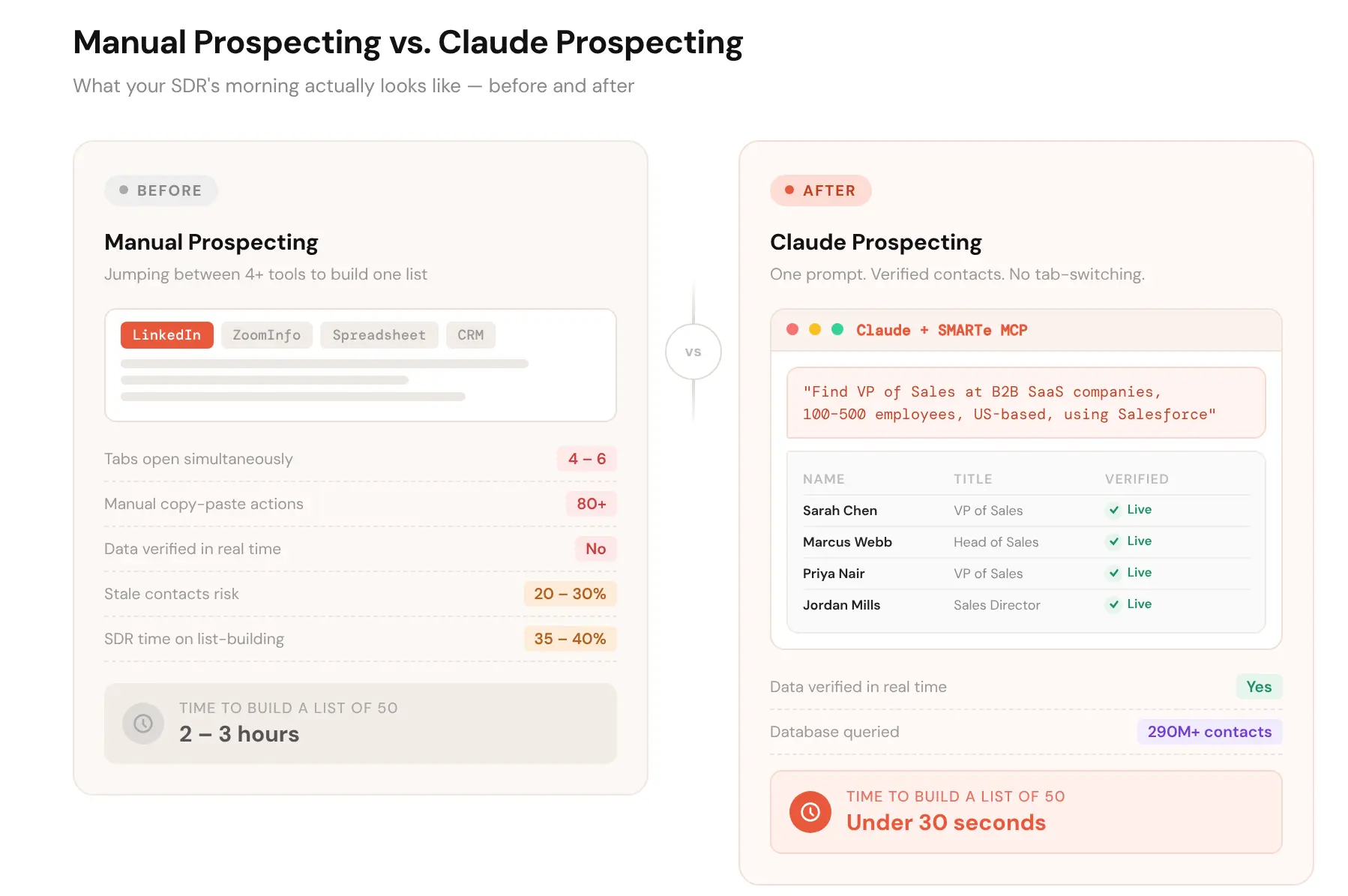
According to LinkedIn Sales Solutions research, SDRs spend only around 24% of their time on actual selling. The rest goes to research, list-building, data entry, and verification. A TechTarget survey found that SDRs dedicate 35 to 40% of their day just to list-making and lead prioritisation.
That's before writing a single cold email.
I think about that a lot. You hire someone smart and hungry, and you spend most of their day having them do what a database should do automatically.
The AI sales prospecting shift is real. And Claude is right at the centre of it — because most reps already have it open. They're already typing into it. It's familiar. The question is whether you can get actual prospect data back instead of just well-written text.
That's the gap Claude prospecting with live data fills. For context on how bad the manual prospecting problem actually gets for most teams, the B2B prospecting statistics paint a pretty clear picture.
What Claude Can Do in Prospecting (Honestly)
Let me be direct here, because I think it's more useful than hype.
Claude alone — without a live data connection — can do a few genuinely useful prospecting-adjacent things.
- Account research. Paste in a company name or website and ask Claude to summarise what they do, who their likely buyers are, and what pain points your product maps to. It's good at this. Not perfect, but good.
- ICP definition. If you're fuzzy on your ideal customer profile, Claude can help you sharpen it. Describe your best customers and ask it to identify patterns. It'll ask smart follow-up questions.
- Lead scoring from pasted data. Copy a prospect's LinkedIn profile or a CSV excerpt into the chat, give Claude your ICP criteria, and ask it to score fit. It works better than most people expect.
- Outreach prep. Once you have a prospect's name and company, Claude is excellent at helping you find a personalised angle, write the first email, or anticipate objections.
Here's the honest limitation though: all of that still requires you to find the contacts first. Claude can help you work a list. It can't build one from scratch — not without live data behind it.
That's the boundary. And knowing where it sits helps you use Claude in your sales prospecting strategies without setting yourself up for disappointment.
How to Use Claude for B2B Prospecting, Step by Step
Alright, let's get practical. Here's how you actually run Claude prospecting, whether you have a live data connection or you're working with what you've got today.
Start With a Sharp ICP Definition
Before you type anything into Claude, write down your Ideal Customer Profile (ICP). Not in a dropdown filter format — actual sentences.
Something like: "I'm targeting VP of Sales and Head of Sales at B2B SaaS companies with 100 to 500 employees in the US. They're probably using Salesforce, they have a team of at least five SDRs, and they're running outbound sequences."
That level of specificity matters. The more precise your brief, the better everything downstream works — whether Claude is querying a live database or helping you qualify a list you already have.
What to do: Write your ICP definition before you open Claude. Treat it like a brief. Include: role, seniority, industry, company size, geography, and any technographic signals (tools they use, tools you'd expect them to use). This becomes your master prompt.
Feed Claude Your Existing Data First
If you already have a list from somewhere — a tradeshow scan, a LinkedIn export, a CRM segment — paste a subset into Claude and ask it to score fit against your ICP criteria.
This is one of the fastest ways to get value from B2B prospecting with Claude today, no special integrations needed. You're using Claude's reasoning to prioritise what you already have, instead of treating every lead the same.
Ask it something like: "Here are 20 contacts from a recent event list. Score each one from 1 to 5 based on how well they match this ICP: [paste your ICP]. Flag anyone you'd prioritise for immediate outreach and explain why."
You'll get a ranked, annotated list in under a minute.
Use Claude to Build the Outreach Layer
Once you know who you're targeting, Claude does its best work on the outreach layer. This is where most people under-use it.
Don't just ask it to "write a cold email." Give it context. Paste in the prospect's LinkedIn headline, the company's recent news, your ICP definition, and your product's core value prop. Then ask it to write a first-touch email that connects a specific pain point to a specific capability.
The difference in output quality when you brief Claude properly is significant. I've seen teams go from 3% reply rates to 9% just by changing how they prompt, not by finding new prospects.
What to do: Build a master prompt template for your outreach. It should include your ICP context, your product's top three pain-point fits, and the specific role you're writing for. Reuse this as a starting point for every sequence. It saves time and keeps messaging consistent.
Layer in Research Before Every Call
This is where Claude genuinely earns its place in the best sales prospecting tools conversation.
Before a discovery call, paste the prospect's LinkedIn profile, the company's about page, and any recent news into Claude. Ask it to give you: three likely pain points based on their role and company stage, one personalised opener, and two questions you should ask.
Takes two minutes. Makes you sound like you actually did your homework. (Because you did, sort of — you just did it faster.)
The Buying Group Problem Claude Helps You Solve
Here's something most Sales Development Representatives (SDRs) don't think about enough.
Modern B2B deals don't have one decision-maker. They have a buying committee. Finance, IT, RevOps, the business unit lead — sometimes all five of them. If you only prospect one person at a target account, you're leaving the deal to chance.
Claude can help you map this. Give it a company name, a product category, and the typical stakeholders involved in that buying decision. Ask it to suggest who else you should be talking to and why. It won't have live org chart data on its own — but it reasons well about who typically has a seat at the table for a given decision.
Pair that reasoning with a tool that actually surfaces live contacts across the full buying group, and you've got something genuinely powerful. The platforms for identifying buying group members that do this well are still relatively rare. It's worth knowing which ones actually deliver.
What Holds Claude Prospecting Back (And What Fixes It)
I want to be honest about this part, because I think it matters.
Claude's prospecting capability hits a ceiling without live data. You can use it to score and research leads you already have. You can use it to write and personalise outreach. But if you need to generate a net-new list of verified contacts who match your ICP — Claude alone can't do that.
The reason is straightforward. Claude doesn't have access to a live B2B contact database. It can't verify whether an email address is still active. It doesn't know someone changed jobs last month.
And here's what I think most people miss: B2B data decay is brutal. An estimated 20 to 30% of contact data goes stale every year. People change jobs. Companies get acquired. Titles shift. A static database from six months ago is already full of contacts that don't exist where you think they do.
That's why the data source behind your Claude prospecting matters as much as the prompts you write.
The fix is a live data connection. And that's exactly what MCP makes possible.
How to Build a Full Prospect List Inside Claude With Live Data
Okay, here's where it gets interesting.
When Claude connects to a live B2B database via MCP (Model Context Protocol), the whole workflow changes. You don't need to gather contacts somewhere else and paste them in. You just describe who you're looking for, and Claude queries the database in real time and returns verified results.
A prompt like: "Find me 50 VP of Sales contacts at B2B SaaS companies with 100 to 500 employees in the US who use Salesforce" — that returns an actual, verified list. Direct dials. Verified emails. Current job titles. Right inside the chat.
You can refine it conversationally. "Actually, narrow that to the East Coast." Or "Add CMOs to the list as well." Claude adjusts the query and returns updated results. No clicking between filters. No re-exporting.
This is what AI sales agents start to look like when the data layer catches up to the intelligence layer. And it's what makes building a prospecting list feel genuinely different from the old way.
What to do: If you're evaluating MCP-enabled prospecting for your team, test it with a real use case first. Pick a specific ICP segment, run the same search in your current tool and in Claude with MCP, and compare the output. Data freshness, coverage, and direct dial rates are the three things to look at.
For a fuller picture of what AI-ready B2B data actually requires, it comes down to one thing: real-time verification at the point of use, not at the point of last batch refresh. That distinction matters more than any other spec on a data vendor's webpage.
The sales intelligence platforms that get this right are still relatively few. Most still run on batch-refreshed databases and just put a nice UI on top. When you're prospecting in Claude, you want to know what's actually underneath.
SMARTe MCP: Prospect Inside Claude With 290M+ Verified Contacts
This is the part where I'll tell you about the integration that actually makes all of this work the way I described above.
SMARTe built an MCP server that connects Claude directly to its B2B contact database. That database covers 290M+ verified contacts globally, 75%+ US mobile coverage, and 86% of US decision-makers reachable with verified emails. The data runs on real-time verification — not a static file that gets refreshed quarterly.
When you connect SMARTe MCP to Claude, you can:
- Prospect by natural language. Type exactly who you're looking for — role, industry, geography, company size, tech stack — and get back a verified contact list without leaving the chat.
- Map full buying groups. Ask Claude to surface all the relevant stakeholders at a target account. SMARTe's 65M+ company profiles and role-level data make this genuinely useful, not just a guess.
- Layer in intent and technographic signals. SMARTe tracks 59K+ technographic products and includes Bombora intent data. So you can ask Claude to prioritise accounts actively in-market for your category — not just accounts that theoretically fit your ICP.
- Enrich on the fly. Got a partial list somewhere? SMARTe enriches it in real time, with 90%+ CRM match rates. Missing a phone number? It fills it. Stale email? It flags or updates it.
I think the reason this matters isn't the feature list. It's what it changes about how your team spends its time. The SMARTe B2B data enrichment layer working inside Claude means your SDRs spend less time on database admin and more time in actual conversations.
And that's the point, isn't it. The rep who's in 8 discovery calls a week beats the rep who's in 3 and spent the rest of the week building lists.
Book a demo to see SMARTe MCP in action inside Claude.
The Real Value of Claude Prospecting
Here's what I actually believe after watching this evolve.
The teams that win in outbound aren't the ones with the biggest lists. They're the ones who spend the most time talking to the right people. Everything else is friction.
Claude prospecting — done properly, with live and verified data behind it — removes a lot of that friction. It doesn't replace the human part of selling. The curiosity, the listening, the judgment call in the middle of a discovery call. None of that goes away.
But the three hours your rep spent building a list on Monday morning? That can go away.
And when it does, the reps who replace that time with real conversations are the ones who hit quota.
.png)